Hey!
I wanted to share a custom JavaScript solution that automatically applies a coupon when certain product checkboxes are selected, toggles radio buttons and a free gift, and updates dynamic UI elements — all while keeping the coupon field hidden from the customer.
This is especially useful for high-converting funnels where you want to automatically reward users without revealing the coupon code, maintain a clean checkout, and dynamically show or hide elements based on user selections.
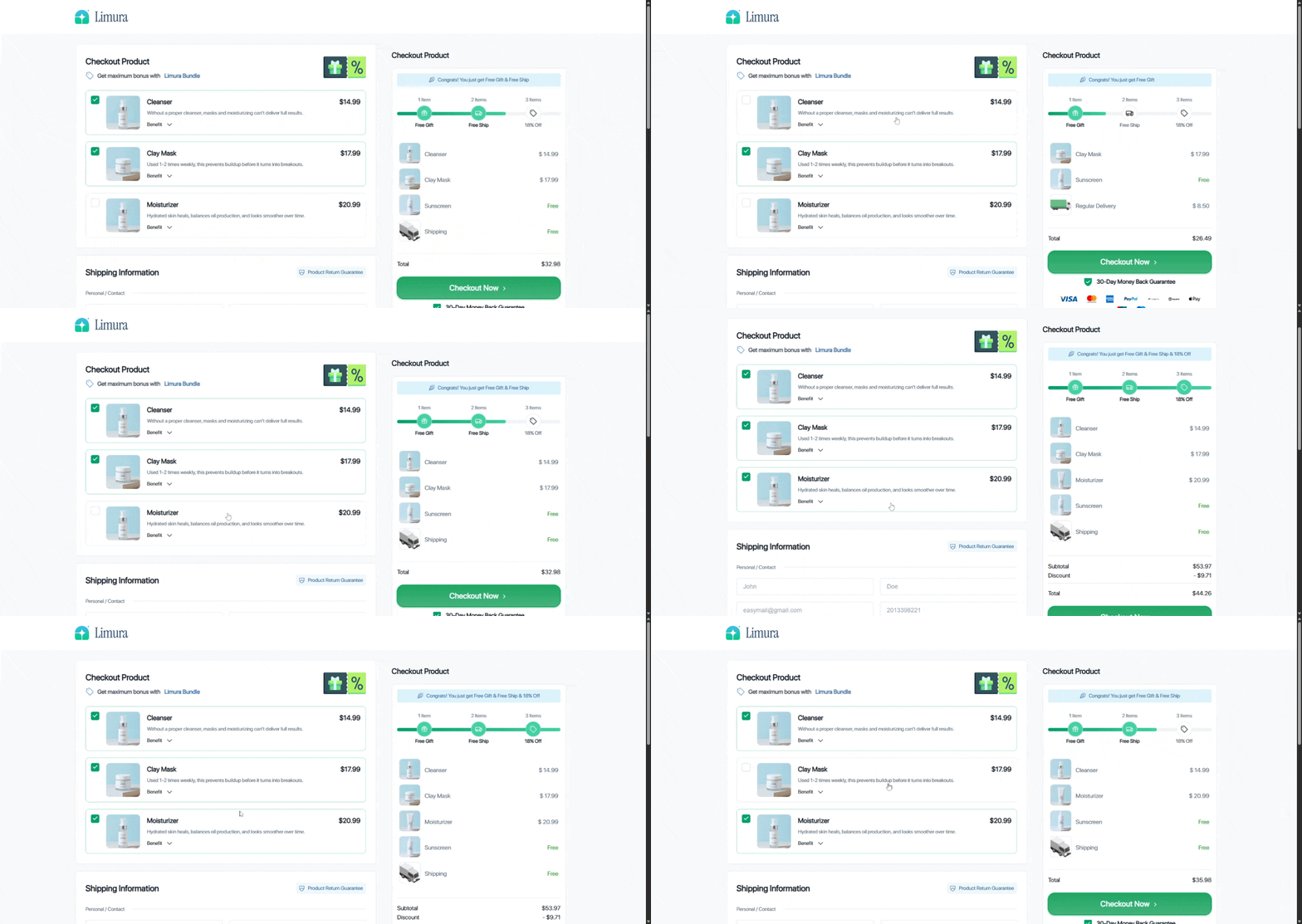
Features of this Script:
-
Automatically checks a radio button depending on how many product checkboxes are selected.
-
Automatically checks a free gift checkbox if at least one product is selected.
-
Applies a hidden discount coupon when all required checkboxes are selected.
-
Dynamically toggles classes on UI elements to show different states for 1, 2, or 3 selected items.
-
Completely hides the coupon field and applied discount display to avoid revealing the code.
-
Works with Vue/React controlled inputs in Funnelish checkout.
Code Example
const checkboxes = document.querySelectorAll('input[type="checkbox"][value="3731321"], input[type="checkbox"][value="3731322"], input[type="checkbox"][value="3731323"]');
const radioA = document.querySelector('input[type="radio"][value="3792606"]');
const radioB = document.querySelector('input[type="radio"][value="3732922"]');
const freeGift = document.querySelector('input[type="checkbox"][value="3782391"]');

const discountInput = document.querySelector('.order-summary .os-discount-box .__input');
const applyBtn = document.querySelector('.order-summary .os-discount-box .__apply');

const d1 = document.querySelector('#dynamic1item');
const d2 = document.querySelector('#dynamic2items');
const d3 = document.querySelector('#dynamic3items');

const COUPON = "LIMURA18";

function setCoupon(code) {
  if (discountInput.value !== code) {
    discountInput.value = code;
    discountInput.dispatchEvent(new Event('input', { bubbles: true }));
    applyBtn.click();
  }
}

function removeCoupon() {
  if (discountInput.value === COUPON) {
    discountInput.value = "";
    discountInput.dispatchEvent(new Event('input', { bubbles: true }));
    applyBtn.click();
  }
}

function updateRadios() {
  const checked = [...checkboxes].filter(c => c.checked).length;

  if (checked === 1) {
    radioB.checked = true;
    radioB.dispatchEvent(new Event('change', { bubbles: true }));
    freeGift.checked = true;
  }

  if (checked === 2) {
    radioA.checked = true;
    radioA.dispatchEvent(new Event('change', { bubbles: true }));
    freeGift.checked = true;
  }

  if (checked === 0) freeGift.checked = false;

  d1.classList.toggle('new_state_795885', checked === 1);
  d2.classList.toggle('new_state_795885', checked === 0 || checked === 1 || checked === 3);
  d3.classList.toggle('new_state_795885', checked === 3);

  checked === 3 ? setCoupon(COUPON) : removeCoupon();

  // Keep discount input hidden
  discountInput.value = "";
  discountInput.dispatchEvent(new Event('input', { bubbles: true }));
}

// Listen to checkbox changes
checkboxes.forEach(cb => cb.addEventListener('change', updateRadios));
CSS to Hide Discount Field
.order-summary .os-discount-box,
.order-summary .os-subtotal .__applied-discount {
    display: none;
}
This ensures that customers never see the coupon code or the discount input field while the discount is applied automatically.
Use Cases
-
Bundle Discounts:
-
If a user selects all three items in a bundle, automatically apply a coupon to give a discount.
-
Show dynamic UI elements to highlight the bundle deal.
-
-
Upsell Free Gifts:
-
Automatically check a free gift when at least one main product is selected.
-
Great for incentivizing larger orders without manual interaction.
-
-
Dynamic Checkout States:
-
Use
.classList.toggle()to dynamically update UI elements based on the number of selected items. -
Example: Show “1 item selected”, “2 items selected”, or “Bundle complete” messages.
-
-
Hidden Coupons for VIP or Limited Offers:
-
Prevents users from seeing and sharing the coupon code.
-
Automatically applies the discount seamlessly.
-
Example Scenario
| Selected Checkboxes | Behavior |
|---|---|
| 0 | Free gift unchecked, default UI, no coupon |
| 1 | Radio B checked, free gift checked, UI state 1 |
| 2 | Radio A checked, free gift checked, UI state 2 |
| 3 | Coupon LIMURA18 applied automatically, UI state 3, input hidden |
Why This Works Well in Funnelish
-
Fully compatible with Vue/React controlled checkout inputs.
-
Avoids flicker by clearing the input field after applying.
-
Reduces customer confusion by hiding the discount input entirely.
-
Works in combination with dynamic UI updates to make the funnel interactive and smooth.
Final Thoughts
This script is perfect for bundle deals, upsells, and high-converting checkout pages. By combining checkbox logic, radio buttons, free gifts, and hidden coupons, you can create a seamless checkout experience that automatically rewards users without revealing codes or requiring extra clicks.