Deprecation Notice
This article covers our legacy ClickFunnels (CF) plugins, which are no longer supported.We’ve moved on to Funnelish v2 — a faster, more powerful, and easier way to build high-converting funnels.
Need help migrating your ClickFunnels funnel into Funnelish? Reach out to support.
The Smart Currency Converter app lets you display prices in your customers’ local currency.
It works by:
-
Detecting currency based on location
-
Detecting currency based on billing or shipping address
-
Automatically rounding prices
-
Updating prices across your funnel
-
Using real-time exchange rates

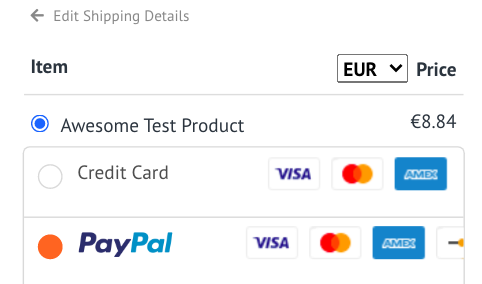
Customers can also select their preferred currency from the dropdown shown above the product price.
Step 1: Turn on the app in Global Apps
-
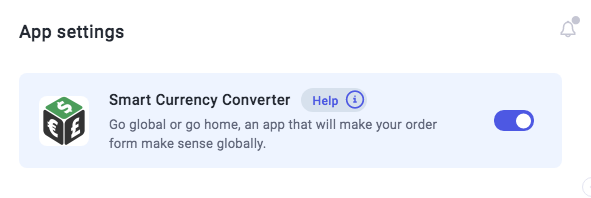
Go to Funnelish → Global Apps
-
Enable Smart Currency Converter
-
Click Save Changes
Step 2: Turn on the app inside your funnel
-
Open your funnel
-
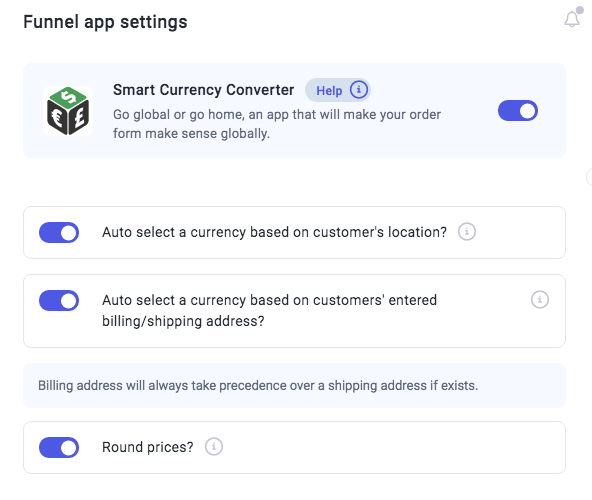
Go to Funnel Apps
-
Select Smart Currency Converter
-
Enable the app
You can optionally enable:
-
Currency detection by location
-
Currency detection by billing/shipping address
-
Price rounding
Click Save Changes.
Notes
-
Supports over 100 currencies
-
No additional setup required
-
Displayed currency may differ from the charged currency
For better performance and support, upgrade to Funnelish: