Hi @Henrique_Feitoza1  welcome to the community!
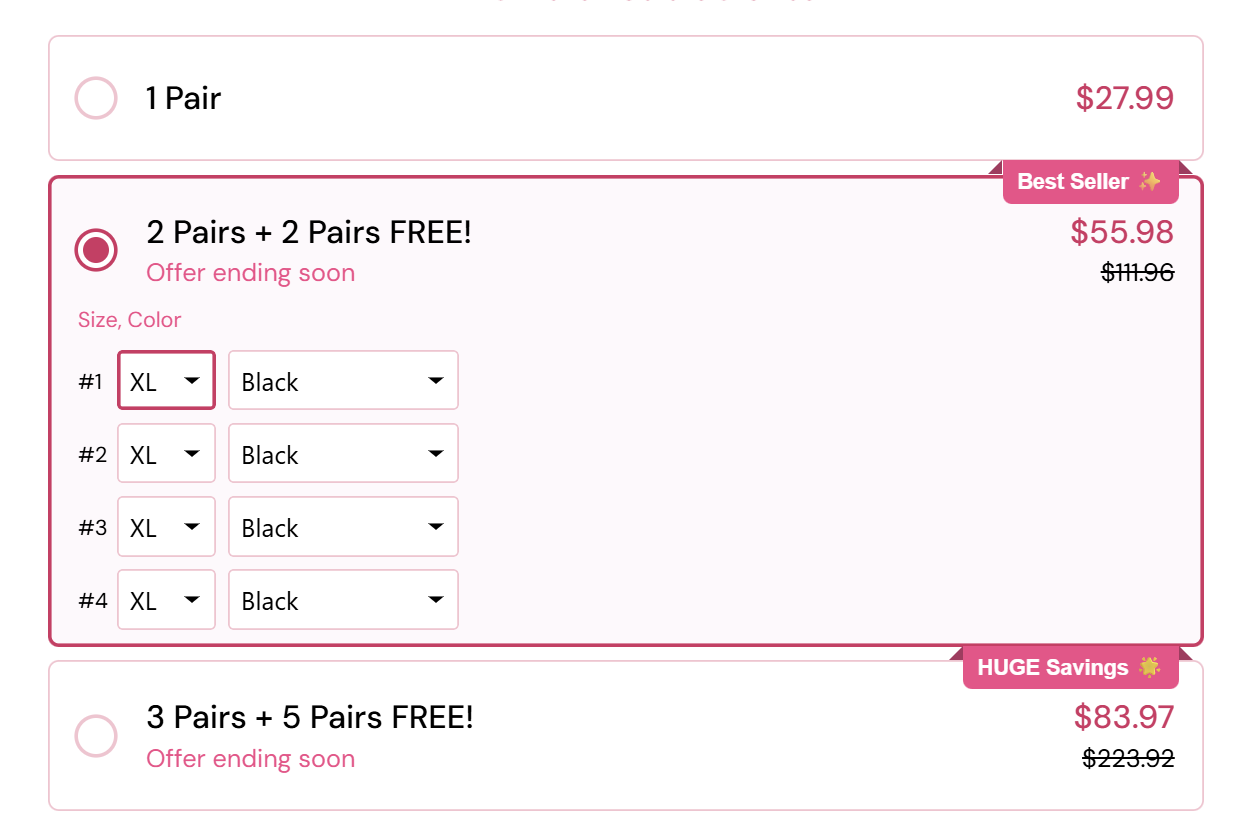
Thanks for sharing the screenshot. Could you please also share the link or page where you captured that image from? That will help us understand exactly which checkout design you want to replicate and guide you better on how to customize it. 
Looking forward to your reply!
Hello, good afternoon, how are you?
Once again, thank you for your availability and attention. As agreed, here is the link to the page where I captured the screenshot: Everstride™ Wide Compression Socks
.
I hope this helps to clarify the context. I remain at your disposal for any questions or additional information.
Thank you very much, and have an excellent afternoon!
Hi @Henrique_Feitoza1 thanks for sharing the reference page! That helps a lot.
Can you also share the URL of your own funnel checkout page where you want to implement this design? That way we can take a look and guide you with the right steps.
hello @anwerashif course, follows the link of the funnel: New Landing page
Hi @Henrique_Feitoza1 thanks for sharing your funnel link!
Just to confirm — do you want this custom product list style applied on the landing page or on the checkout page of your funnel? That will help us give you the right solution.
hello @anwerashif
I’d like to add this on the landing page.
have nice day
Hi @Henrique_Feitoza1  thanks for confirming you want this on the landing page.
Here is an example you can use to build that custom bundle product list.
It has styled radio options, best seller badge, old price, and dropdowns for size & color.
<!-- Add CSS -->
<style>
  .bundle-option {
    border: 1px solid rgba(221, 46, 99, 0.3);
    border-radius: 8px;
    padding: 15px;
    margin-bottom: 15px;
    position: relative;
    cursor: pointer;
    transition: border-color 0.2s, background 0.2s;
    display: flex;
    align-items: flex-start;
    gap: 12px;
  }
  .bundle-option.active {
    border-color: #e91e63;
    background: #fff5fa;
  }
  .bundle-option input[type="radio"] {
    appearance: none;
    width: 20px;
    height: 20px;
    border-radius: 50%;
    cursor: pointer;
    flex-shrink: 0;
    margin-top: 4px;
    background: #fff;
    border: 3px solid #fff;
    box-sizing: border-box;
    box-shadow: 0 0 0 2px rgba(221, 46, 99, 0.3);
  }
  .bundle-option input[type="radio"]:checked {
    background: rgb(221 46 99);
    box-shadow: 0 0 0 2px rgb(221 46 99);
  }
  .bundle-content { flex: 1; }
  .bundle-header {
    display: flex;
    justify-content: space-between;
    align-items: center;
    width: 100%;
  }
  .bundle-title { font-weight: bold; font-size: 16px; }
  .bundle-price { font-weight: bold; color: #e91e63; font-size: 18px; }
  .bundle-old-price {
    text-decoration: line-through;
    color: #999;
    margin-left: 10px;
    font-size: 14px;
  }
  .offer-text { color: #e91e63; font-size: 14px; margin-top: 5px; display: block; }
  .badge {
    position: absolute;
    top: -10px;
    right: -10px;
    background: #e91e63;
    color: #fff;
    padding: 3px 8px;
    font-size: 12px;
    border-radius: 4px;
    font-weight: bold;
    white-space: nowrap;
  }
  .bundle-options { margin-top: 15px; display: none; }
  .bundle-option.active .bundle-options { display: block; }
  .bundle-options div { margin-bottom: 10px; }
  .bundle-options label { font-size: 13px; margin-right: 5px; }
  select {
    padding: 5px;
    border-radius: 4px;
    border: 1px solid #ddd;
    margin-right: 5px;
  }
</style>

<!-- Example Options -->
<label class="bundle-option">
  <input type="radio" name="bundle" value="1">
  <div class="bundle-content">
    <div class="bundle-header">
      <span class="bundle-title">1 Pair</span>
      <span class="bundle-price">$27.99</span>
    </div>
  </div>
</label>

<label class="bundle-option">
  <input type="radio" name="bundle" value="2" checked>
  <div class="bundle-content">
    <div class="bundle-header">
      <span>
        <span class="bundle-title">2 Pairs + 2 Pairs FREE!</span>
        <span class="offer-text">Offer ending soon</span>
      </span>
      <span>
        <span class="bundle-price">$55.98</span>
        <span class="bundle-old-price">$111.96</span>
      </span>
    </div>
    <div class="badge">Best Seller ✨</div>
    <div class="bundle-options">
      <div><label>#1</label>
        <select><option>XL</option><option>L</option><option>M</option></select>
        <select><option>Black</option><option>White</option></select>
      </div>
      <div><label>#2</label>
        <select><option>XL</option><option>L</option><option>M</option></select>
        <select><option>Black</option><option>White</option></select>
      </div>
      <div><label>#3</label>
        <select><option>XL</option><option>L</option><option>M</option></select>
        <select><option>Black</option><option>White</option></select>
      </div>
      <div><label>#4</label>
        <select><option>XL</option><option>L</option><option>M</option></select>
        <select><option>Black</option><option>White</option></select>
      </div>
    </div>
  </div>
</label>

<label class="bundle-option">
  <input type="radio" name="bundle" value="3">
  <div class="bundle-content">
    <div class="bundle-header">
      <span>
        <span class="bundle-title">3 Pairs + 5 Pairs FREE!</span>
        <span class="offer-text">Offer ending soon</span>
      </span>
      <span>
        <span class="bundle-price">$83.97</span>
        <span class="bundle-old-price">$223.92</span>
      </span>
    </div>
    <div class="badge">HUGE Savings ✨</div>
  </div>
</label>

<!-- JS -->
<script>
  const bundleOptions = document.querySelectorAll('.bundle-option input[type="radio"]');
  bundleOptions.forEach(option => {
    option.addEventListener('change', () => {
      document.querySelectorAll('.bundle-option').forEach(el => el.classList.remove('active'));
      option.closest('.bundle-option').classList.add('active');
    });
  });
  document.querySelector('.bundle-option input:checked')
          .closest('.bundle-option')
          .classList.add('active');
</script>
This is just a starting point — you can tweak styles, texts, or connect it with your checkout button logic.
Hope this helps!
Thank you very much, and have an excellent afternoon!