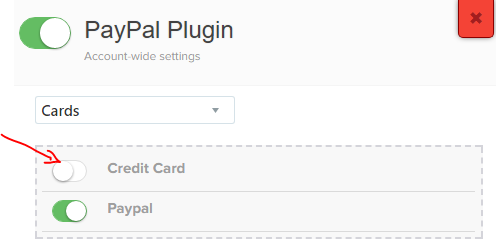
Update for those who pass by here:
In the past, integrating PayPal with legacy funnels sometimes caused the native credit card fields to disappear if a specific toggle (“Hide Credit Card”) was accidentally turned on in the app settings. Today, this issue is entirely a thing of the past. Funnelish has modernized its payment architecture, allowing you to natively accept both Credit Cards and PayPal on the same high-converting checkout page without complex third-party plugins.
Some changes since 2018
For users referencing old documentation or trying to fix legacy setups, please be aware of the following major changes:
Deprecated “PayPal Plugin”: The old Funnelish PayPal Plugin app (which required you to toggle a switch to unhide credit card forms) has been officially deprecated. You no longer need to navigate to the “Apps Center” to fix this issue.
ClickFunnels Legacy Setup Deprecated: The original method of forcefully injecting PayPal into a ClickFunnels Classic checkout page is deprecated. Funnelish is now a standalone, highly optimized funnel builder and e-commerce ecosystem.
No More Overlapping Code: Because you no longer need to “hack” an external checkout to support PayPal, there are no more script conflicts that cause credit card fields to magically disappear.
Managing Payments Today
With the current version of Funnelish, managing your payment options is completely visual and built directly into the funnel builder:
Native Integration: You can now add PayPal directly to your Funnelish checkouts natively alongside credit card gateways (like Stripe).
Side-by-Side Payment Methods: Customers will simply see a clean, modern checkout form where they can choose between paying via Credit Card, PayPal, Google Pay, or Apple Pay and more!
No Hidden Toggles: Because payment methods are added as elements directly within the Funnelish Page Builder, you have total visual control over what displays on your live page.
If you are setting up your payment gateways today, you don’t need any legacy workarounds. Follow our current, streamlined process:
Read Our Full Guide: How to Connect PayPal to Your Checkouts
Explore The Funnelish Ecosystem: Discover how to build high-converting checkouts with native payment gateways at https://funnelish.com/
I recently integrated funnelish in my clickfunnel but credit card payment option disappeared,
there only paypal for now, how can I use both?