I want to make it so when people make it to my upsell pages in my funnel they are not able to go back to the checkout page and accidentally place a duplicate order.
I cant add links so here is an image with the link to an example of what I mean, just click through their no button and then try to go back
This is a common headache with funnel flows. Since we can’t actually “disable” the browser’s back button (browser security won’t allow it), we have to get a little creative with how the page handles that “Back” click.
Here are the two best ways to handle this directly inside Funnelish to keep your customers moving forward.
Option 1: The “History Lock” (Best for Upsells)
This is the “pro” way to do it. It basically tricks the browser into thinking there’s a new page in the history stack. When the customer clicks back, they just “land” on the same upsell page again.
How to set it up:
Open your Upsell Page in the Funnelish editor.
Go to Page Settings > Custom Codes.
Paste this into the Footer Tracking section:
<script>
  // Push an extra entry so the 'back' button has nowhere to go
  history.pushState(null, null, location.href);

  window.onpopstate = function() {
    // If they try to go back, force them to stay right here
    history.go(1);
  };
</script>
Option 2: The “Safety Warning” (Best for Data Protection)
If you’d rather give them a “Hey, wait!” heads-up, this triggers a browser pop-up if they try to leave the page or hit back. It’s great for preventing those accidental double-taps.
How to set it up:
In the same Footer Tracking area, use this code instead:
JavaScript<script>
  window.addEventListener('beforeunload', function (e) {
    // Modern browsers show a standard "Are you sure?" message
    e.preventDefault();
    e.returnValue = '';
  });
</script>
Which one should you use?
For an upsell specifically, Option 1 is usually the winner. It keeps the momentum going and ensures they either click your “Yes” or “No” buttons to progress to the Thank You page.
One quick tip: Only put these on your Upsell or Downsell pages. You definitely want people to be able to navigate freely while they are still on the initial Checkout page!
Actually it isnt really working. It works when going from Upsell one to upsell 2 and trying to go back. But on my live funnel it doesnt work at all. Customers keep double ordering even tho the script is active
Also having trouble with duplicate orders occasionally. Not really sure how to solve it client side, hoping funnelish can solve it server side some day :(.
Hi @Sarah_Smith@QTAP just an update, our team is currently working on a native solution to this, an option that can be turned on within your funnel settings to prevent duplicate payments.
We will update this thread in the following days once it’s deployed.
YESSSSSS! That would be amazing, this is one of my largest gripes with Funnelish as it causes customer dissatisfaction + refunds and sometimes even chargebacks.
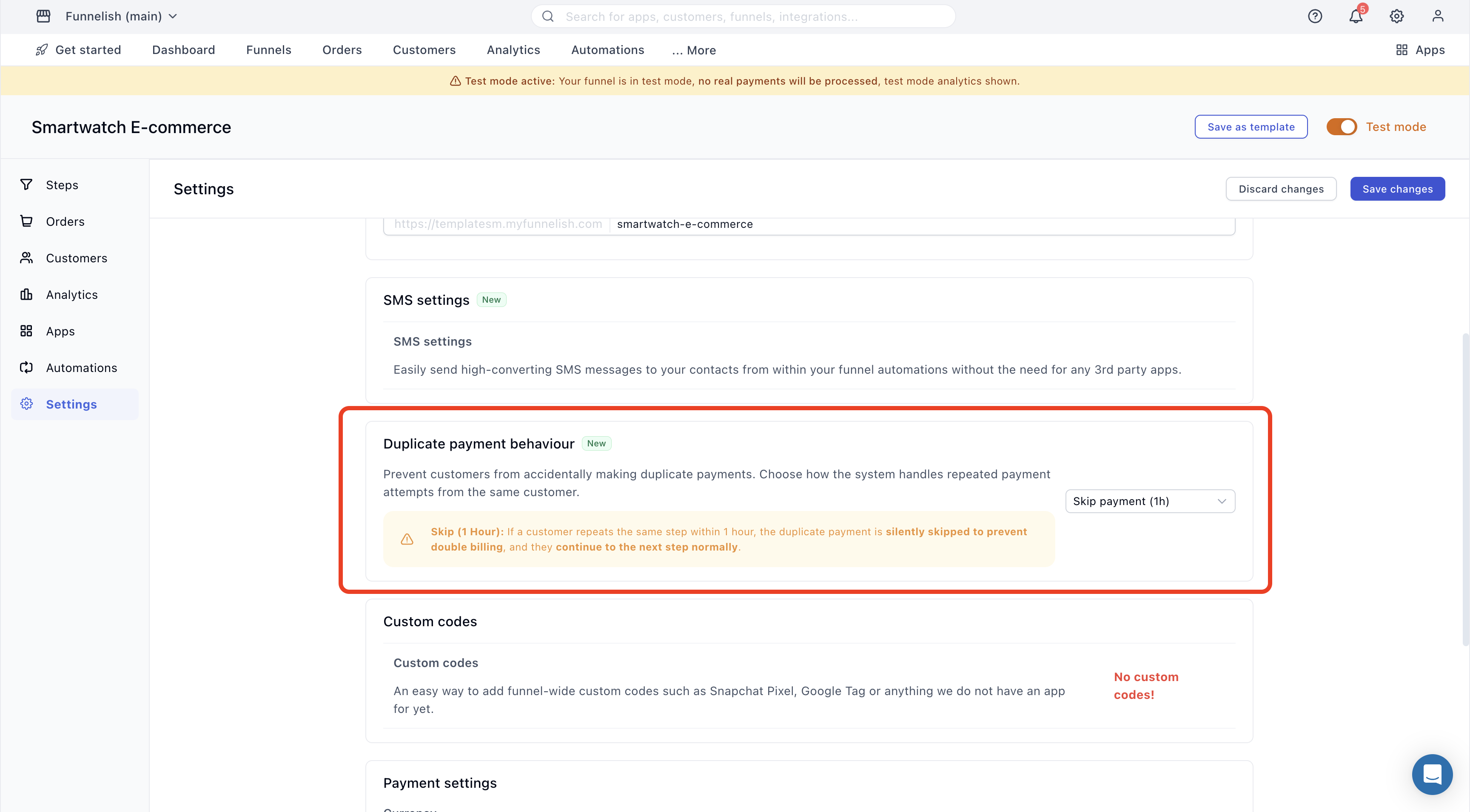
We’ve just rolled out the Duplicate Payment Behaviour setting you’ve been requesting. This gives you complete flexibility to choose exactly how duplicate transactions are handled on a funnel-by-funnel basis.
You can find this new feature under Funnel > Settings > Duplicate payment behaviour:
This setting applies to all payment processing steps (checkouts, upsells, and downsells).
Here are the supported options you can choose from:
Nothing (Default):Processes all payments normally. Duplicate transactions are always charged unless our systems detect rapid, non-human spam or abuse.
Skip (1 Hour): If a customer repeats the same step within 1 hour, the duplicate payment is silently skipped to prevent double billing, and they continue to the next step normally. (Highly recommended for most use cases!)
Skip (24 Hours): If a customer repeats the same step within 24 hours, the duplicate payment is silently skipped to prevent double billing, and they continue to the next step normally.
Block (1 Hour): Blocks duplicate payment attempts on the same step for 1 hour. The customer will see an error message and cannot proceed to the next step.
Block (24 Hours): Blocks duplicate payment attempts on the same step for a 24-hour window. The customer will see an error message and cannot proceed to the next step.
We’d love to hear from you! If you have suggestions for other behaviours we should add to this list, or if there are entirely new features you’d like to see us build next, your feedback is always welcome.
 Which one should you use?


 but do let us know just in case