Just bumping this older thread because adding custom text inputs to your checkouts has gotten so much easier with the new Funnelish v2 builder! You no longer need to rely on custom code or workarounds to collect extra information (like order notes, engraving details, or custom instructions) on your 2-step checkouts.
You can now add custom fields natively right inside the drag-and-drop builder.
How to add a Custom Text Input in Funnelish v2:
Open your funnel step in the Page Builder.
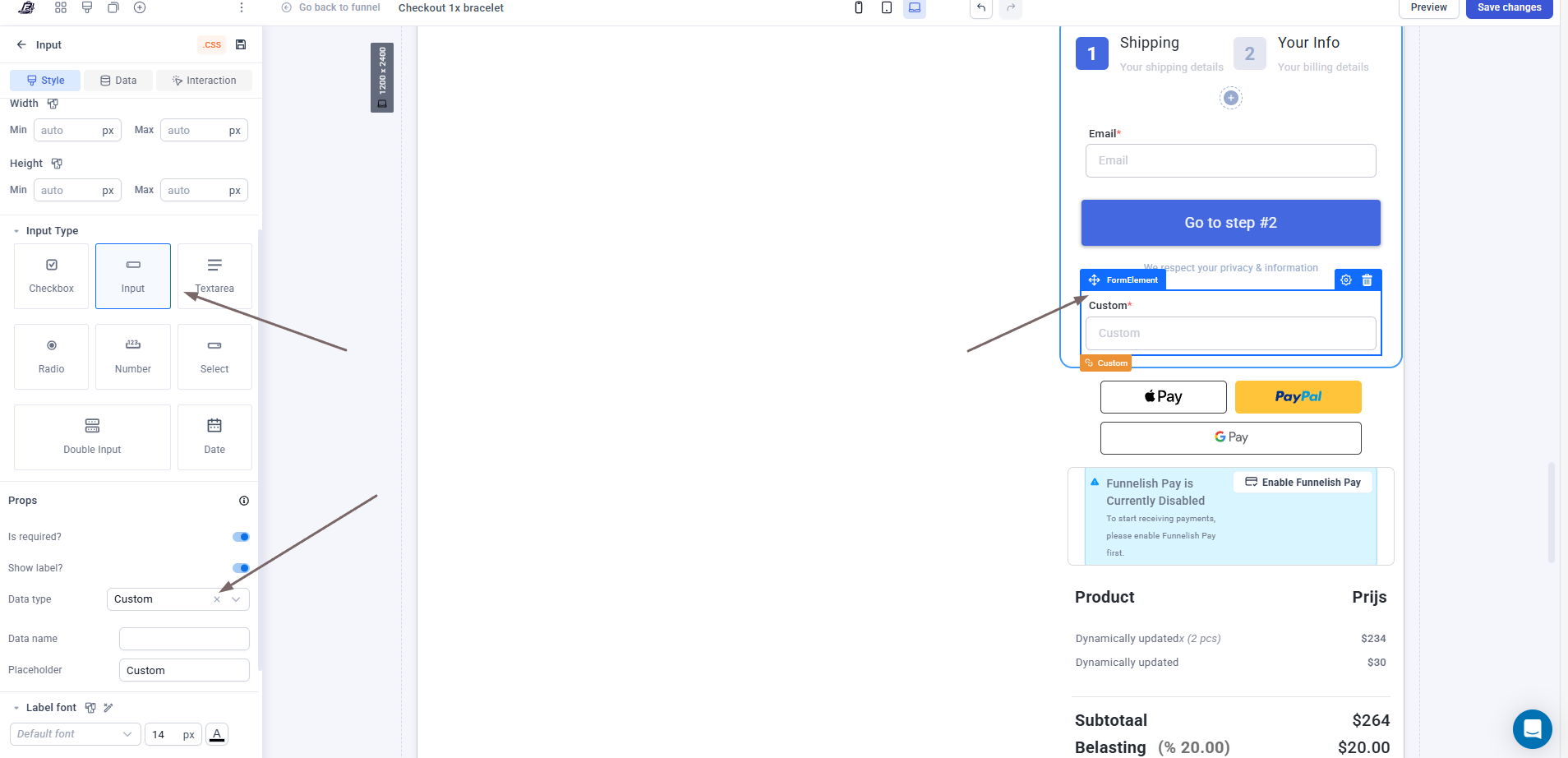
Drag and drop a new Input element into your checkout form area (you can place it exactly where you want it in the step).
Click on the new input element to open its settings panel on the left side of the screen.
Under Input Type, select Input (or select Textarea if you need a larger multi-line box for longer notes).
Scroll down to the Props section and change the Data type dropdown to Custom.
Set your Data name (this is the label that will show up in your order details backend) and customize your Placeholder text.
Here is a screenshot showing exactly how this looks in the new builder:


 How to add a Custom Text Input in Funnelish v2: