Solved: How to Fix Order Summary Showing $0 in Funnelish (Fancify App Update)
Important Update: If you are reading this thread today, please be aware that Funnelish has introduced major platform updates since the original discussion in 2020!
If you are experiencing an issue where your Funnelish order summary shows $0, specifically when using the Fancify App, please note that this is a legacy ClickFunnels app and is now officially deprecated.
What Has Changed?
The Fancify App is no longer required or supported for dynamic order summaries.
Funnelish now features powerful built-in order forms. Your order summary will now adjust dynamically based natively on the exact product your customer chooses from the product list, no third-party apps needed!
How to Ensure Your Order Summary Updates Correctly
Even with the new built-in elements, there are a few common scenarios where your order summary might still display a $0 total. This usually happens because of missing page elements or unlinked products.
Here are the 3 main culprits for a $0 Order Summary:
- There is no Product List element on the checkout page.
- There is a Product List element, but no products have been created/added to the page settings.
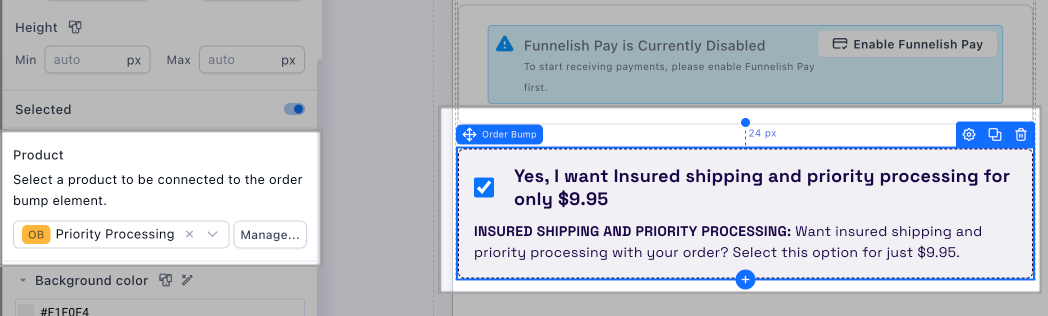
- An Order Bump element is set to “pre-selected” on the page, but there is no actual product linked to it.
How to fix this and make sure your Order Summary reflects your total:
Step 1: Add a Product List Element
Simply drag and drop the built-in Product List element onto your existing checkout page.
Learn more: Product List | Funnelish Docs
Step 2: Create & Link Your Products
Make sure you have actually created the products in your checkout, upsell, or downsell page settings so the list has data to pull from.
Step 3: Check Your Order Bumps
If you have an order bump on your page, click on the element and make sure it is actively linked to the corresponding order bump product. A pre-selected, empty order bump will zero out your cart.
Step 4: Add the Order Summary Element
Once the steps above are complete, just make sure you have the native Order Summary element on your page. The pre-selected product in your product list will now automatically reflect the correct price!
If you follow these steps, your order summary will adjust dynamically with the products chosen by your customers!
I am using Fancify and Funnelish Pay apps in my funnel.
I have an order bump and 4 products added to my funnel in Funnelish.
However, in my order page, I am seeing when the Order Summary loads, it is loading all 4 products instead of the default product I have chosen through the Fancify app.
The default value also doesn’t show up.
When I tick the checkbox for order bump, that value also isn’t added to order summary. But, when the Order Bump is chosen, the duplicated 4 products listed there goes off and nothing is updated.
Not sure what is happening. My funnel is stuck cos of this.
Pls help… @samlee