Hey guys,
How do I change the color of the toggle buttons?
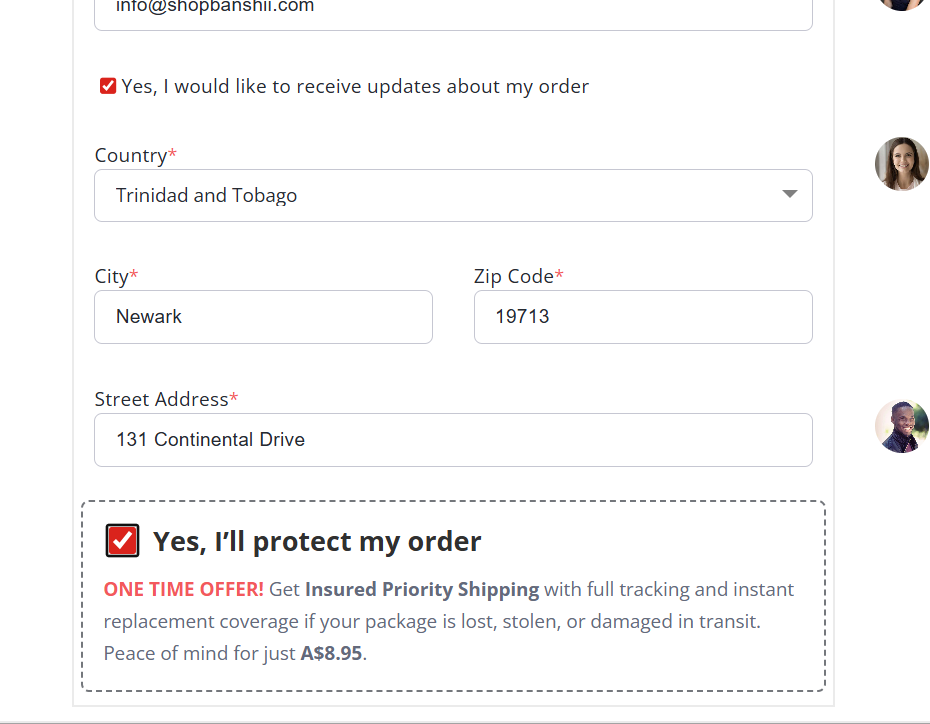
For example — the checklist, product list, or order bump toggles (see screenshot).
Right now, the active state is red, but I want to change that to my own color (using a hex code).
Normie mentioned this requires a custom code, but didn’t specify what exactly to put.
Can anyone share the custom CSS snippet I should use to replace the default toggle color?
Basically:
I’m not talking about the product highlight — I mean the toggle color for selecting anything (order bump, checklist, product select toggle, etc.).
Would appreciate a short example of the color hex code being used with the custom CSS.
Thanks! 
Hey @banshii.admin 
Yeah, that can be changed easily with a small CSS tweak.
But the exact code depends on your funnel setup and the toggle style used.
Can you please share your page link here (or DM it)?
I’ll check the structure and send you the right CSS snippet with your color code.
hi @banshii.admin
I see this CSS exists in your page, and it was added in Custom CSS area:
.order-bump .ob-header input[type="checkbox"] {
  accent-color: rgb(0, 0, 0);
}
You can replace that code with following code:
input[type="checkbox"], input[type="radio"] {
  accent-color: blue !important;
}
this will change all radio input and checkbox input to blue color.
1 Like
Thank you, I appreciate it
1 Like