When to use Multi-Quantity Selector
Use Multi-Quantity when you want customers to choose how many units of the same product they want to buy (e.g., 1, 2, 3, etc.) directly on the checkout page.
This is useful if:
- You’re selling a single product and want to allow bulk purchases
- You want a simple quantity selector instead of adding the same product multiple times
- You don’t need multiple product choices, just different quantities of one item
To enable it:
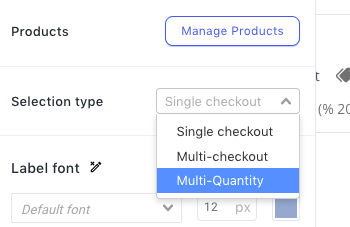
Open your Funnel Step Editor>Product List element. In the left sidebar, find Selection type>Multi-Quantity>Save Changes.
If you’re unsure what type of selector to use for your product, feel free to reach out, we’re happy to help 