April 2026 Updates: Smart Currency Handling in Funnelish V2
If you are looking to localize your checkout currencies today, the process has been completely streamlined since this original post. Funnelish has evolved into a much more powerful platform (Funnelish V2), and we’ve completely revamped how currency conversions are handled to maximize your international conversion rates.
What’s Changed & Deprecated
- Legacy ClickFunnels App Deprecated: The older “ClickFunnels Currency Converter” app referenced below is no longer supported. We have deprecated our legacy ClickFunnels-based apps and integrations to focus on faster, more reliable native solutions.
- No More Clunky Popups: The old method of relying on external popups or scripts to force currency changes on third-party checkouts is a thing of the past.
Current Behavior & How to Manage Currencies
Currency handling is now built-in, smarter, and managed directly within Funnelish!
- Native Funnelish Management: Currency display and localization now depend entirely on your funnel setup and the payment integrations you have active inside Funnelish.
- Funnel-Level Control: Settings are managed strictly at the funnel level rather than through legacy global app configurations.
- Where to find it: If you aren’t seeing the currency feature in your funnel, make sure you are checking under your Funnel Apps (not Global Apps), as these features are applied on a per-funnel basis.
For updated guidance, always refer to the latest Funnelish documentation or reach out to our support team!
Why Funnelish is the Best Way to Sell Internationally
Selling globally? Funnelish’s native checkout system is now vastly superior to trying to patch third-party currency converters onto legacy platforms like ClickFunnels. By using Funnelish for your checkouts, you get seamless, high-converting international payments right out of the box.
(Note: The information below is from the original December 2020 update and is kept for historical reference. Please refer to the 2026 updated guidelines above for current functionalities.)
The Clickfunnels Currency Converter app has some brand new features!
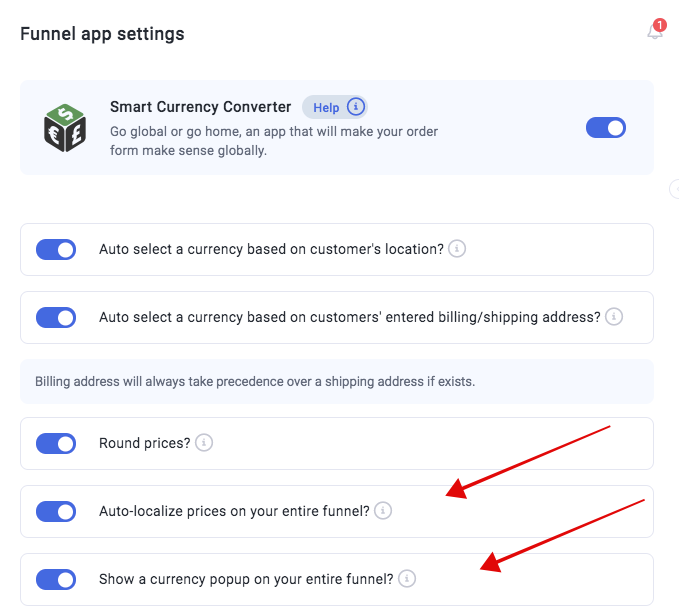
You can now have the app auto-localize the currency on each product throughout your funnel, including upsells and downsells!
Additionally, you can have the currency popup show throughout your funnel to allow customers to choose their desired currency.
Lastly, you can have your prices round up to the nearest integer.
To enable any of these new features, toggle them on inside the Smart Currency Converter app inside your desired funnel - not in your global app section.
Relevant resources
-
Learn how to add multiple currencies to your ClickFunnels funnels and smash your international sales!