Hi everyone!
We know it can be incredibly frustrating when your sales are rolling in but your orders refuse to sync. If your order failed to sync and are seeing “Shopify returned an error”, most of the time, this happens due to an invalid or incomplete product automation setup.
Here is a quick checklist to help you troubleshoot and fix the issue:
What to Check in Your Funnel Settings
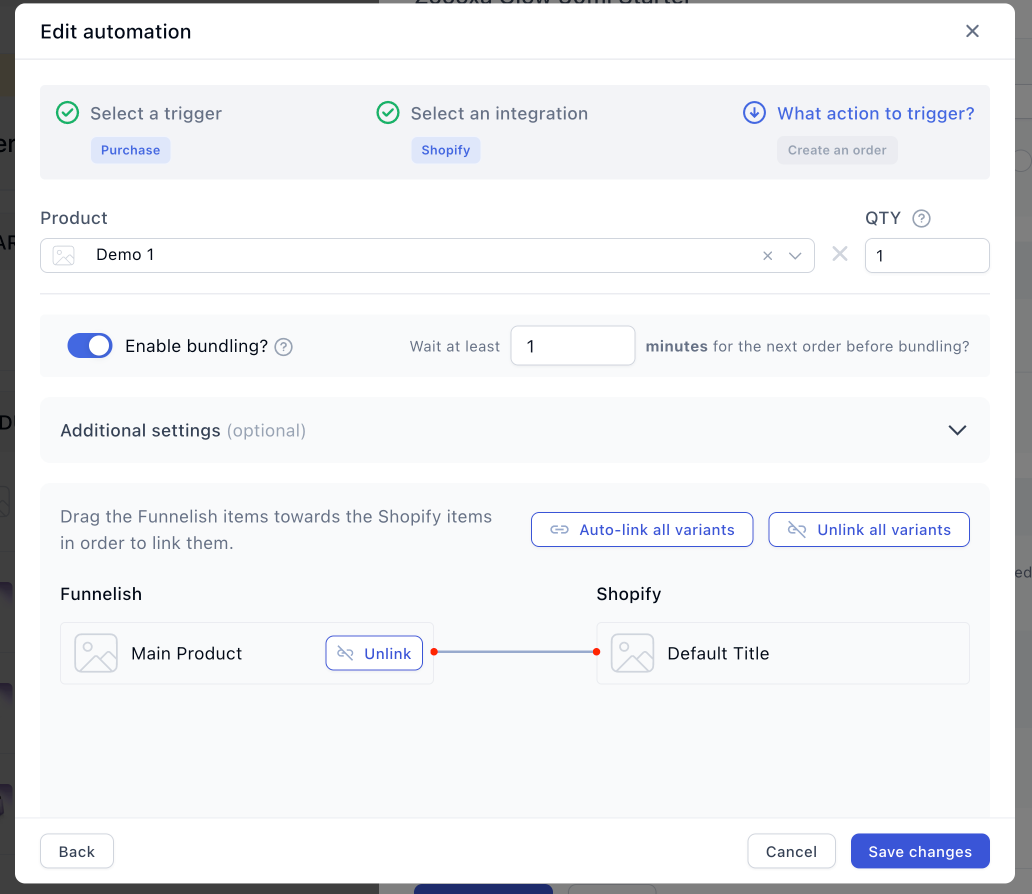
Verify Product Links: Double-check that all products in your funnel are properly linked in your automation settings as shown in the example below:
Don’t Forget Order Bumps & Upsells: Make sure your order bump products and upsell products are also correctly mapped and automated.
Review Cloned Funnels: If you recently cloned a funnel, double-check your checkout and upsell pages. Cloned funnels often keep the YES button linked to the previous product of the original funnel.
Check Bundle Settings: If you have “Enable Bundling” turned ON, keep in mind that if any single product in the bundle has an invalid automation, the entire order will fail to sync.
Dynamic State/Province Field: Make sure your checkout’s State/Province field is set to dynamic. If it is set as strictly required, it can cause checkout and sync errors for customers purchasing from countries where states or provinces aren’t used.
Updated Shopify Product: If you recently updated the product in Shopify (for example title etc) this can lead to the automation unlinking, so go back to the product and make sure it’s properly connected.
Other Potential Causes
If your automation looks perfect, the issue might be stemming from elsewhere:
Insufficient Inventory: If you have inventory updating enabled, make sure all the products in the order actually have sufficient stock. Syncs will fail if the inventory cannot cover the order.
Shopify Downtime: Occasionally, Shopify experiences temporary outages that can prevent orders from pushing through successfully.
Pro Tip: Always run a quick test purchase when setting up a new funnel or cloning an old one to ensure your automations are communicating flawlessly with Shopify!
Hopefully, this checklist gets your orders flowing smoothly again.

We are experiencing issues, the orders are not reflecting on Shopify
Orders were reflecting before, and when we tested just recently that’s when we encountered the issue
When we checked the orders on funnelish it shows “Shopify returned an error”
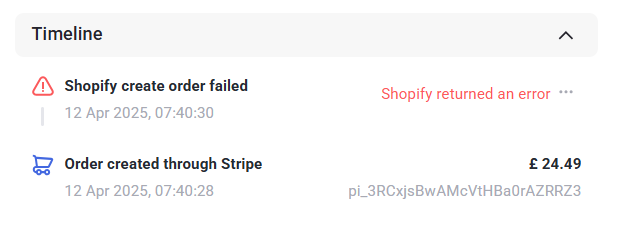
We can’t seem to know what the error is
Has anyone experienced this issue? How did you solve it?