Is there anyway to make a discount popup on my checkout page show up after the customer scrolls to the section where they fill out their information, and if they scroll back or try to leave from that point the pop up shows up, but if they don’t scroll back or try to leave then the pop up doesn’t show up. I’m also not sure how one would go about adding a discount only after someone clicks the accept discount button on the popup. I’ve attached an example of what I mean as a video.
1 Like
Hey Admin!
You can for sure make the popup show up after a certain distance of the page was scrolled.
Inside Page editor > page properties > poup settings you can set that up:
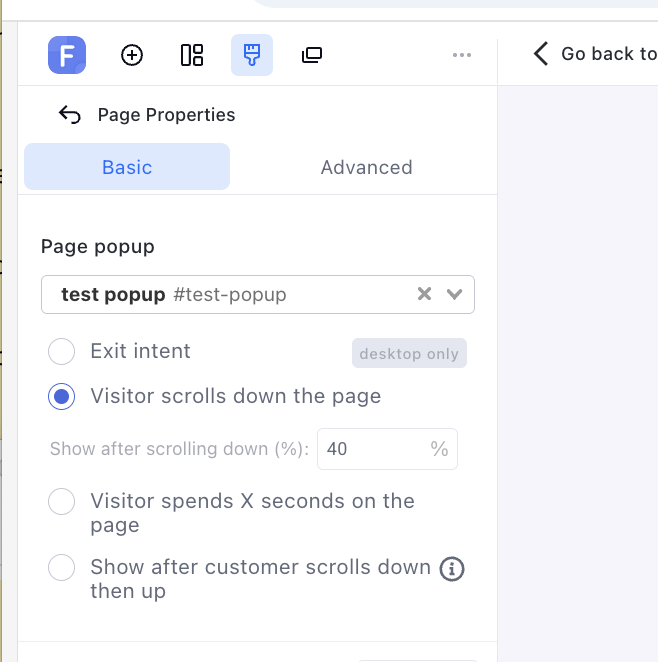
In the example you show above, my guess is that they made the button (of the popup) go to new URL > a discounted checkout.
Funnel layout assumption:
- Landing
- Checkout1 (where you have the popup); if they make it and see the popup > then the “Yes I want discount” button leads to Checkout 2.
Checkout 2 is just Checkout 1 duplicated with a discount added already.
-
Guide to duplicate your funnel step.
Once you did all this, you can edit checkout 2 step path with your discount so the discount gets automatically applied.
E.G. my discount is “SAVE20” so here’s how I’d edit Checkout 2 step path
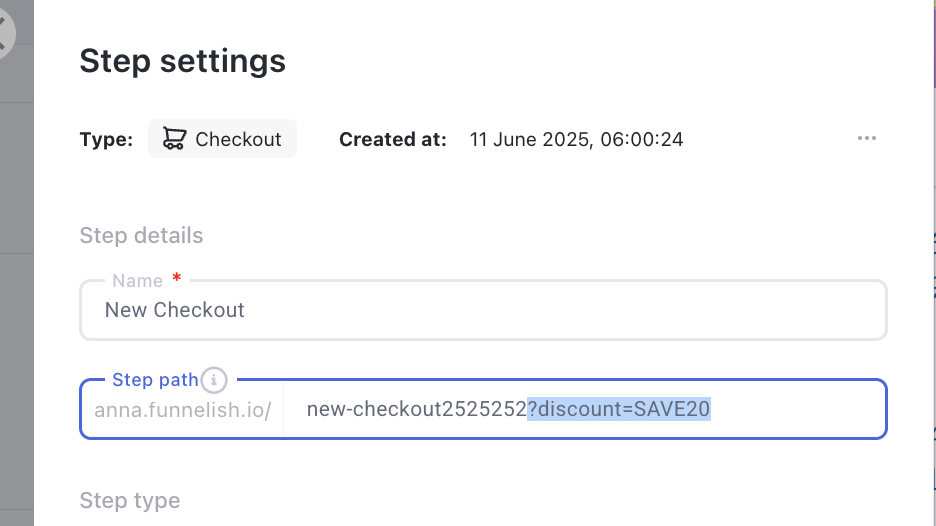
That’d be it! Now, through the popup, they will go from checkout1 to checkout2 where the discount is automatically applied for them 
Let me know if you’re struggling with this or anything else.