I had a landing page with 3 product bundles, each with a common class .pBundle.
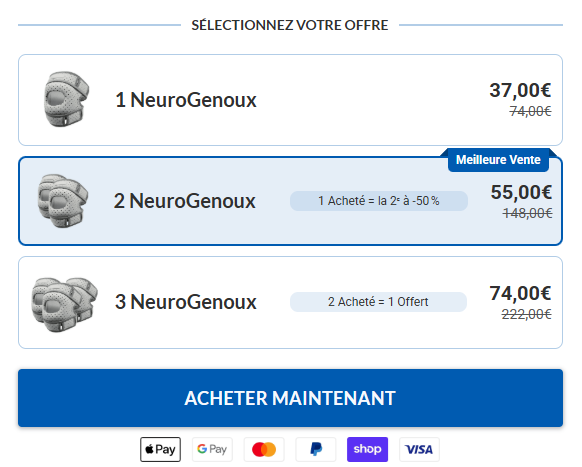
On my checkout page, I had 3 products with radio buttons:
<input type="radio" value="2967563">
<input type="radio" value="2967565">
<input type="radio" value="2967566">
Since I couldn’t change the HTML structure, I simply added a unique class for each bundle:
.pBundle.pid2967563
.pBundle.pid2967565
.pBundle.pid2967566
Note: The numbers in classes like
.pid2967563come from each product’s unique product ID in Funnelish.
You can find this number by opening the product in the Funnelish Product Editor — it’s visible in the product’s URL or settings.
Here’s the JavaScript I used to store the selected product when a user clicks a bundle:
<script>
  document.addEventListener('DOMContentLoaded', function () {
    document.addEventListener('click', function (e) {
      const bundle = e.target.closest('.pBundle');
      if (bundle) {
        // Remove existing selections
        document.querySelectorAll('.pBundle.selected').forEach(el => el.classList.remove('selected'));

        // Add selected class
        bundle.classList.add('selected');

        // Extract product ID from class
        const pidClass = Array.from(bundle.classList).find(cls => cls.startsWith('pid'));
        if (pidClass) {
          const productId = pidClass.replace('pid', '');
          sessionStorage.setItem('selectedProduct', productId);
        }
      }
    });
  });
</script>
Then, on the checkout page, I used this to preselect the correct radio button:
<script>
  document.addEventListener('DOMContentLoaded', function () {
    const selectedProduct = sessionStorage.getItem('selectedProduct');
    if (selectedProduct) {
      const targetInput = document.querySelector(`input[type="radio"][value="${selectedProduct}"]`);
      if (targetInput) {
        targetInput.checked = true;
        targetInput.dispatchEvent(new Event('change', { bubbles: true }));
      }
    }
  });
</script>
 With this setup, the bundle a user clicks on the landing page will be preselected when they reach the checkout page.