There’s a funny gap in dropshipping right now. Smart rings are one of the highest-demand consumer products on the internet. Ahrefs estimates over 40,000 monthly US searches for “smart ring” alone, plus thousands more for “Oura alternative,” “fitness tracker ring,” and “sleep tracker ring.” Yet almost nobody in the dropshipping community is actually selling them.
Part of the reason is that smart rings are hard. Cold traffic in this category arrives pre-loaded with three specific objections: “Is this another subscription trap like Oura?”, “How does it compare to Whoop or RingConn?”, and “Is this real quality or just another Amazon clone?” A generic Shopify product page can’t address those three before the visitor scrolls past. A funnel built specifically for this kind of comparison-shopping, subscription-fatigued buyer can.
That’s what we just released: a complete smart ring sales funnel template, engineered around how cold buyers in this niche actually decide.
 Template Overview Template Overview |
|
|---|---|
 Summary Summary |
A high-converting, mobile-first funnel template designed for premium wearable tech brands - including smart rings, fitness trackers, sleep monitors, biohacking devices, and other high-AOV tech accessories. |
 Funnel Anatomy Funnel Anatomy |
 Home Pagewith featured product sections and brand positioning. Landing Page with a 3-tier pricing stack and product comparison section. Checkout Page with a 3-bump accessory stack. Post-purchase Upsell Page offering a ring case. Downsell Page offering a charger. Thank You Page. Home Pagewith featured product sections and brand positioning. Landing Page with a 3-tier pricing stack and product comparison section. Checkout Page with a 3-bump accessory stack. Post-purchase Upsell Page offering a ring case. Downsell Page offering a charger. Thank You Page. |
 Quick Import Quick Import |
 Clone this Funnel Template Clone this Funnel Template |
How This Template Solves the Smart Ring Conversion Problem
1. Killing Three Objections Before the First Scroll Ends
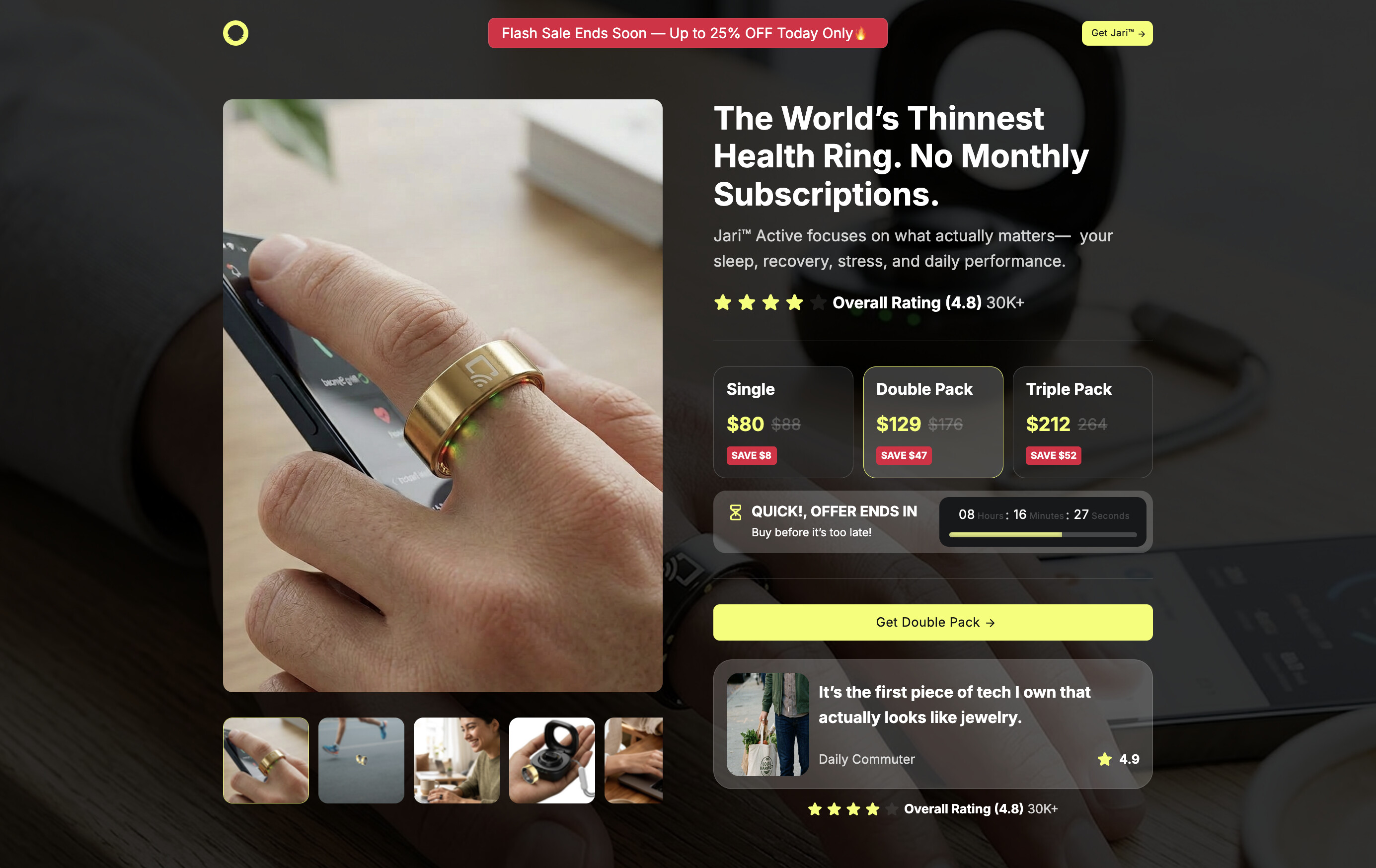
The first thing a cold visitor sees on the landing page is “The World’s Thinnest Health Ring. No Monthly Subscriptions.” That headline isn’t generic — it’s a direct counter-punch at the two players the buyer is mentally comparing against. Oura charges $5.99/month on top of $349 of hardware. Whoop runs a leased $30/month model. The very first sentence of the page eliminates the largest pre-purchase objection in this category.
The second objection — comparison anxiety — gets handled by the Lite vs. Active vs. Pro comparison table embedded directly on the offer page. Most funnels avoid product comparisons because they invite the buyer to leave and Google around. This one invites the comparison and resolves it on-page, with the Active tier highlighted as the obvious middle-of-the-line choice. The buyer doesn’t need to leave to compare; the comparison has already been made for them.
The third objection — quality skepticism — gets a layered answer: 30,000+ reviews next to the buy buttons, a 30-day trial that reverses the what if I don’t like it risk, a 1-year warranty for the what if it breaks concern, and UGC testimonials addressing the wear experience specifically (“finally, a tracker that doesn’t feel like a handcuff”). Every piece of social proof is positioned to answer a different question — not just to look impressive.
By the time the visitor reaches the buy buttons, all three pre-loaded objections have been quietly killed. That’s the first lever.
2. Three Order Bumps Instead of One (And Why That Breaks the Rule)
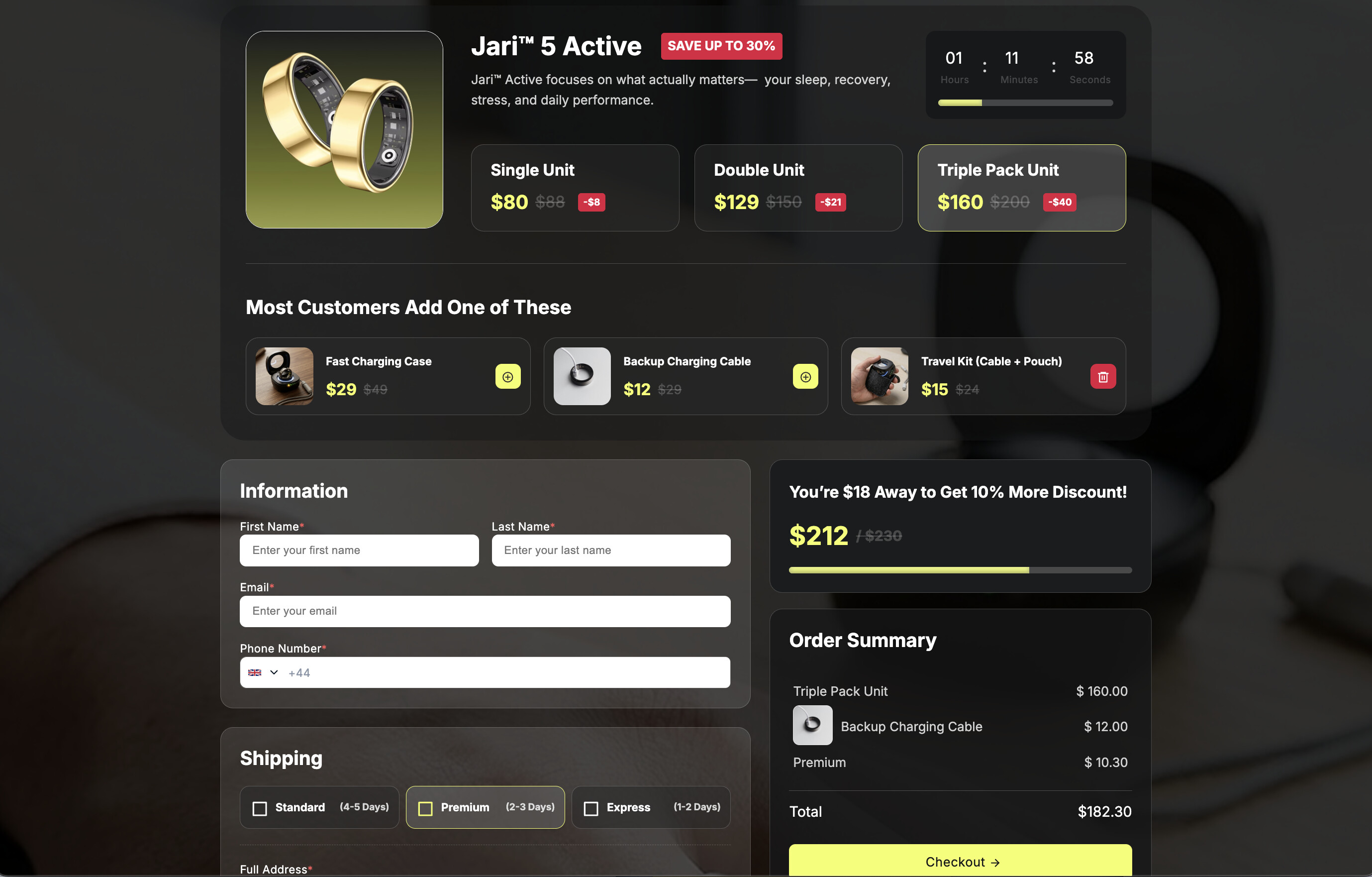
Conventional CRO wisdom says one order bump max — more than that and you trigger decision fatigue, abandonment, friction. This template breaks the rule deliberately: three bumps stack at checkout — Fast Charging Case ($29), Backup Charging Cable ($12), Travel Kit ($15) — all framed as “Most Customers Add One of These.”
Here’s why the rule-break works. The three bumps aren’t random adds — they all map to the same single concern the buyer is already thinking about: how do I keep this thing charged and protected? That’s not three decisions. It’s one decision (do I solve the charging/care logistics now or deal with it later?) presented at three price tiers. The plural framing — “Most Customers Add One” — also nudges these bumps from “extras” into “what people normally do.”
Layered on top is a second AOV mechanic most templates don’t have: a progress bar reading “$18 Away to Get 10% More Discount!” That’s not a discount — it’s a threshold incentive. The buyer sees how close they are to unlocking a meta-discount and instinctively adds one more bump to push past the line. Two psychological levers (loss aversion + completion bias) running on the same checkout. The kind of design that wouldn’t pay off on a $20 product but compounds aggressively on $80–$200 base SKUs.
Read more: The One Change That Doubles AOV (That No One Implements Properly) + Free High Aov Template
3. The Accessory Tail (Where Smart Rings Beat Almost Every Other Niche on LTV)
Smart rings are unusual in the wearables category because they have a long accessory tail. Replacement bands, charging cases, alternate sizes, sport bands, gift packaging — all of these become future cross-sells. And the warmest audience for any one of them is the buyer who already owns the ring.
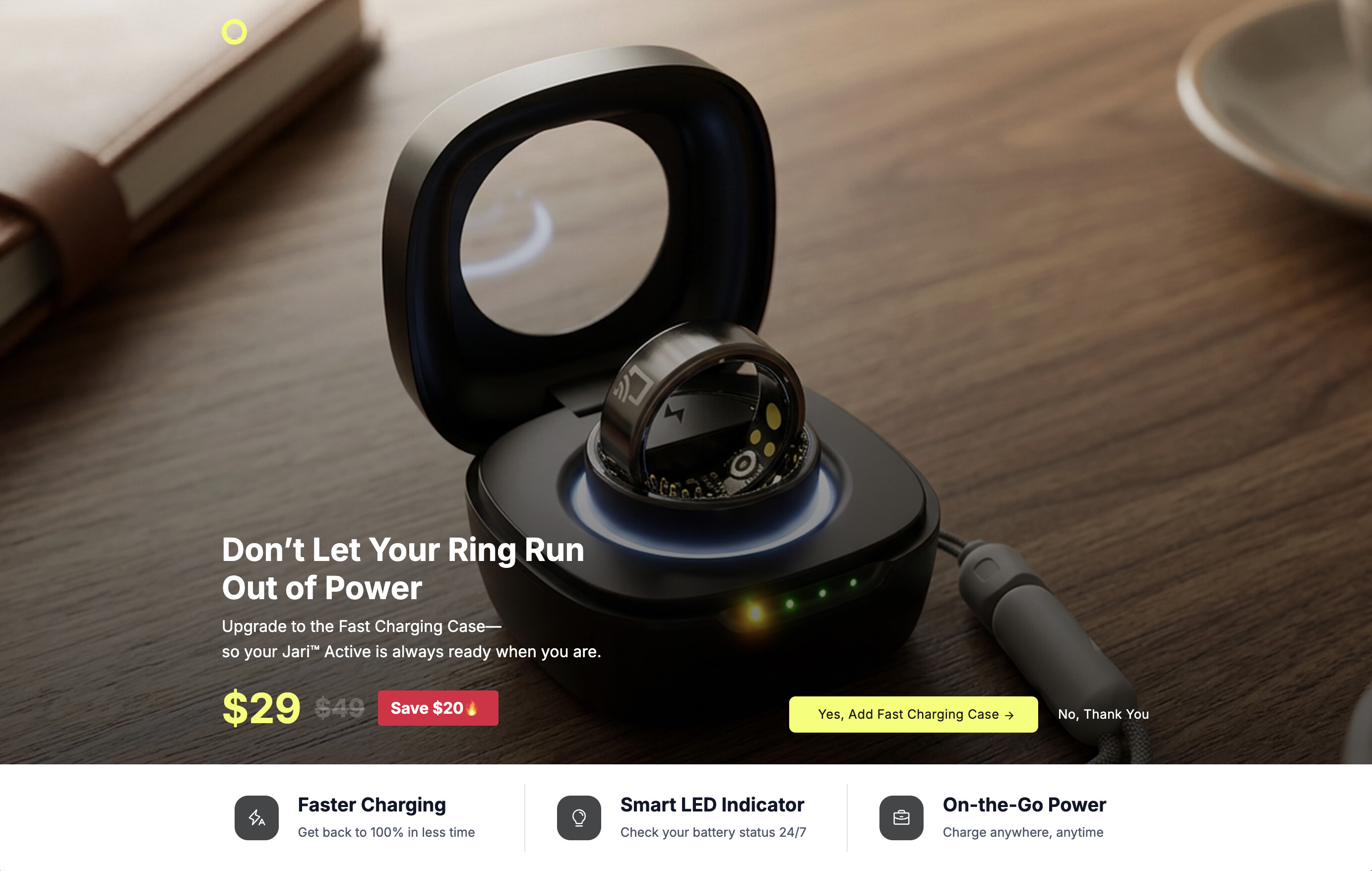
The funnel captures the first slice of that LTV with a layered post-purchase architecture. Right after the card clears, the buyer hits an upsell page offering a protective case for the ring — a logical, low-friction add-on at the highest-temperature moment of the entire transaction. If they decline, they’re routed to a downsell offering a charger instead — a smaller commitment that catches the no with a different yes. Most templates stop at one offer and lose every maybe. This one converts the buyers the upsell would have left on the table.
But the bigger play is what happens after the funnel itself. Every email in your post-purchase sequence has a built-in audience for accessory cross-sells. Bands in new colors. Replacement chargers. Multi-size kits for the household. Gift packs around the holidays. A single first sale can compound into a meaningful multiple of its base value over the months that follow, just on accessories — without ever convincing the buyer to purchase a second ring. That’s the part of the funnel that doesn’t show up in any screenshot but matters most for the long-term math.
Need help or looking for a different design?
 Got a question? If you run into any issues setting this up or swapping out the products, feel free to drop a reply below or start a new thread in the Ask the community section.
 Browse more templates: We have more wearable tech and health-niche templates waiting for you! Or, if this design isn’t quite right for your product, you can explore our full library, share your own creations, or request a custom layout in our Templates category.