Hey everyone 
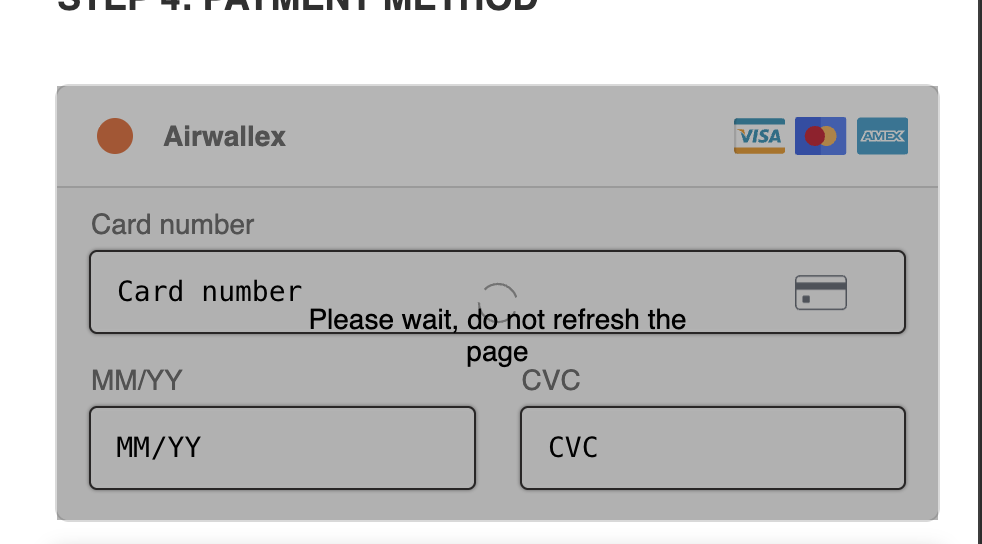
Got a question about customizing the spinner text during payment processing — like showing a message such as:
 “Please wait, do not refresh the page”
By default, Funnelish shows a loading spinner, but you can add your own message using a small JS snippet.
 Use Case
This is useful if you want to:
-
Reduce users refreshing the page during checkout
-
Improve trust during payment processing
-
Add clarity (especially for slower gateways)
 Solution (Custom JS)
Add this script inside your Page → Custom Code → Body:
<script>
const spinner = document.querySelector('.payment-form .spinner');
if (spinner) {
  const span = document.createElement('span');
  span.textContent = 'Please wait, do not refresh the page';
  span.style.cssText = 'position: absolute; top: 50%; left: 50%; transform: translateX(-50%); color:#000; font-size:14px;';
  spinner.appendChild(span);
}
</script>
cc: Bianca
 How It Works
-
Targets the payment spinner element
-
Injects a text message dynamically
-
Positions it centered over the spinner
 Customization Ideas
You can easily tweak:
-
Text → “Processing your order…” / “Securing your payment…”
-
Color → match your brand
-
Font size → make it more visible
Example:
span.textContent = 'Processing your order securely...';
 Notes
Notes
-
This works on pages using the native Funnelish payment form
-
Make sure the script is placed in the Body section
-
If you have heavy custom code, test once to confirm it loads properly
 Pro Tip
Combine this with:
-
Clear CTA copy
-
Trust badges
-
Fast checkout flow
…and you’ll reduce drop-offs during payment 
If you want help styling it to match your design or making it mobile-friendly, drop your page link and I’ll help 