Hey guys… 
I have been using Funnelish for a while now, and I’m really happy with how it streamlines my funnels. However, I’ve recently run into an issue while trying to integrate Stripe with my checkout process.
When a customer attempts to complete a purchase, the transaction is failing with an error that says “Payment processing error”. I’ve checked my Stripe account, and there doesn’t seem to be any issues on their end, so I’m wondering if I’ve missed something in the Funnelish settings.
I also check this: https://community2.funnelish.com/t/shopify-funnelish-integration-issuaws-devops but I have not found any solution. Could anyone guide me about this? I’ve already made sure that my API keys are correct, and I’ve tried testing with both live and test modes, but the issue persists. Has anyone else experienced something similar or have suggestions on what I might be missing?
Any troubleshooting tips or advice would be greatly appreciated!
Thanks in advance for your help!
Respected community member! 
Hi @vekatip971 thanks for sharing the details! Sorry about the trouble that you ran into.
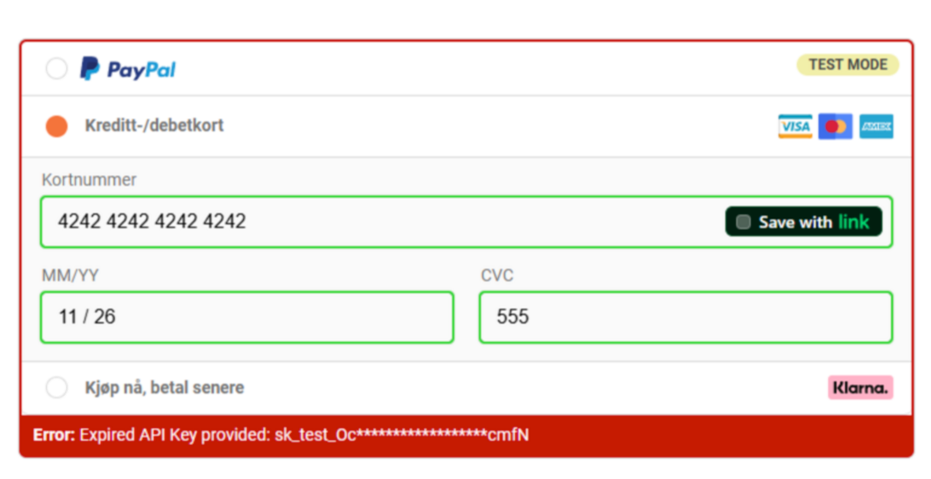
From what you’re describing it sounds like you’re running into this error:
If that’s the case, the team is aware of it and are currently working on resolving this ASAP as it’s a small bug on our end.
To clarify, this only affects the TEST MODE when using Stripe, so if you prefer disabling the test mode and testing the integration with a real card (which you can then cancel and refund) the payment integration should work just fine.
If you run into any other questions or issues you can always reach out to Support as well via chat or email and we’ll be more than happy to help. 
Hi! For the “Payment processing error” in Funnelish with Stripe, try these quick checks:
- Double-check that webhooks are properly set up in your Stripe dashboard and linked in Funnelish.
- Ensure your API keys (both test and live) match the mode you’re testing in.
- Verify currency settings match between Funnelish and Stripe.
- Clear cache or try a different browser/device for testing.
- Contact Funnelish support with error details—they can often spot config issues quickly.
If all else fails, reconnect Stripe integration from scratch. Hope this helps!
Hi @vekatip971,
Thanks for sharing all the details!
It looks like you’re already doing the right things — checking API keys, modes, etc. But based on what Belén mentioned earlier, this might be a known issue with Stripe test mode in Funnelish.
 If possible, try switching to live mode and use a real card (you can refund it later). That usually works fine.
If the problem continues in live mode too, it might be related to webhook settings or a misconfigured integration. In that case, I’d suggest:
- Reconnecting Stripe from scratch
- Double-checking your webhook URL in Stripe matches the one provided in Funnelish
- Reaching out directly to Funnelish support with the error message — we can dig into the logs and find out exactly what’s going wrong
Let me know how it goes — happy to help if you need further guidance!
 April 2026 Update: Stripe “Payment Processing Error” Troubleshooting
Hey @vekatip971 
Just jumping in to consolidate the best practices for this exact issue so you (and anyone else reading this) can get your Stripe checkout working flawlessly!
If you are seeing a general “Payment Processing Error” when attempting to submit a checkout in Funnelish, the solution depends on whether you are in Test Mode or Live Mode.
 Scenario 1: You are in Test Mode
As mentioned above, there was a known limitation/bug specifically affecting Stripe Test Mode transactions inside Funnelish.
- The Fix: Switch your funnel to Live Mode and run a real transaction using your own credit card. You can immediately log into your Stripe dashboard and refund the transaction to yourself so it costs you nothing.
- If the live transaction goes through successfully, your integration is perfect and you are ready to launch!
Scenario 2: You are in Live Mode
If you run a live card and still get the “Payment Processing Error,” this points to a configuration issue with your Stripe connection. Here is your checklist to fix it:
- Re-authorize the Connection: Go to your Funnelish Integrations, delete the Stripe connection, and reconnect it. This refreshes your API tokens.
- Check Your Webhooks: Ensure your webhook URL in the Stripe developer dashboard exactly matches the one provided in Funnelish, and that it is active.
- Currency Mismatch: Verify that the currency selected in your Funnelish funnel settings exactly matches your default Stripe currency settings.
Helpful Resources:
If you have tried the live card test and the checklist above and are still stuck, drop a message to [email protected] with a screenshot of the error, and our tech team will look directly into your error logs to find the exact block!