Sharing your account password with a media buyer or a designer is how accounts get broken. Multi-user access is the right way: each team member gets their own login, scoped to exactly what their job needs.
Add a team member
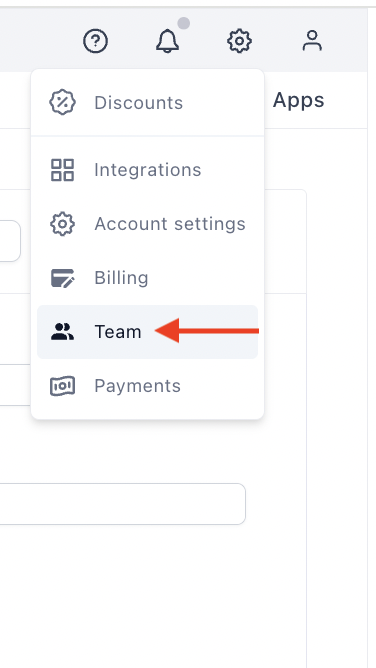
- Click the Settings icon at the top right of your dashboard, then click Team:
-
Click Add new team member.
-
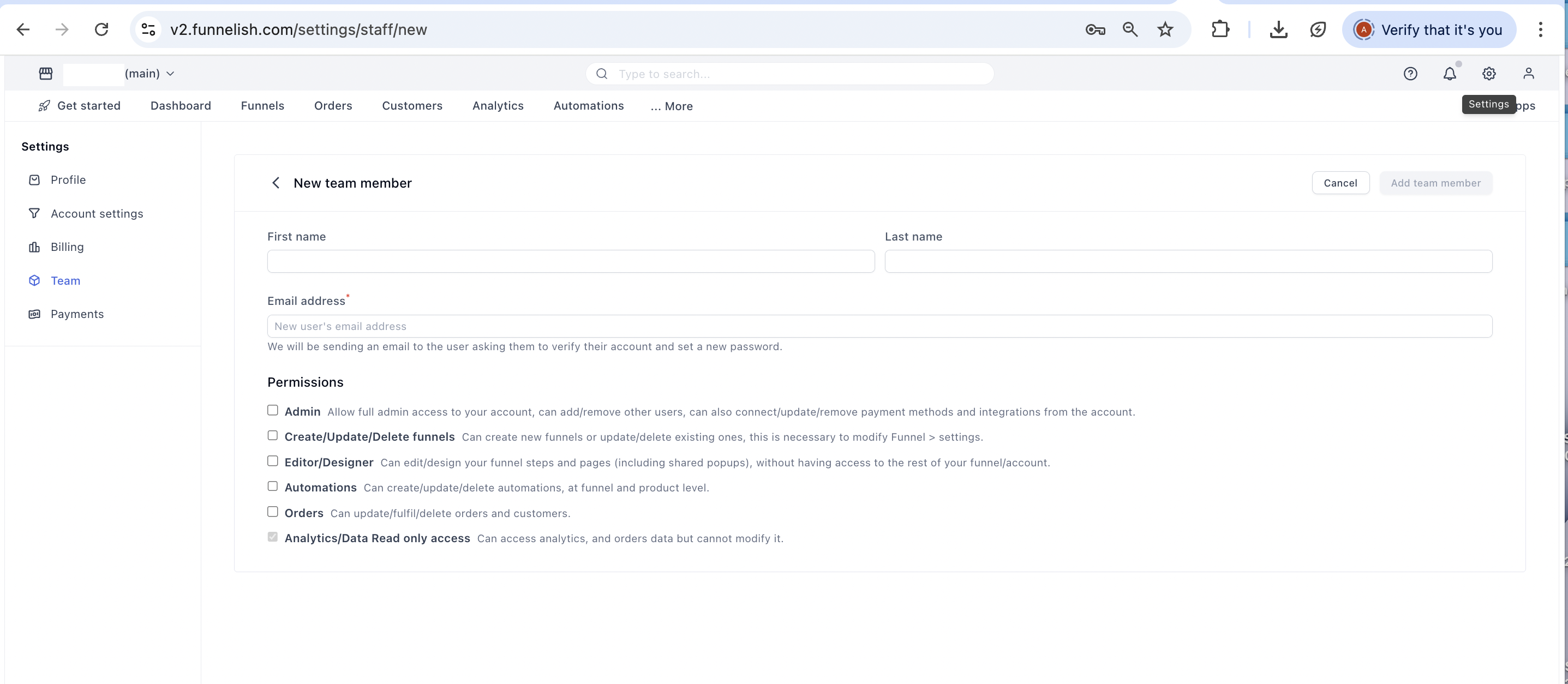
Fill in their name and email, and tick the permission boxes they need:
- Save. Funnelish sends them an invite email with access to your account.
Already on Funnelish? If the email belongs to an existing Funnelish user, they’re simply linked to your account and can switch into it from their own login. One person can be a team member on several accounts without juggling passwords.
The permissions
Permissions are checkboxes, not exclusive roles: combine as many as a person needs.
-
Admin: full account access. Admins can add and remove other users (including other admins), and connect, update or remove payment methods and integrations. This is also the only permission that can open Account → Settings.
-
Create/Update/Delete funnels: create new funnels, update or delete existing ones, change funnel settings (domain, currency, favicon), and access app settings.
-
Editor/Designer: edit funnel steps and pages in the page builder, including shared popups. No access to funnel settings or account settings.
-
Automations: create, update and delete workflow and product automations.
-
Orders: update, fulfill, cancel or delete orders and customers.
-
Analytics/Data read-only: view analytics, orders and customers without being able to change anything.
Scoping by job
-
Designer: Editor/Designer only. They can build pages all day and can’t touch a domain, gateway or order.
-
Media buyer: Editor/Designer + Analytics read-only. Pages and numbers, nothing destructive.
-
VA doing fulfillment: Orders only.
-
Automation specialist: Automations, plus Editor/Designer if they also build the emails’ landing steps.
-
Accountant or investor: Analytics/Data read-only.
-
Agency running the whole account: Funnels + Editor + Automations + Orders. Reserve Admin for people who should be able to change billing and team membership, because that’s exactly what it grants.
Admin is not “everything else plus a bit”. An admin can remove you-level access, change payment methods, and rewire integrations. Give it to as few people as possible, and audit the Team list when someone leaves: removing a member there cuts their access immediately.
Related articles
Not sure which permission set fits a hire? Describe the role in Ask the community and someone will suggest a combination.