When scaling a dropshipping winner or growing a DTC brand, guessing what your customers want is a fast way to burn through your ad budget. To maximize the profitability of your ecommerce funnels, you need to make data-driven decisions.
That is exactly where A/B Split Testing comes in.
A/B testing allows you to run two (or more) different versions of a funnel step at the exact same time. Funnelish will automatically split your incoming traffic between the variants, track the performance of each, and show you exactly which one generates the highest Conversion Rate and Average Order Value (AOV).
Lightning Fast Testing: Split-testing in Funnelish is done on the edge thanks to our advanced global CDN network. This means no matter how many split-tests you run, the impact on your page load speed is minimal to none!
 Creating a Variant Step
Creating a test requires zero external tools or complicated tracking scripts. It is built right into your step dashboard.
-
Open your funnel and select the step where you want to run the test (e.g., your Landing Page or Checkout).
-
Click the New Variant button.
-
Choose how you want to create your variant:
-
Start from scratch: Build a brand new version of the step using a blank canvas.
-
Duplicate main variant: Make an exact copy of your current step so you can tweak a specific element (like a headline or button color). This is the recommended method for standard A/B tests!
-
Use a saved template: Pick a design from your saved brand templates or the Funnelish library.
-
Navigation Tip: If you run multiple tests over time, use the search bar to quickly find any variant you need. You can also filter by active or inactive variants for easier management.
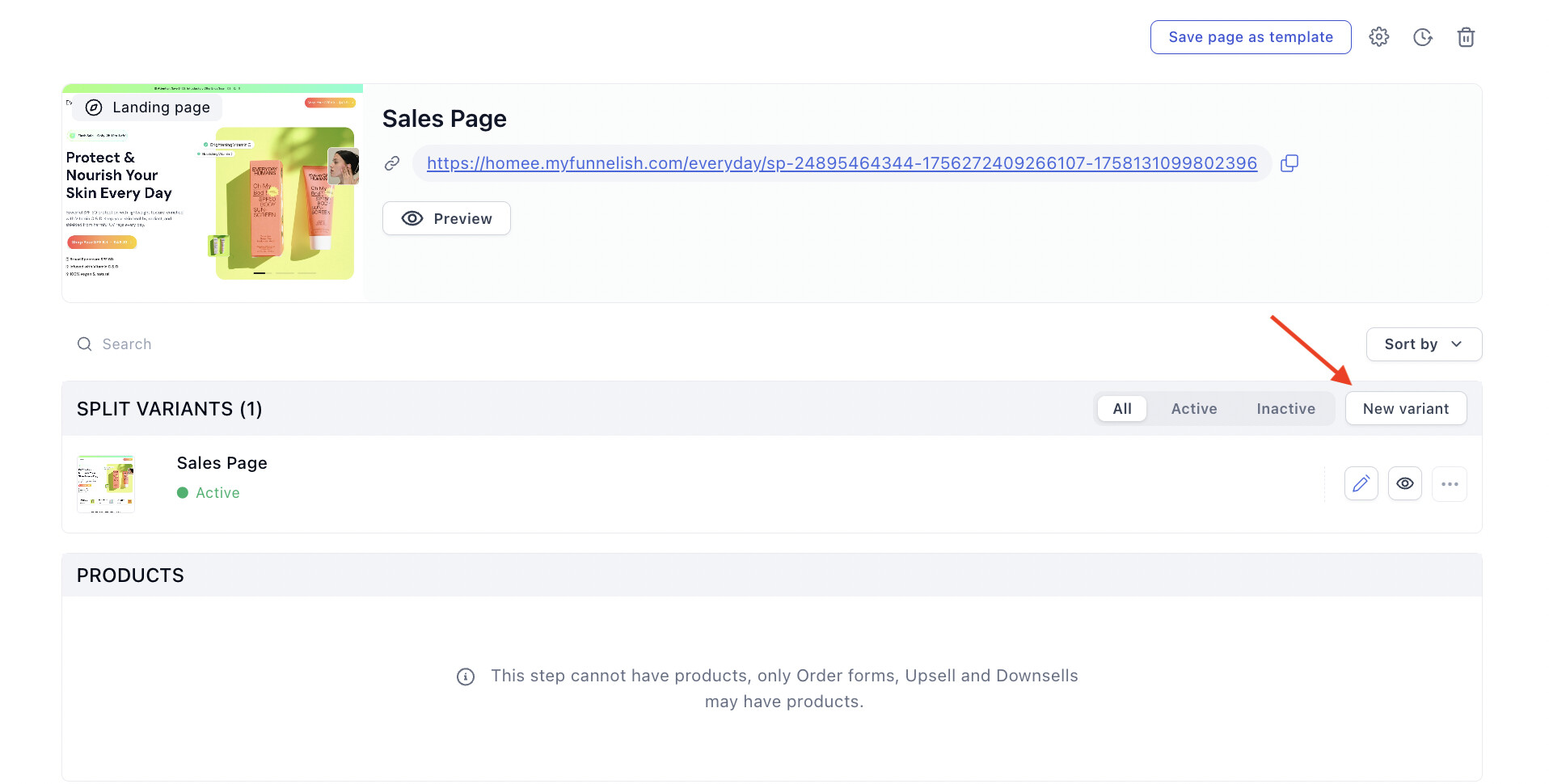
New AB split test variant.
 Managing Variants (Promote, Kill, Edit)
Once your variants are created, hovering over them will reveal your management tools. Funnelish uses simple actions to control the flow of your tests:
-
Edit: Open the Page Builder to update the design and copy of the variant at any time.
-
Kill a variant: Remove an underperforming variant from the test rotation without affecting the rest of your funnel flow.
-
Promote a variant: If a variant is clearly crushing the competition, click “Promote” to immediately make it your main, permanent step!
Testing Best Practice: While Funnelish allows you to run as many simultaneous split-tests as you see fit, we highly recommend keeping a maximum of 3 variants running long-term. Testing too many pages at once can lead to inconsistent traffic assignment and makes it take much longer to reach statistical significance.
 Setting Splits: Random vs. Geo Testing
Funnelish gives you advanced control over how your traffic is distributed between your variants. Inside your Step Settings, you can choose between two distinct types of A/B testing: Random or Geo.
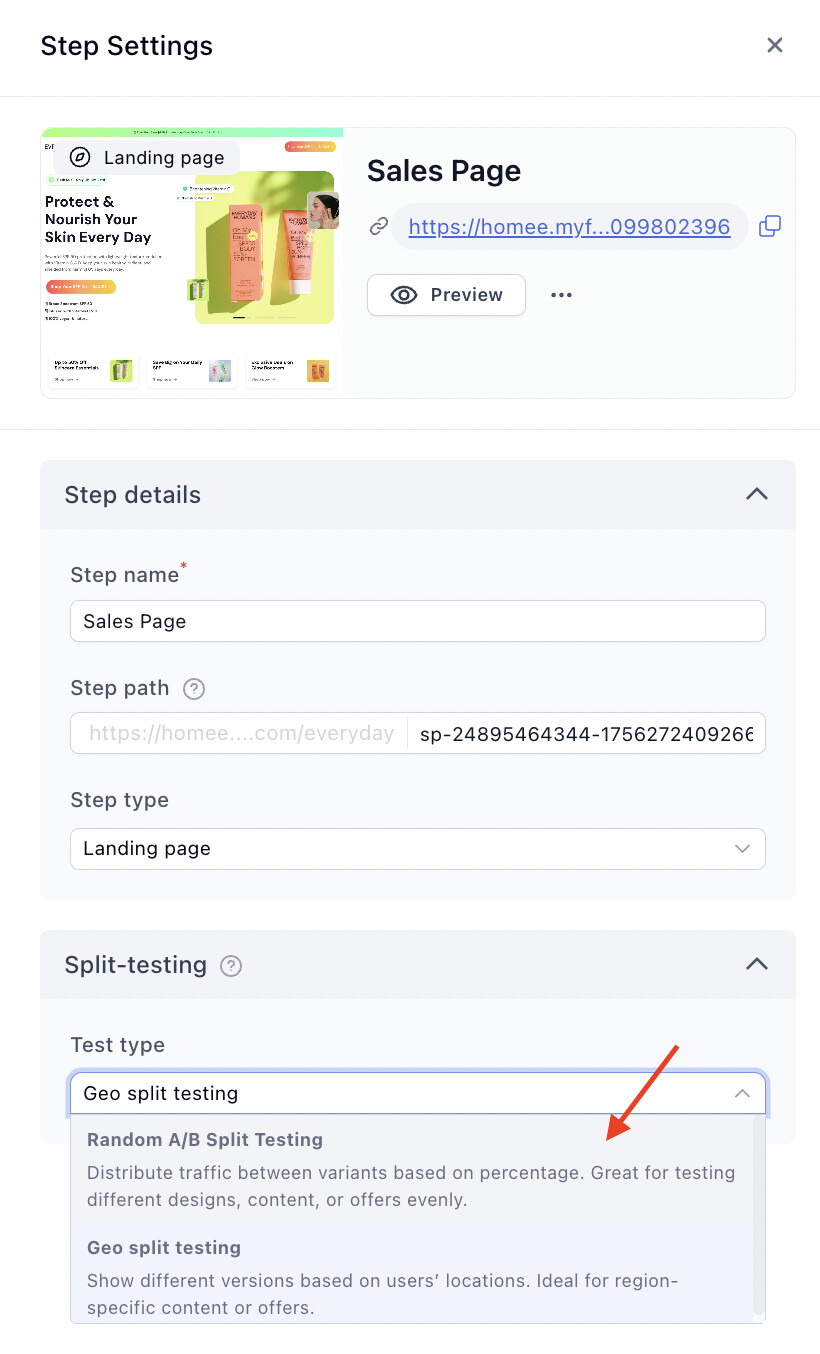
1. Random Split-Testing (The Standard Method)
This is the typical A/B testing setup that most users rely on. Incoming traffic is randomly divided between your variants based on weights you define.
-
Assign a percentage of traffic to each variant by typing it into the field next to the variant name.
-
Funnelish Smart Logic: Don’t worry if your totals don’t perfectly add up to 100%. Funnelish automatically calculates and adjusts the splits based on the relative values you enter!
2. Geo-Split Testing (Testing by Region)
This allows you to run a split test based on the visitor’s specific region or country.
This is incredibly effective for split-testing changes in a specific locale before applying them globally.
- Use Case: Want to see if a $5 price increase hurts your conversion rate? Use a Geo-split to test the higher price exclusively on traffic from the UK. If it performs well, you can confidently roll it out to the US and the rest of the world.
 Important: Geo-Split Testing vs. Geo-Funnels
It is vital to understand the difference between a Geo-Split Test and our advanced Geo-Funnels feature.
Geo-Split Testing (Covered in this article): This happens at the step level. It is purely for testing page design, copywriting, shown products, or order bumps within a single funnel. Because it is just a page variation, you CANNOT use Geo-splits to change your currency, app settings, or payment methods.
Geo-Funnels (Global Scaling): If you need to show entirely different currencies, payment gateways, product SKUs, and languages on the exact same URL (e.g., a US buyer sees USD with Stripe, while a UK buyer sees GBP with Klarna), you need to use Geo-Funnels.
 Read our full guide on setting up Geo-Funnels here!
 What Should You Test? (CRO Best Practices)
If you aren’t sure where to start your first Random A/B test, here are the highest-impact elements to challenge:
-
Headlines on Advertorials/Landing Pages: Your headline does 80% of the heavy lifting. Test a “Benefit-Driven” headline against a “Curiosity-Driven” headline.
-
Pricing & Bundles: Test offering a “Buy 2, Get 1 Free” bundle vs. a flat “30% Off” discount. Funnelish allows you to attach different products and prices to your variant pages!
-
Checkout Layouts: Test the standalone 1-Step Checkout Form against the 2-Step Order Form to see which captures more leads and sales for your specific audience.
-
Order Bumps: Test a physical product bump (e.g., an extra accessory) against a digital product bump (e.g., an ebook or priority shipping).
 Viewing Results & Declaring a Winner
Once your test is live and driving traffic, head over to your Funnel Analytics page to track performance.
You will be able to directly compare how many views, opt-ins, and sales each variant generated. Once you identify the variant with the highest, most consistent conversion rate, simply go back to your step dashboard and click Promote on the winner!
 Next Up:
Now that your funnel is optimized and generating sales, let’s look at how to double your profits immediately after the initial checkout.
Read the next guide: One-Click Upsells & Downsells (OTOs)