Hello everyone, just updating this thread 
Our CF plugins have been deprecated and are no longer maintained. If you are looking to migrate your CF funnel to Funnelish, our support team is happy to help you through the process.
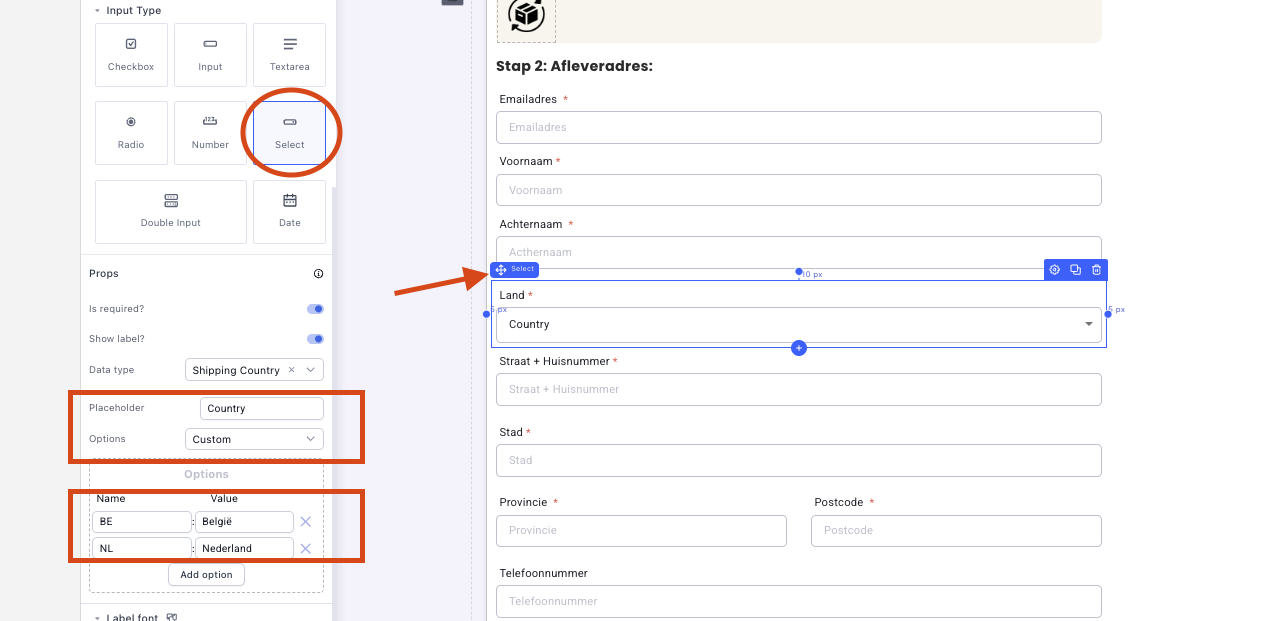
However, here on Funnelish, to customize the country list selector in Funnelish, you can use the “Select” input type in your form element and set the data type to “Shipping Country.”
-
For a custom list of countries, choose the “Custom” option in the Options field.
-
Add each country you want to display by clicking “Add option.”
-
Under “Name,” input the country code, and under “Value,” input the country name as you want it to appear in the dropdown.
This allows you to control the language and display of each country in the selector. If you want to translate the country names, simply enter the translated names in the “Value” field for each country.
For reference, you can find all country codes here: How to Set Custom Country Options in Funnelish