Cash on Delivery is the one payment method that needs no gateway, no processor and no credentials: the customer orders now and pays the courier when the parcel arrives. Funnelish supports it natively through Funnelish Pay, on its own or alongside every other method at your checkout.
Why offer Cash on Delivery
-
It sells where cards don’t. In large parts of the Middle East, North Africa, Eastern Europe, Latin America and Southeast Asia, COD isn’t a fallback — it’s how e-commerce works. Card penetration is low, distrust of online payment is high, and a checkout without COD simply doesn’t convert.
-
It converts the skeptic. Even in card-first markets, a COD option removes the last objection of a buyer who doesn’t trust your store yet — they risk nothing until the product is in their hands. That trust often carries over: the second purchase happens by card.
-
Nothing to set up. No account, no approval process, no fees to a processor. It’s the fastest payment method you can switch on.
The trade-off, honestly
COD moves the risk from the customer to you. Know these going in:
-
Unconfirmed orders are real orders to you, but not to the buyer. Some fraction won’t answer the courier, and you carry the shipping cost both ways. Serious COD sellers confirm orders by phone or WhatsApp before shipping.
-
Cash flow arrives with the courier, not at the sale — plan for the settlement delay from your delivery partner.
-
A COD surcharge isn’t built in. There’s no native toggle to add an automatic fee when the customer picks COD. The usual approaches are pricing it into the product, or custom code — if you need this, ask in Ask the community, where several merchants have shared their setups.
Add Cash on Delivery to your checkout
-
Open your checkout step, select the payment form element, and click Edit payment options.
-
Click Add a new payment method, then choose Cash On Delivery.
-
Name it, create it, then select it on the payment method list and save your changes.
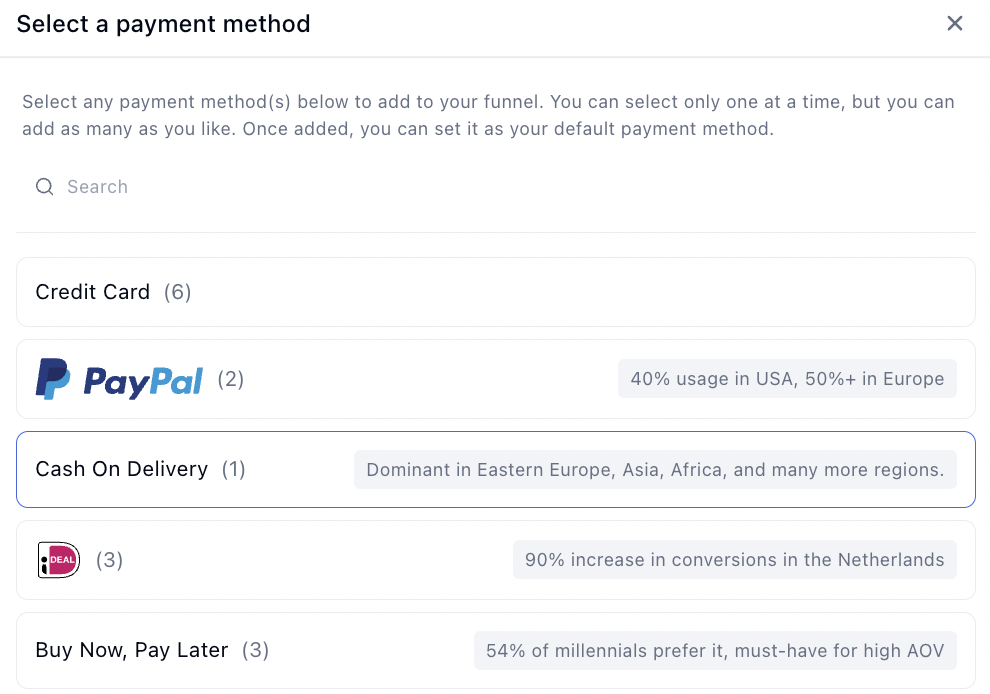
That’s the whole setup — there’s no external account to connect.
Don’t make COD the default when you also take cards. If both are on, set cards as the pre-selected method — buyers who would have paid upfront shouldn’t be nudged into the option that carries your risk. See Add payment methods to your checkout for setting the default.
Handling COD orders
A COD order lands in Funnelish like any other, but no money has moved — the payment completes in the real world, when your courier collects. Build your fulfilment flow around that: confirm the order, ship, and reconcile against your delivery partner’s remittance.
Testing
There’s nothing financial to test — no gateway, no charge. Place an order through your own checkout with COD selected and confirm it arrives in Funnelish with the right products, amounts and customer details, and that your confirmation email and automations fire. Test payments before launch covers the rest of the pre-launch pass.
If something isn’t working
COD doesn’t appear at checkout. Check it’s selected and saved on the payment form, and that Funnelish Pay is enabled on the funnel — with no gateway involved, those two are the only moving parts.
Payment processing is the fiddliest part of building a funnel. Gateway credentials, currencies, country rules, the form itself — a lot of moving parts, and the one area where a mistake costs you orders rather than just looking wrong.
If COD isn’t behaving, or you’re working out how to run confirmation and fees around it, start a topic in Ask the community — plenty of COD merchants are in the community. For anything tied to your account or a specific transaction, contact us on chat support.