A checkout that looks perfect and takes no money is the most expensive thing that can go wrong in a funnel, because nothing tells you. There’s no error, no alert. Just traffic arriving, orders that don’t exist, and an ad spend you find out about later.
Testing properly takes about ten minutes. This article covers the process; the test cards for your specific gateway are in that gateway’s own article.
Two tests, not one
Test mode proves your funnel works. The form submits, the order records, your automations fire. No money moves.
A real payment proves your account will accept money. Test mode can’t tell you this, because the things that block live payments are all live-account settings: risk rules, 3D Secure configuration, which currencies you’re approved for, which payment methods are activated, and whether your account has cleared verification or KYC at all.
Do both, in that order. Testing only in test mode is the single most common way a launch goes wrong: everything passes, and the first real customer gets declined.
If the funnel is already live and taking orders, test on a duplicate. Some gateways apply test mode at the account level, which stops real transactions processing while you’re testing.
Turning on test mode
Open your funnel and use the Test Mode toggle in the top bar.
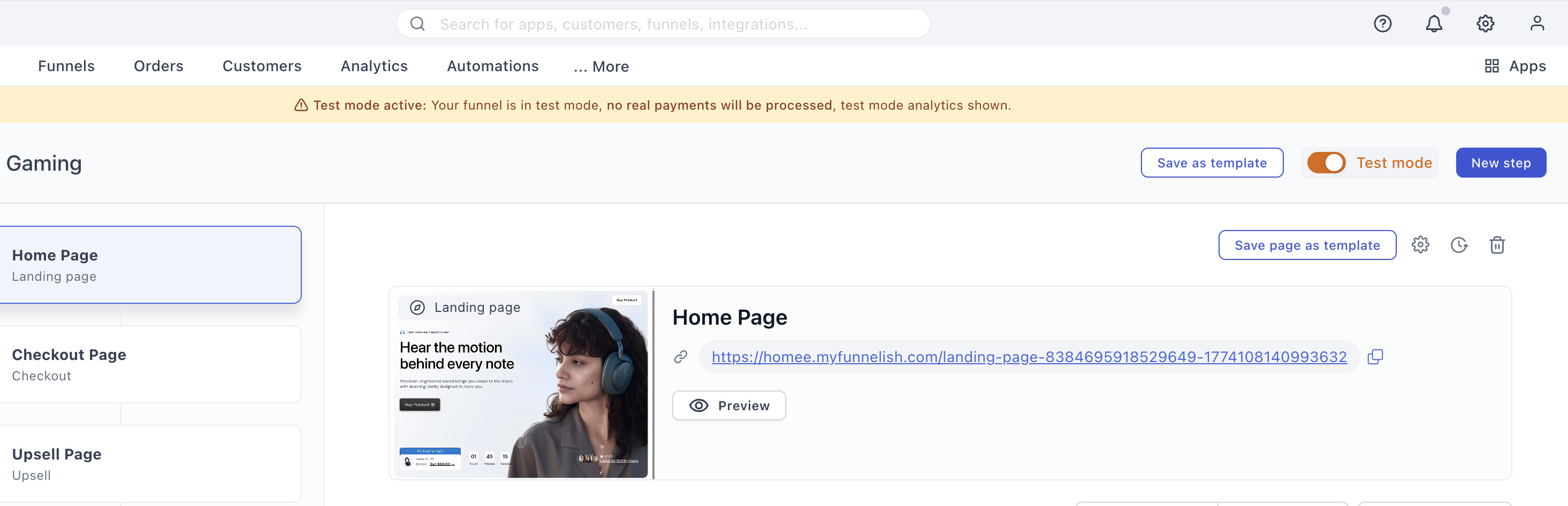
Most gateways respond to that toggle directly. A few need something set up on their side first:
| Gateway | What test mode needs |
|---|---|
| Stripe | The funnel toggle, nothing else |
| PayPal (new) | The funnel toggle, nothing else |
| PayPal (classic) | Sandbox credentials, plus the toggle |
| Airwallex | A separate demo-account gateway |
| NMI | A demo account, sandbox keys, or NMI’s own Test Mode. Read that article first |
| Checkout.com | Sandbox API keys |
| RazorPay | Test keys, plus the gateway’s own test switch |
Each of those articles lists the test cards that gateway accepts, including the ones that deliberately fail.
What to test
The payment itself
-
A successful payment. The obvious one.
-
A declined payment. Every gateway gives you a card number for this. You want to see the message your customer sees, in the place they see it. A decline that leaves someone staring at a frozen button costs you the sale twice.
-
A 3D Secure challenge, if you sell anywhere it applies.
-
Every payment method you’ve switched on, separately. A method that’s enabled but misconfigured looks fine until a customer picks it. If you offer cards, PayPal and Klarna, that’s three tests.
The funnel around the payment
This is where money actually leaks, and it’s the part most people skip:
-
Upsell and OTO steps charge correctly. A one-click upsell that silently fails is invisible. The main order still succeeds, so nothing looks broken.
-
Order bumps add to the total.
-
Discount codes apply the right amount.
-
Shipping fees and tax calculate as expected.
-
The thank-you page loads with the right order details.
Where the order ends up
A payment that succeeds and records nowhere is still a problem:
-
Funnelish orders: correct product, quantity, amount, currency and customer details.
-
Your gateway dashboard: a matching transaction, with the same amount.
-
Your integrations: Shopify, ShipStation, Klaviyo, Google Sheets, whatever you’ve connected actually received it.
-
Automations and confirmation emails: fired, and to the right address.
The conditions your customers are actually in
-
On mobile. Most of your traffic. Test it there, not just on the desktop you built it on.
-
On your live domain, not the preview URL.
-
In a fresh browser or incognito window, so you’re not seeing cached or logged-in behaviour nobody else has.
Then take one real payment
Test mode done, do it again for real:
-
Temporarily reduce your product price to a nominal amount: $1 or the local equivalent.
-
Turn Test Mode off.
-
Buy from your own funnel with a real card.
-
Check the order in Funnelish and in your gateway dashboard.
-
Refund yourself from your gateway dashboard.
-
Set the price back.
Steps 2 and 6 are the ones people forget, and both are costly in opposite directions: a funnel still in test mode takes orders that charge nobody, and a funnel left at $1 sells your product for $1 to everyone who finds it.
Before you launch
Adapted from the funnel launch checklist:
-
Test Mode is off. First on the list for a reason.
-
Your gateway holds live credentials, not sandbox or test keys. Several gateways name them so you can tell:
Checkout.comkeys containtest, RazorPay’s beginrzp_test_. -
Prices are back to normal after your $1 test.
-
URLs are correct across every step.
-
Required apps are on under Funnel → Apps: pixels, Proofy, and anything else your launch depends on.
-
One real payment has succeeded end to end on the live setup.
Is test mode still on?
The symptoms are easy to misread, because nothing is broken:
-
Orders appear in Funnelish but there’s no matching money in your gateway.
-
Your gateway dashboard is empty, or shows only test transactions.
-
Revenue reporting doesn’t match your order count.
If that’s what you’re seeing, check the Test Mode toggle in the funnel’s top bar first, and the gateway’s own test switch second.
Payment processing is the fiddliest part of building a funnel. Gateway credentials, currencies, country rules, the form itself: a lot of moving parts, and the one area where a mistake costs you orders rather than just looking wrong.
If a test is failing and you can’t work out why, start a topic in Ask the community with the gateway you’re using and what you’re seeing. Someone will help. For anything tied to your account or a specific transaction, contact us on chat support.