Sales tax in the US is a minefield: rates change by state, county, and even city, and different product types are taxed differently in different places. The TaxJar app takes that off your plate. Connect it once and Funnelish automatically calculates and adds the correct tax amount at checkout, based on your customer’s location and your product’s category.
| Funnels | Blogs | Customer Portals | Stores | |
|---|---|---|---|---|
| Available on |  |
 |
|
|
 Get your TaxJar API key
-
Log in to your TaxJar account.
-
Click Account in the top-right corner, then TaxJar API in the drop-down menu.
-
Copy your API key.
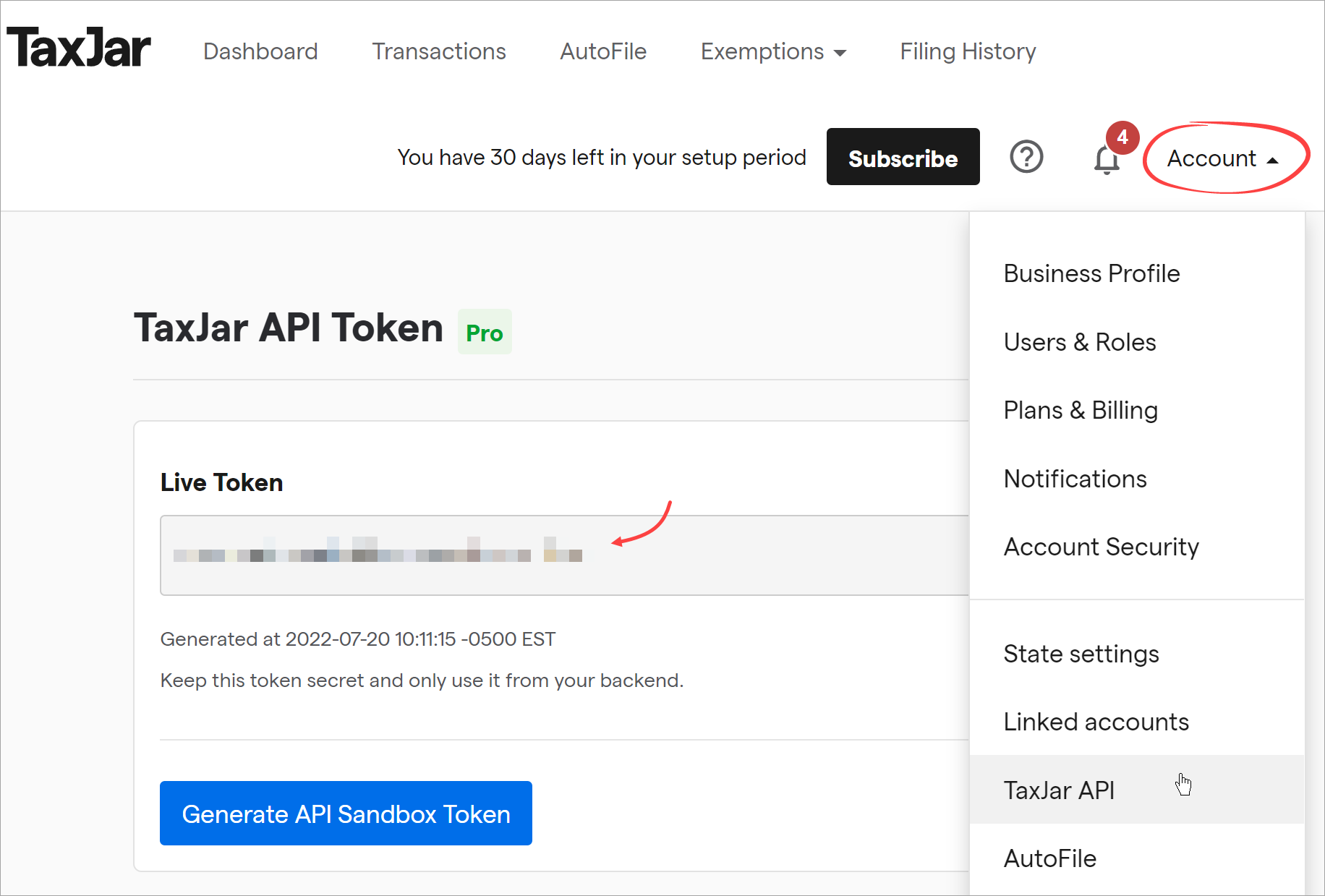
API access requires a TaxJar plan that includes the API. If you don’t see the TaxJar API option, check your plan on TaxJar’s side.
 Activate the app and paste your API key
-
Open the funnel where you collect payments and go to its Apps tab.
-
Enable TaxJar.
-
In the side panel, paste your API key into the field.
-
Click Save changes.
 Assign tax codes to your products
This step matters more than it looks: in many US states, clothing, food, supplements, and digital goods are all taxed differently. TaxJar can only apply the right rules if it knows what each product actually is.
With the TaxJar app settings open in your funnel:
-
Find your products under the Products’ tax code section.
-
Click the three dots next to a product and select Change.
-
Search for and select the product category that matches. The app automatically assigns the correct tax code.
-
Repeat for every product in your funnel.
Don’t skip products. Anything left without a category falls back to generic treatment, which can mean overcharging customers in some states and undercharging (and owing the difference later) in others.
 Customize the tax line at checkout (optional)
-
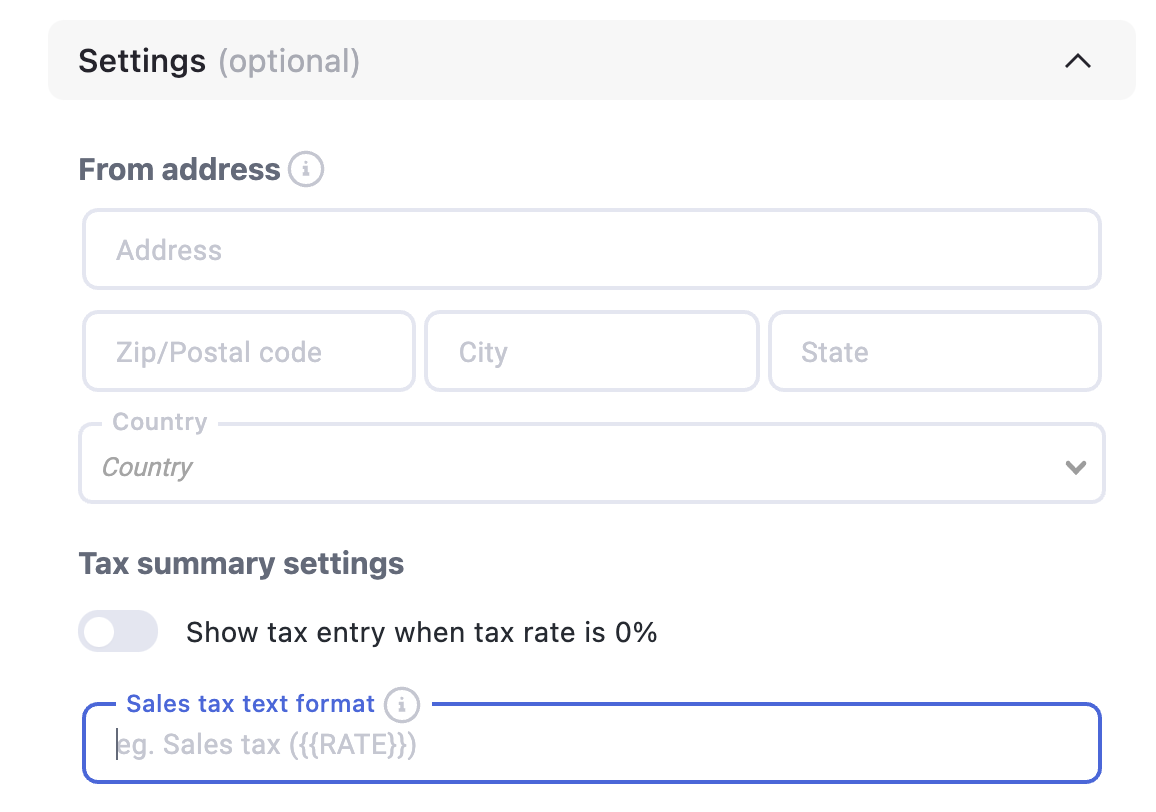
You can set your business address here or manage it in your TaxJar account. It’s part of how tax is calculated, so keep it accurate.
-
You can also change the tax summary text your customer sees at checkout. The default is Sales tax (X%), where the rate comes from TaxJar. Write your own text if you like, just make sure it includes
({{RATE}})so the correct percentage autofills.
That’s it. Your funnel now charges and collects accurate sales tax on every order. 
 Sales tax basics every merchant should know
A few things that trip up merchants constantly. This is general information, not tax advice — for your specific situation, talk to TaxJar’s resources or a tax professional.
Calculation is not the same as filing
The app handles charging the right tax at checkout. Actually filing returns and remitting what you collected to each state is a separate job, on TaxJar’s side (their reports and AutoFile features exist for exactly this). Collecting tax and never remitting it is far worse than not collecting at all, so make sure the second half of the pipeline exists before you scale.
You only owe tax where you have nexus
You generally only need to collect sales tax in states where you have nexus: a physical presence, or enough sales volume to trigger a state’s economic nexus threshold (commonly around $100,000 in sales or 200 transactions per year, but it varies by state). TaxJar tracks your sales against these thresholds and warns you as you approach them — check that dashboard regularly as you grow, because crossing a threshold mid-year creates obligations from that point on.
Keep your addresses accurate
Tax is calculated from the ship-to address and your business address. A wrong or missing business address quietly skews every calculation. Set it once, correctly, and update it if you move.
Testing your setup
Place a test order using a shipping address in a state where you collect tax, and confirm the checkout shows a sales tax line with a sensible rate. Then check the transaction appears in your TaxJar dashboard.
 Keep learning
More app guides: browse the full Apps documentation category for step-by-step setup guides.
Stay compliant while you scale:
-
Is Dropshipping Legal in 2026? A Complete US Compliance Guide — the wider compliance picture beyond sales tax.
-
How to Start Dropshipping Business in 2026 — where tax setup fits in launching your operation.
Questions about your TaxJar setup? Reply below and the community will help you out. 