Funnelish Pay is the payment backbone of Funnelish. It lets your customers pay however they prefer — cards, PayPal, Apple Pay & Google Pay, Klarna, iDEAL, Cash on Delivery, and 21+ more methods — all inside a beautiful, high-converting checkout that never breaks the design or flow of your pages.
| Funnels | Blogs | Customer Portals | Stores | |
|---|---|---|---|---|
| Available on |  |
 |
* |
|
*Customer Portals use Funnelish Pay implicitly — see “What about Customer Portals?” below.
 How Funnelish Pay works
One thing to understand before anything else: Funnelish Pay is not a payment processor. It doesn’t touch, hold, or process your money.
Instead, it’s the layer that connects your own payment gateways (Stripe, NMI, PayPal, and so on) to your checkout, and takes care of everything around them: rendering the payment form, organizing which methods appear where, handling upsells and order bumps, subscriptions, refund workflows, and keeping gateway webhooks in sync.
-
Your money flows directly through your own gateway accounts, under your own agreements and payout schedules.
-
Funnelish charges zero extra fees on top of your standard processor costs. No commission, no per-transaction cut.
-
The one special case is Cash on Delivery (COD): no payment is collected online at all — the order is recorded and payment happens at delivery, no gateway involved.
 Activate Funnelish Pay
Open the funnel or store where you sell, go to its Apps tab, and enable Funnelish Pay.

You can also enable it straight from the page editor:
-
Open your checkout step in the editor.
-
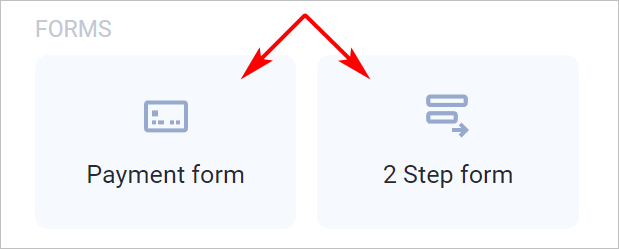
Place a payment element on the canvas: the Payment form or the 2-Step form.
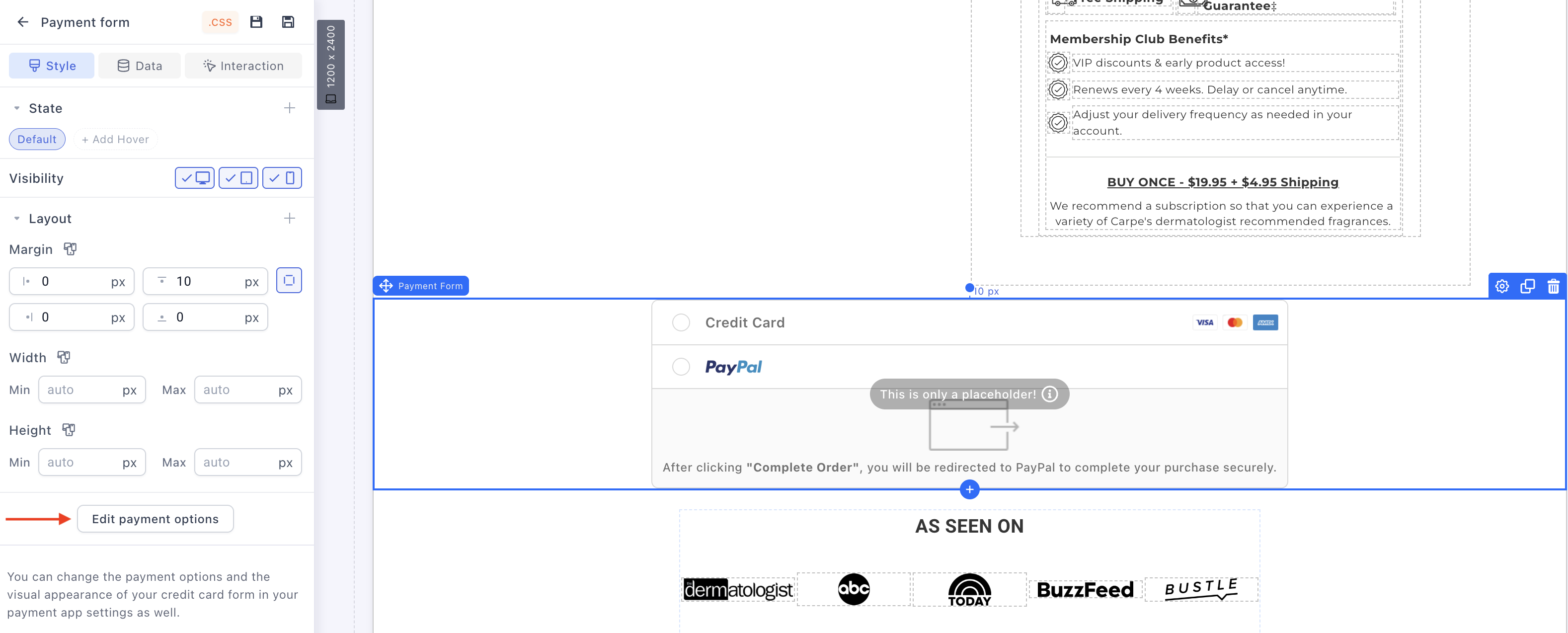
- Click the payment form field, then click Edit payment options in the settings panel.
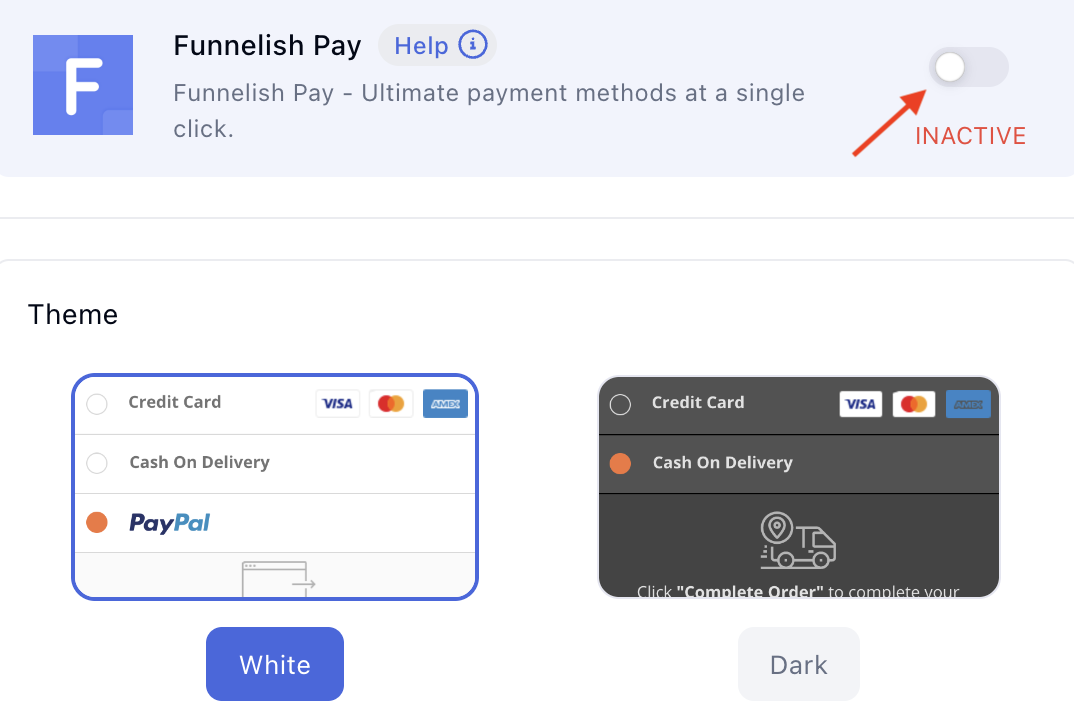
- Switch the toggle to enable Funnelish Pay, and pick a theme for your live payment form.
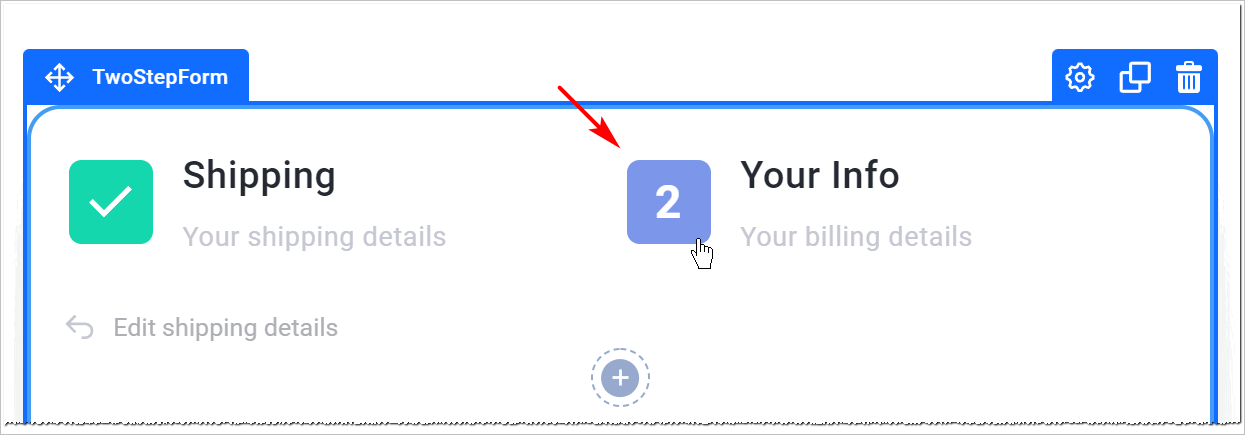
Using the 2-Step form? Click the number 2 at the top of the element to reveal the payment form field, then follow the same steps.
 Connect your payment gateways
With the app active, add the payment methods you want to offer. Each gateway has its own step-by-step guide — until they’re migrated here, the guides live in our legacy docs:
Card payments: Stripe · NMI · Checkout.com · Airwallex
Wallets & express checkout: PayPal · Apple Pay & Google Pay
Buy Now, Pay Later: Klarna (via merchant account, Stripe, or Airwallex)
European methods: iDEAL (via Stripe, Mollie, or Airwallex) · Bancontact · SEPA Direct Debit · SOFORT · P24 (Poland) · EPS (Austria)
Other: Cash on Delivery · RazorPay (India)
 Before you delete a gateway
Removing a gateway from Funnelish Pay is not a clean undo. Once a gateway is deleted:
-
Refunds can no longer be processed through it from Funnelish for past orders.
-
Webhooks stop being tracked, so payment status updates from that gateway no longer reach your account.
-
Recurring charges for subscriptions created through it can no longer be tracked or managed.
If a gateway processed real orders — especially subscriptions — disable it or stop routing new payments to it instead of deleting it, and only delete once nothing live depends on it.
 What about Customer Portals?
Customers can buy inside their portal — upsells, reorders, and so on. So why doesn’t Funnelish Pay appear in a portal’s Apps tab?
Because portals use it implicitly. When a customer pays inside a portal, the charge runs through their pre-saved payment details, via the gateways already configured in Funnelish Pay on the funnel or store they originally came through. There’s nothing to configure at the portal level — set up your gateways once on your funnels and stores, and portal purchases just work.
 Scaling up? Meet Gateway Pools
When you’re processing serious volume, a single gateway becomes a single point of failure. Gateway Pools is our payment orchestration solution: it intelligently routes each payment across a pool of your gateways in real time — spreading volume, reducing failed payments, and increasing revenue.
Learn more on the Gateway Pools page, or in the legacy docs guide. A full guide is coming to this category.
 Keep learning
Payment guides: individual gateway setup guides are being migrated to the Payment Processing category — until then, use the legacy links above.
Convert more at checkout:
-
Why Funnel Checkout Pages Outperform Shopify’s Cart Checkout — what makes a funnel checkout different.
-
Shopify Checkout Optimization: Save Your ROAS — checkout friction is where ad money goes to die.
-
What Is Stripe in 2026 — a closer look at the most popular gateway you’ll connect.
Questions about payments or gateways? Reply below and the community will help you out. 