If you are selling Subscription Products alongside a Shopify store, you might have run into this scenario: a customer’s first subscription order syncs to Shopify perfectly, but when the second month hits, the renewal order (the rebill) is nowhere to be found in your Shopify admin.
Below is a troubleshooting guide on why this happens, the most common causes for sync failures, and exactly how to fix them so your fulfillment stays on track.
 Common Causes for Missing Renewal Orders
If your initial orders are passing through to Shopify but the renewals are failing, check these common culprits:
1. Missing the “Recurring Payment” Trigger (Most Common)
When an initial order syncs to Shopify but the renewals do not, the issue almost always comes down to your Funnelish Automations setup.
Many merchants set up a Purchase automation to send the order to Shopify. However, the Purchase trigger only fires on the very first transaction. It does not look for future rebills.
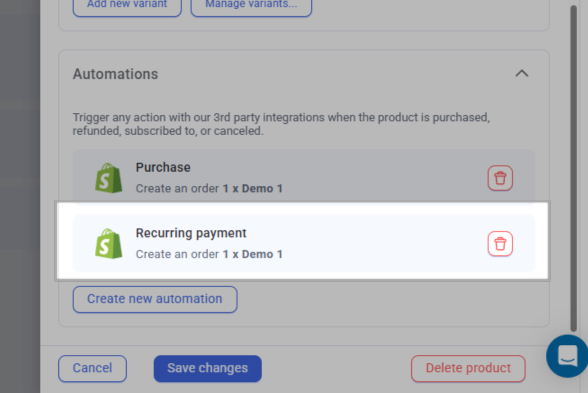
The Fix: You need to have both automations running on the same subscription product.
-
Purchase Trigger: Pushes the initial order to Shopify so your team can ship the first box.
-
Recurring Payment Trigger: Add a second automation triggered by
Recurring payment. This specifically listens for the renewal charge from your payment gateway and pushes every subsequent rebill to Shopify as a fresh, fulfillable order.
2. Mismatched SKUs Between Funnelish and Shopify
For Funnelish to successfully push an order to Shopify and link it to the correct product, the SKUs must be identical. If you recently changed the SKU inside Shopify but forgot to update it inside your Funnelish product settings, the renewal order automation can fail to find the matching item.
The Fix: Open the product automation and double-check that the product linked to it exactly matches the one from your Shopify admin (watch out for accidental spaces!).
3. Inventory Rules Blocking the Order
If you are updating the inventory in the product automation settings in Funnelish and the product ran out of stock, the order will fail to sync.
If you are sending that order bundled with other products and the other products don’t have sufficient inventory, the whole order will also fail to sync, regardless if the subscription product had enough stock.
If in Shopify the setting “Continue selling when out of stock” is unchecked, Shopify will reject the incoming order if your inventory count hits zero. Funnelish tries to send the rebill, but Shopify blocks it because it believes the item cannot be fulfilled.
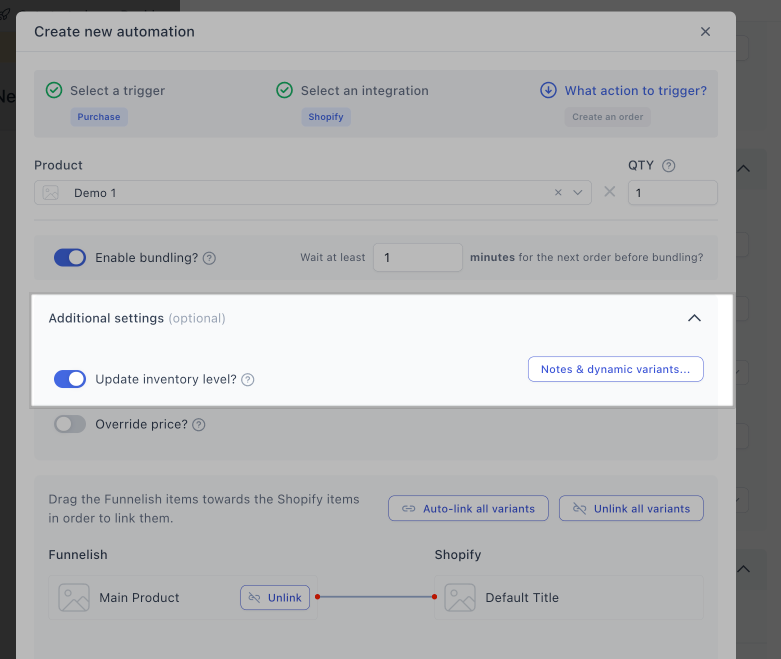
The Fix: Ensure your Shopify inventory levels are up to date, or check the “Continue selling when out of stock” box in Shopify for your subscription products.
4. Failed Payments at the Gateway Level
Sometimes the order didn’t sync simply because the payment never went through. If the customer’s credit card expired, lacked funds, or was blocked by the bank, Stripe/PayPal will decline the rebill. Because no payment was captured, Funnelish has no “Recurring payment” event to trigger.
The Fix: Always check your Stripe or PayPal dashboard first to verify if the subscription rebill was actually successful. If it failed, the system worked as intended by not sending an unpaid order to Shopify!
5. Disconnected Shopify App Integration
Check if your Shopify store is properly connected. In rare cases, it can happen that the store might have accidentally been disconnected.
The Fix: Go to your Funnelish Integrations tab, find the Shopify app, and ensure it shows as actively connected.
 Helpful Resources and Related Articles
Make sure your funnel steps and products are configured perfectly to support subscriptions. Here are our official documentation guides and community resources:
Community Discussions:
-
Our Main Article on Managed Subscriptions (Recurring Payments Built for eCommerce)
-
Best Practice for Syncing Subscription Orders to Shopify (When the Store Uses Loop)
Funnelish Documentation:
 Need more help? If your renewal orders still not passing through to Shopify after checking these steps, let us know in the comments and we’ll help troubleshoot!