Express checkout lets your customer pay with the card already stored on their device. One tap, Face ID or fingerprint, done. No card form, no typing.
On mobile, where most of your traffic is, this is the single biggest friction remover you can add to a checkout.
Availability
| Express option | Through | Status |
|---|---|---|
| Apple Pay | Stripe | Available now |
| Google Pay | Stripe | Available now |
| Apple Pay & Google Pay | Airwallex | Coming soon |
| PayPal express checkout | PayPal (new integration) | Coming soon |
Wallet payments are processed by whichever gateway handles your card payments. Today that means your cards need to run through Stripe. PayPal express checkout will work differently: it comes through the PayPal gateway itself, so it won’t depend on Stripe.
What you need
-
A Stripe gateway handling card payments on the funnel, with Funnelish Pay on. Connect one: Stripe.
-
Your own domain (recommended). Funnelish registers it with Apple for you, no manual step. Allow a few minutes after setup before Apple Pay starts appearing.
Set it up
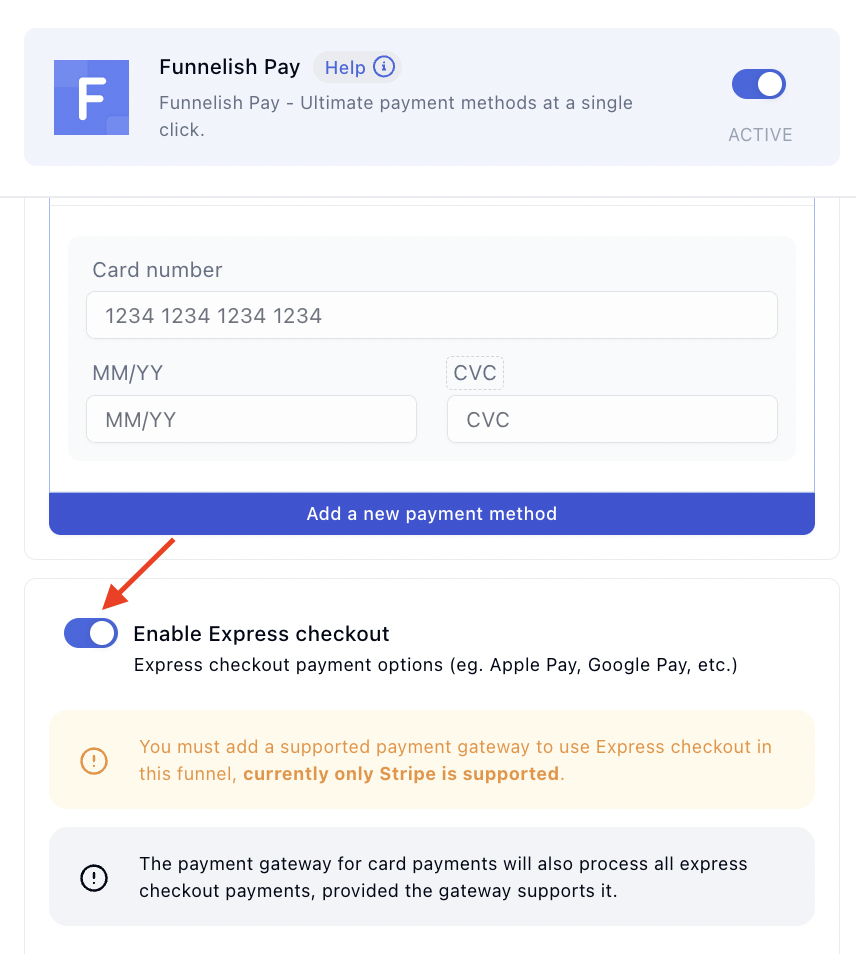
1. Turn it on. Select your payment form and click Edit payment options (or go to Funnel → Apps → Funnelish Pay), then toggle Enable Express checkout:
2. Choose what the wallet collects. Under Settings, pick what Apple or Google must hand over with the payment: email, billing address, phone. Everything the wallet collects is a field your customer doesn’t type:
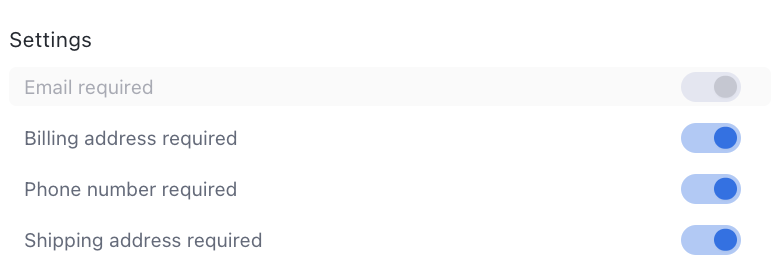
The shipping address is collected automatically whenever the funnel uses shipping options:
3. Place the Express Checkout element on your checkout page, above the payment form is where wallet buyers look for it:
4. Save your changes. That’s the whole setup.
No element, no buttons. The toggle alone shows nothing. Both are required: toggle on + element on the page. Full element reference: Express Checkout in the Page Builder.
Buttons appear only when they work
Express buttons are conditional by design. A shown button never fails on tap:
-
Apple Pay: Safari on Apple devices, with a card in Apple Wallet.
-
Google Pay: Chrome and Android browsers, with a card saved to the Google account.
-
No wallet set up: no buttons at all. The visitor gets your normal card form, nothing looks broken.
So if you don’t see the buttons on your own machine, that’s the conditional display, not a fault. Check on a phone with a wallet configured.
Plan for what wallet buyers skip
A wallet payment bypasses the rest of your checkout page. Tap, approve, done, without reading anything else. Three consequences:
-
Order bumps get missed. Wallet buyers never look at the form area where bumps convert. If bumps are a big share of your AOV, weigh that before enabling funnel-wide.
-
Shipping options still work inside the wallet sheet, so they become your bump substitute: a faster-delivery fee, or an offer attached to a hidden product.
-
Post-purchase upsells work normally. The wallet only replaces the payment step. OTOs are the safer place for extra margin on wallet buyers.
Test before you rely on it
Use real devices, not your desktop:
-
iPhone with a card in Apple Wallet, and an Android phone or Chrome with a saved Google Pay card.
-
Buttons appear where you placed the element.
-
A wallet purchase completes and lands in Funnelish and Stripe with the right amount.
-
The email, address and phone you required actually arrive on the order.
-
The normal card form still works for a visitor without a wallet.
Then run the usual test payments before launch pass.
Using payment routing?
Wallet payments follow your card payments. If cards run through smart payment routing and the route doesn’t lead with Stripe, Funnelish flags that express checkout needs a supported gateway on that funnel. Decide per funnel: the routing setup, or the wallets.
Troubleshooting
-
No buttons on your machine: almost always the conditional display. Test on a device with a wallet configured.
-
No buttons anywhere: check the four requirements in order: element on the page, Stripe handling cards on this funnel, the toggle on, and the page viewed on its real domain over HTTPS.
-
Apple Pay specifically missing: domain registration with Apple isn’t instant. Wait a few minutes, re-check on an Apple device, and confirm you’re on the funnel’s actual domain.
-
Wallet sheet opens but payment fails: that’s a Stripe-side decline. The reason is on the payment attempt in your Stripe dashboard.
Express checkout not behaving? Start a topic in Ask the community with the device and browser you tested on. For anything tied to your account or a specific transaction, contact us on chat support.