Smart payment routing spreads your card payments across multiple gateways, automatically. Built for merchants who don’t want revenue depending on a single account: real volume, cross-border sales, multiple merchant accounts, or anyone who’s ever had a gateway freeze on them.
How it works, in one breath:
-
You group card gateways into a routing setup. One is the default.
-
Every other gateway gets a condition: retry declines, take a share of volume, handle a region, currency, card brand, amount, product type or tag.
-
Funnelish routes each payment to the gateway whose condition matches. The customer sees one card form and one attempt.
Smart payment routing is in beta. The interface may change, and you’ll still see the older “Gateway pools” name in a few places while we rename it.
What routing solves
-
Declines eating your revenue. A card one acquiring bank refuses, another often approves. Add a second gateway with the Transaction declined condition and recover those sales automatically.
Example: Stripe takes every payment, Airwallex retries anything Stripe declines. -
One frozen account stopping your business. Holds and outages happen. Your other gateways keep the checkout selling while you sort it out.
Example: Stripe reviews your account on a Friday. Airwallex sells all weekend. -
Cross-border cards declining. Local processors approve local cards better. The Regions condition sends each buyer to the gateway that acquires locally, in the same funnel.
Example: Airwallex (EU acquiring) takes Germany, France, Netherlands. US Stripe takes the rest. -
FX fees on every order. The Currency(s) condition routes each currency to the gateway that settles in it.
Example: EUR orders to your EU account, USD to your US account. No conversion either side. -
Volume caps on new accounts. Split-volume keeps each account under its cap and warms up fresh accounts gradually. Pairs well with NMI: several gateways sharing keys, each pinned to a different Processor ID.
Example: 20% to the new $50k-capped account, 80% to your main one. Rebalance when the cap raises. -
Chargeback counts creeping up. Card networks flag dispute counts as well as ratios. Splitting volume keeps each account’s numbers low.
Example: 120 disputes on one account gets flagged. Across three accounts, each sees 40. -
One product line risking the whole account. Product tag or Product type isolates risky offers on the account built for them.
Example: low-risk products through Stripe, the high-risk offer and its upsells through NMI. -
A card brand only working on one account. Card brand(s) sends each brand where it’s supported best.
Example: Visa and Mastercard on Stripe, Amex to the Airwallex account with Amex enabled. -
Big orders needing a bigger account. The Amount condition routes high-value orders to your high-limit account.
Example: under $500 to Stripe, above it to your high-limit NMI account. -
Choosing a gateway with real data. Split volume and compare approval rates from your own traffic.
Example: 50/50 Stripe and Airwallex for two weeks. Keep the winner. -
Switching gateways without breaking subscriptions. With managed subscriptions, renewals keep routing through the setup. Swap gateways, renewals carry on.
Example: add gateway B, remove gateway A. Next month’s renewals bill through B, no customer notices.
Requirements and limits
-
Cards only. PayPal, Klarna, iDEAL and the rest can sit on the same checkout, they just don’t route.
-
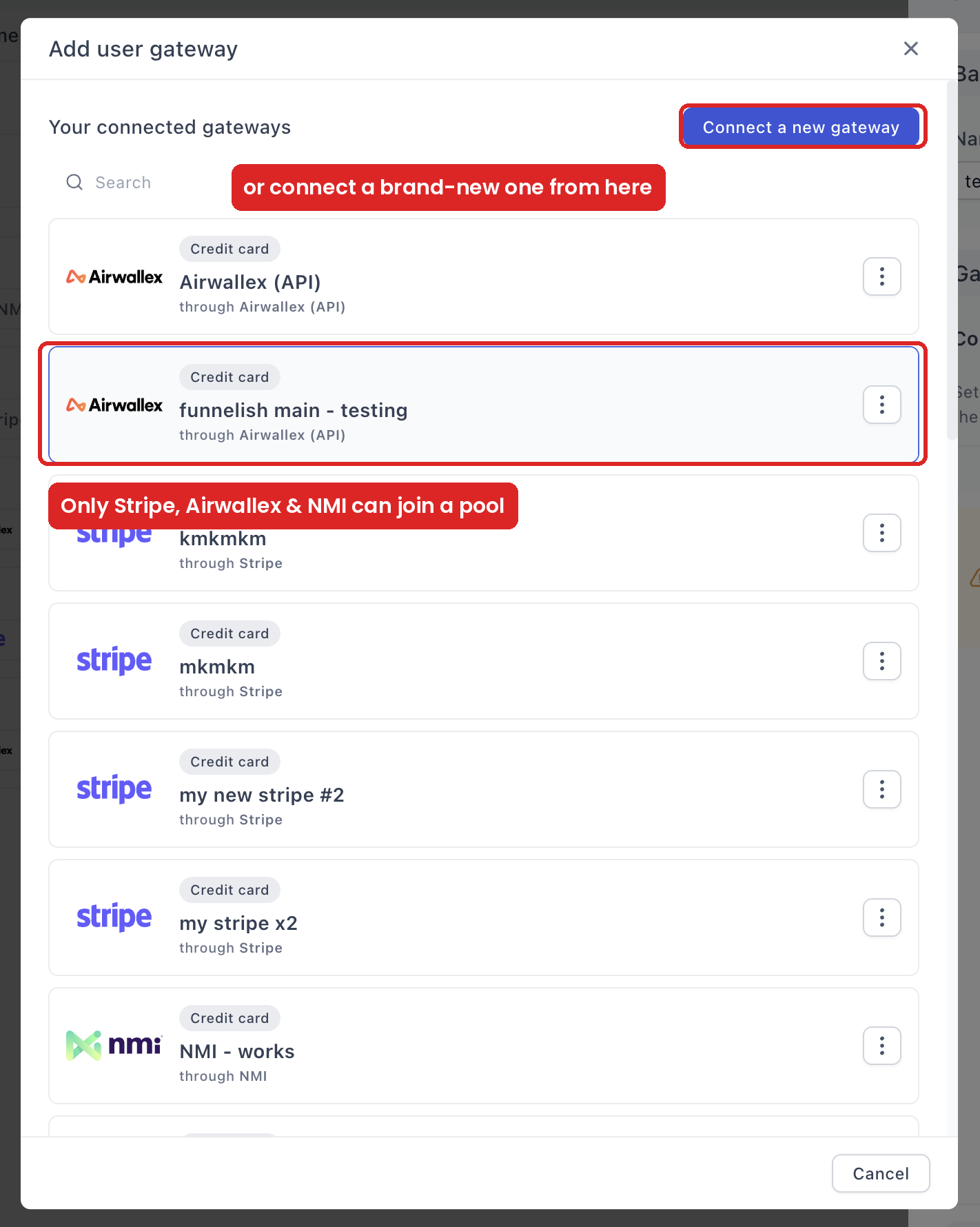
Stripe, Airwallex and NMI are the gateways that can route today. Checkout.com, PayPal and RazorPay can’t be added.
-
Managed subscriptions only. Gateway-held subscriptions can’t route. Managed subscriptions route on every renewal.
-
Fee: 0.5% per transaction on top of normal processing fees (current pricing). If your decline rate is already low, do the math first.
Set up your routing
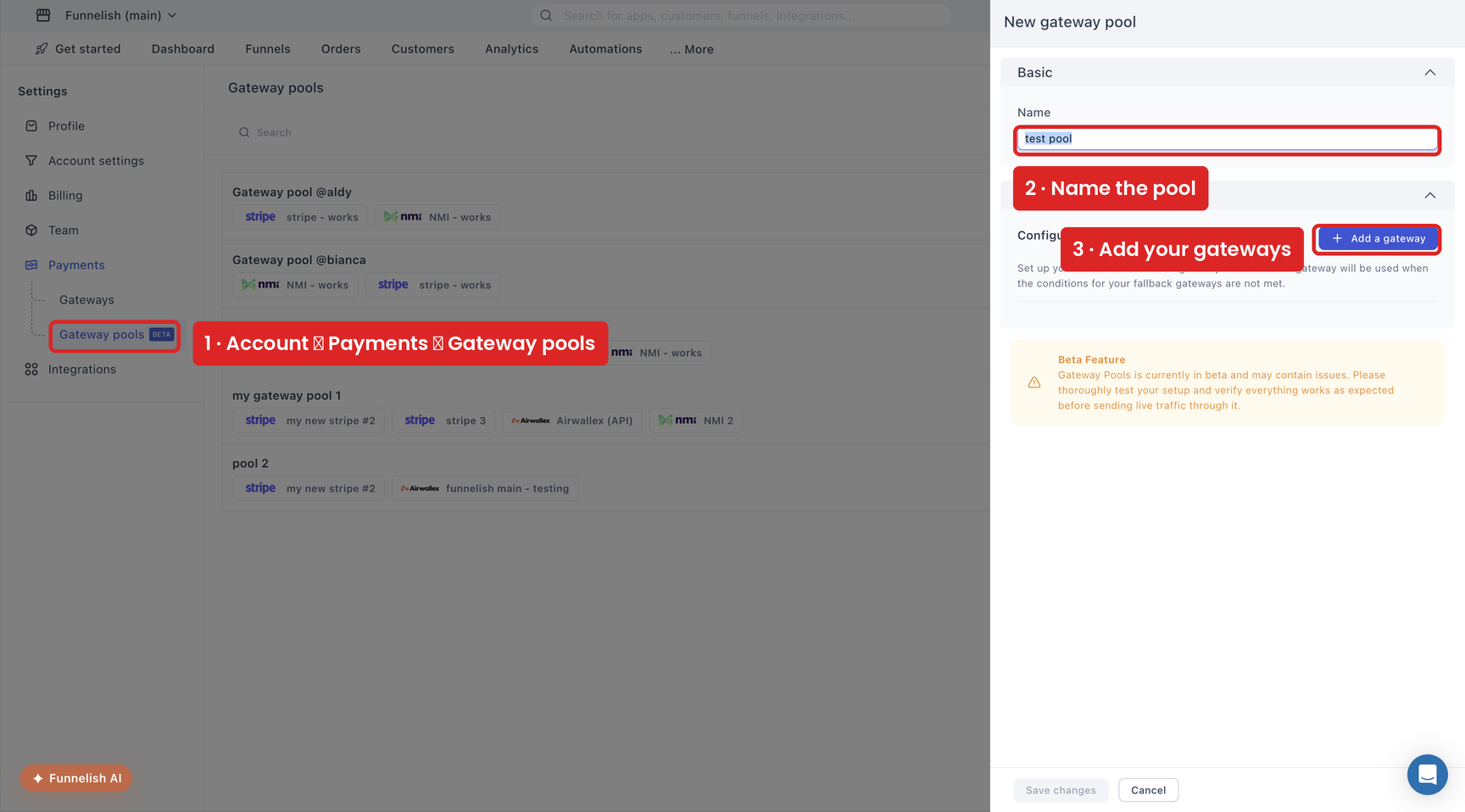
- Go to Account → Payments → Gateway pools and create a new one.
-
Name it for what it does:
EU cards — Stripe first,Volume split 70/30. The name is internal. -
Click Add a gateway and pick from your connected gateways. Only card gateways on Stripe, Airwallex or NMI appear.
-
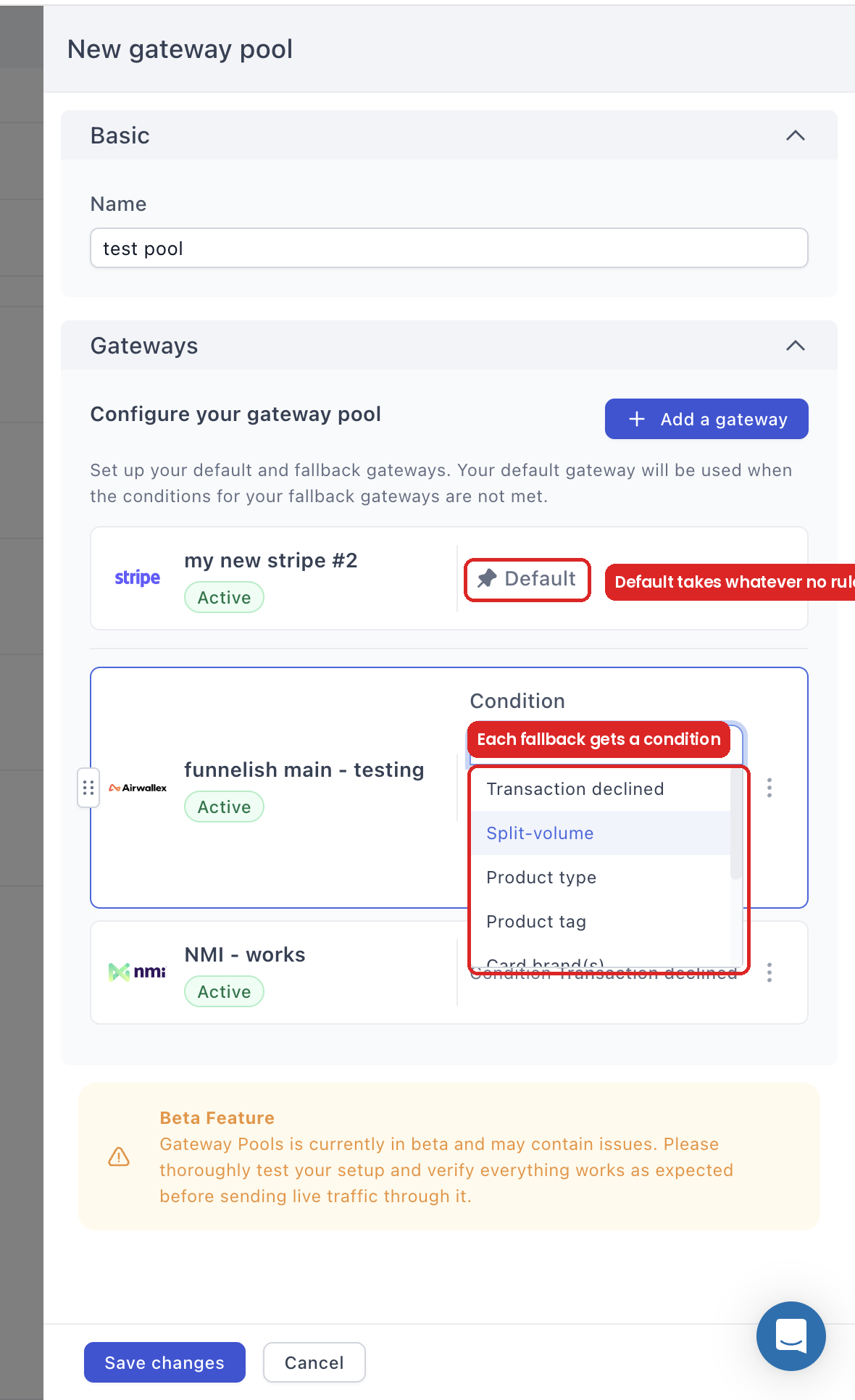
The first gateway is your Default. It takes every payment no rule claims.
-
Set a Condition on each other gateway from the dropdown on its row:
-
Drag the handles to reorder. Order matters when conditions overlap.
-
Save changes.
Routing conditions
| Condition | What it does | Example |
|---|---|---|
| Transaction declined | Failover: retries payments an earlier gateway declined | Stripe declines, NMI retries |
| Split-volume | Sends a fixed number or percentage of transactions here | 30% to a second merchant account |
| Regions | Routes customers from selected countries here | GB customers to your UK-acquiring gateway |
| Currency(s) | Routes payments in selected currencies here | USD and GBP to Airwallex |
| Card brand(s) | Routes Amex, Mastercard, Visa or Discover here | Amex to the account with Amex enabled |
| Amount | Routes by order value: > < >= <= == != |
Orders over £87.99 to the high-limit account |
| Product type | Routes one-time, subscription, or managed-subscription products | Subscriptions to the gateway holding them |
| Product tag | Routes products carrying a tag you choose | Everything tagged high-risk to NMI |
Add it to your funnel
Routing goes wherever a single gateway goes: Funnel → Apps → Funnelish Pay, or the payment form’s Edit payment options.
-
Under Payment options, click the settings icon on your Credit/Debit Card method.
-
Switch to the Gateway pools tab.
-
Pick your routing setup, or create one on the spot.
-
The card method now shows Through your setup’s name. Save your changes.
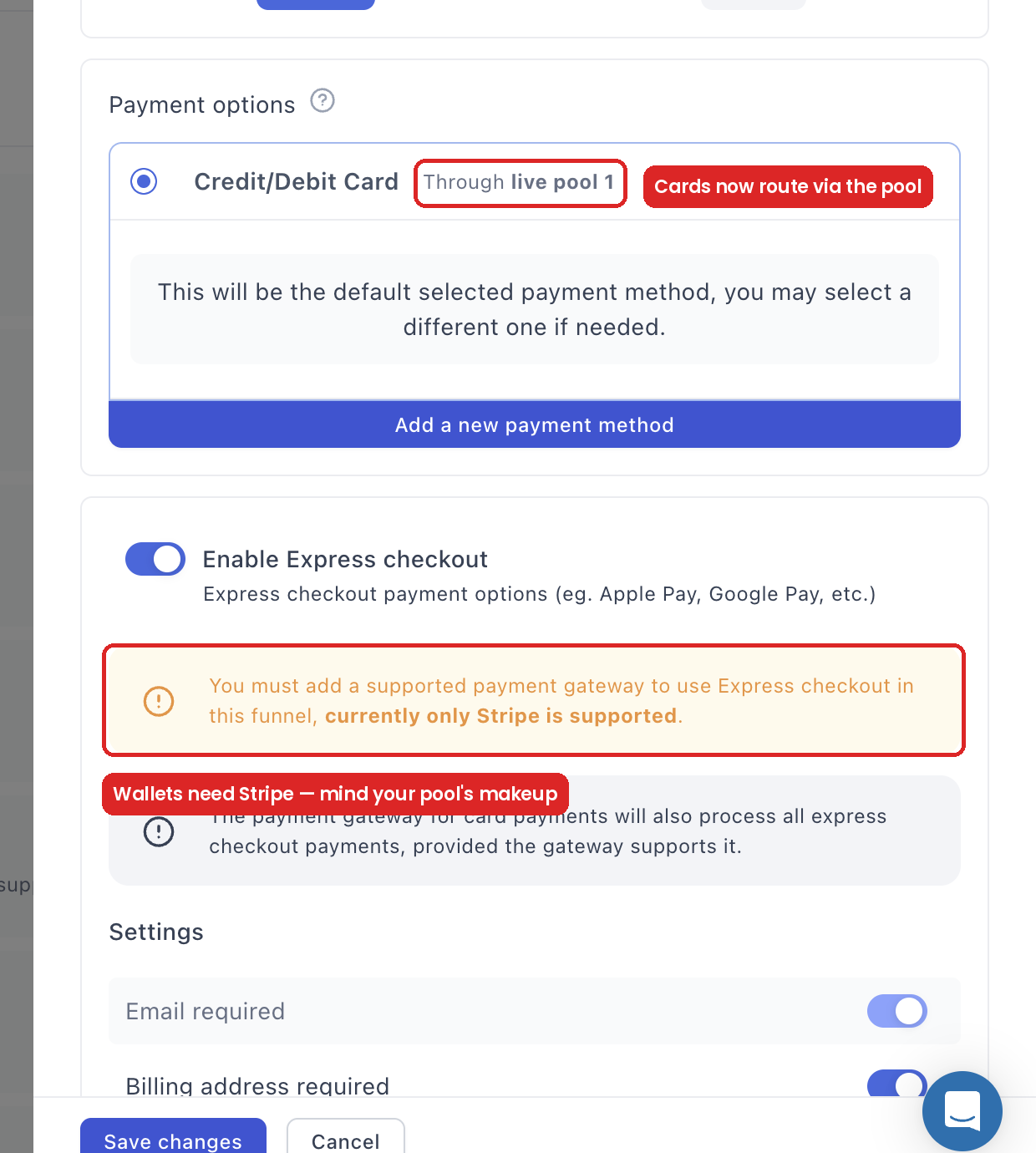
Selling gateway subscriptions in this funnel? Funnelish warns you here: routing can’t process their renewals. Switch those products to managed subscriptions. One-time products route either way.
Best practices
-
Make your best performer the default. Highest approval rate, lowest cost. It takes everything the rules don’t claim.
-
Make the retry gateway genuinely different. Two accounts behind the same acquirer decline the same cards. Failover works when the retry hits a different processor or bank.
Stripe default with an NMI retry works. Stripe with a second Stripe as retry usually doesn’t. -
Keep rules few and non-overlapping. Three well-chosen gateways beat six arbitrary ones. Overlapping rules make routing hard to predict, and repeated retries on one card can look like card testing to an acquirer.
Which declines it can recover
-
Recoverable: issuer risk rules, velocity limits, regional acquiring quirks, temporary gateway problems. Specific to one gateway, another may approve.
-
Not recoverable: insufficient funds, expired or invalid cards, stolen cards. These decline everywhere.
Routing raises your approval rate. If most of your declines are hard declines, it won’t move the number much.
Test before launch
Turn on Test Mode in the funnel’s top bar. Pay with each gateway’s test cards, including a decline card, and watch the failover pick it up. Then take one real payment. See Test payments before launch.
Troubleshooting
-
Routing doesn’t appear as an option: your gateways aren’t Stripe, Airwallex or NMI.
-
Subscriptions skip the routing: they’re gateway subscriptions. Only managed subscriptions route.
-
Declines aren’t recovered: check the decline reasons in your gateway dashboards. Hard declines fail everywhere. And check your gateways aren’t all behind the same acquirer.
-
Everything routes to the default: with Transaction declined conditions, that’s correct, they only fire on a decline. With routing conditions, check they match real traffic: a GB rule does nothing for US customers.
Setting up routing, or it isn’t behaving as expected? Ask in Ask the community. For anything tied to your account or a specific transaction, contact chat support.