Selling into more than one country with a single funnel means someone in Germany reads your page in English, sees prices in USD, and gets offered a card form when they expect Klarna or SEPA. Every one of those mismatches costs conversions.
Geo-Funnels fixes this without new campaigns. It creates country-specific copies of your funnel, each fully customizable, and serves all of them on one URL: visitors are routed to the right version by their location automatically. One ad campaign, one link, localized experience everywhere.
What you can solve with Geo-Funnels
-
Translate per country. Clone your funnel for Germany, translate the text, done. The German version only shows to visitors in Germany.
Example: main funnel in English for the world, one clone in German for DACH, one in Spanish for Spain and LATAM. -
Local payment methods. Each geo variant has its own checkout, so you can add the payment methods each market expects.
Example: iDEAL on the Dutch variant, Bancontact on the Belgian one, COD where cash on delivery wins. -
Local currency and pricing. Price each variant in its own currency, and price differently per market where purchasing power differs.
-
Target whole regions at once. Pick a predefined region (European Union, DACH, Benelux, ASEAN, Anglosphere) or build a custom mix of any countries. See the region targeting announcement.
Example: one EU-wide variant with EUR pricing and GDPR-friendly copy, instead of 27 clones. -
Test a new market before committing. Clone, localize and route one country to the new variant. Your main funnel and every other market stay untouched.
How it works
A Geo-Funnel is a full clone of your funnel: steps, products, images, automations and payment processors all copy over, and the clone keeps the same domain and the same step URLs as the original. That’s what makes the single URL possible.
The routing rule is simple: traffic from a variant’s assigned countries goes to that variant, and your original funnel handles everyone else. No separate ad sets, no country-specific links to manage.
Create a Geo-Funnel
-
Go to the Funnels tab in the header menu
-
Click the Geo-funnels arrow at the left of your funnel’s name
-
Click New Geo-funnel

Assign a country or region
-
Click the box at the left of the new Geo-funnel
-
Pick a country from the dropdown, or search for it

To target more than one country, tick a predefined region (European Union, DACH, Benelux, ASEAN, Anglosphere) to cover all of its countries at once, or select any custom combination, mixing regions and individual countries works too.
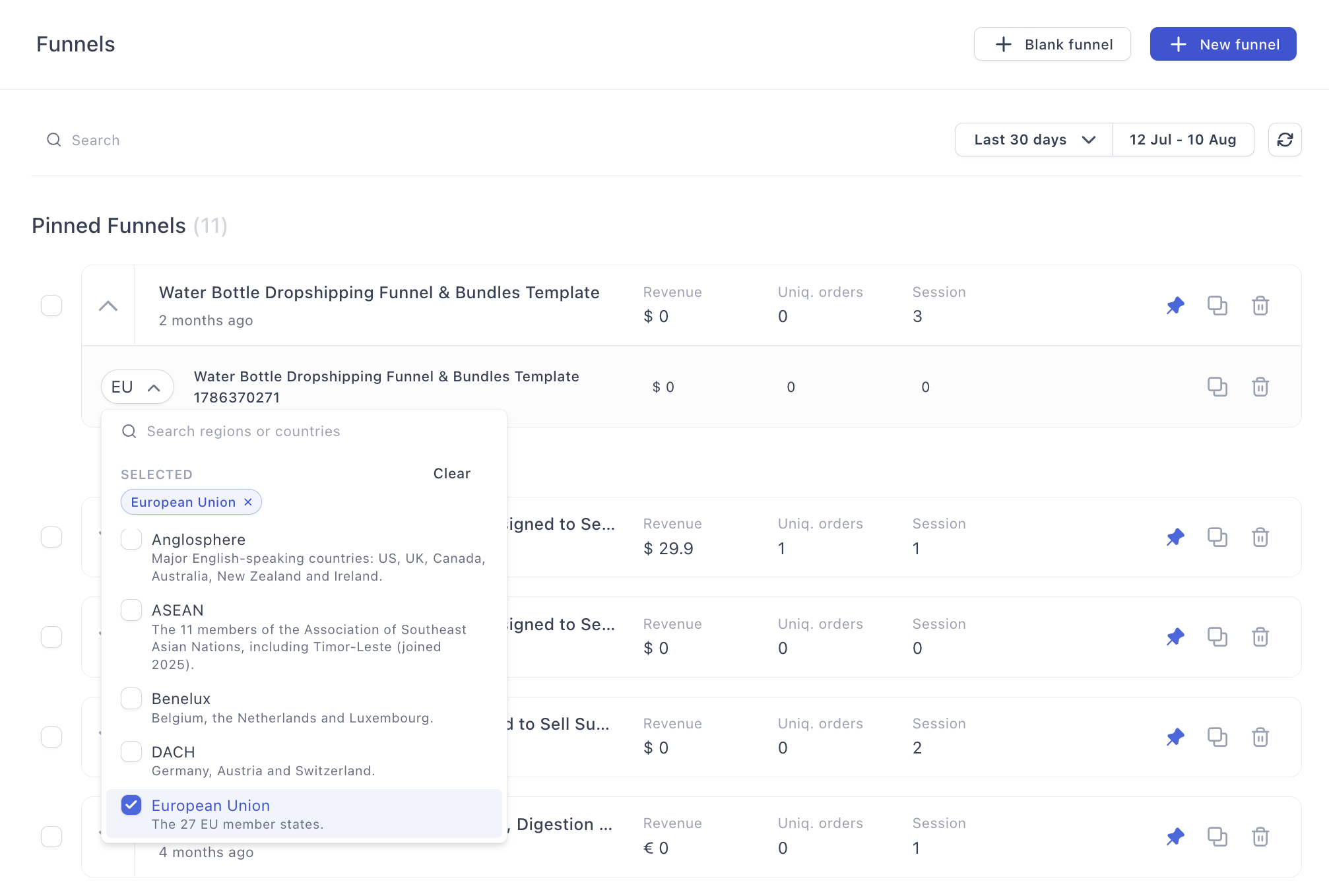
Localize the variant
Open the clone and edit it like any funnel: translate the copy, swap the currency and pricing, adjust the checkout’s payment methods, change images. Nothing you do here touches the original or the other variants.
While inside a funnel, the location indicator shows which geo you’re editing, switch between variants or change this funnel’s assigned location from the same place:
A/B testing on geo variants
Each geo variant can run its own A/B split test, so you can optimize the German offer against a German challenger while the US funnel runs its own test. Localization and optimization don’t get in each other’s way.
Test before launch
Routing is based on the visitor’s location, so test it like a visitor: open your funnel URL through a VPN set to the assigned country and confirm the right variant loads, with the right language, currency and payment methods. Then run a test payment on each variant you localized, checkouts differ per variant, so each one deserves its own test order.
 Questions about going international? Reply below or ask in Ask the community.