The TikTok Pixel app connects your Funnelish pages to TikTok Ads Manager and tracks all your key events on auto-pilot: page views, leads, add-to-carts, checkout initiations, and purchases with accurate value and currency. Paste your Pixel ID once and your TikTok campaigns start optimizing on real conversion data, no coding needed.
| Funnels | Blogs | Customer Portals | Stores | |
|---|---|---|---|---|
| Available on |  |
|
|
|
 Get your TikTok Pixel ID
-
Log in to TikTok Ads Manager.
-
In the top menu, go to Tools → Events. This opens the Events Manager.
-
In your data sources, find the pixel you want to use and copy its Pixel ID.
➕ Don't have a pixel yet? Create one in 2 minutes
Inside Events Manager:
-
Click Connect Data Source.
-
Select Web and enter your URL.
-
Choose Manual Setup.
-
Choose TikTok Pixel and name your pixel (your domain name works well).
-
Click Create, then skip through the code installation steps. Funnelish handles the installation for you — all you need is the Pixel ID.
 Activate the app and paste your Pixel ID
-
Open the funnel, blog, portal, or store you want to track and go to its Apps tab.
-
Enable TikTok Pixel.
-
Paste your Pixel ID into the field.
-
Click Save changes.
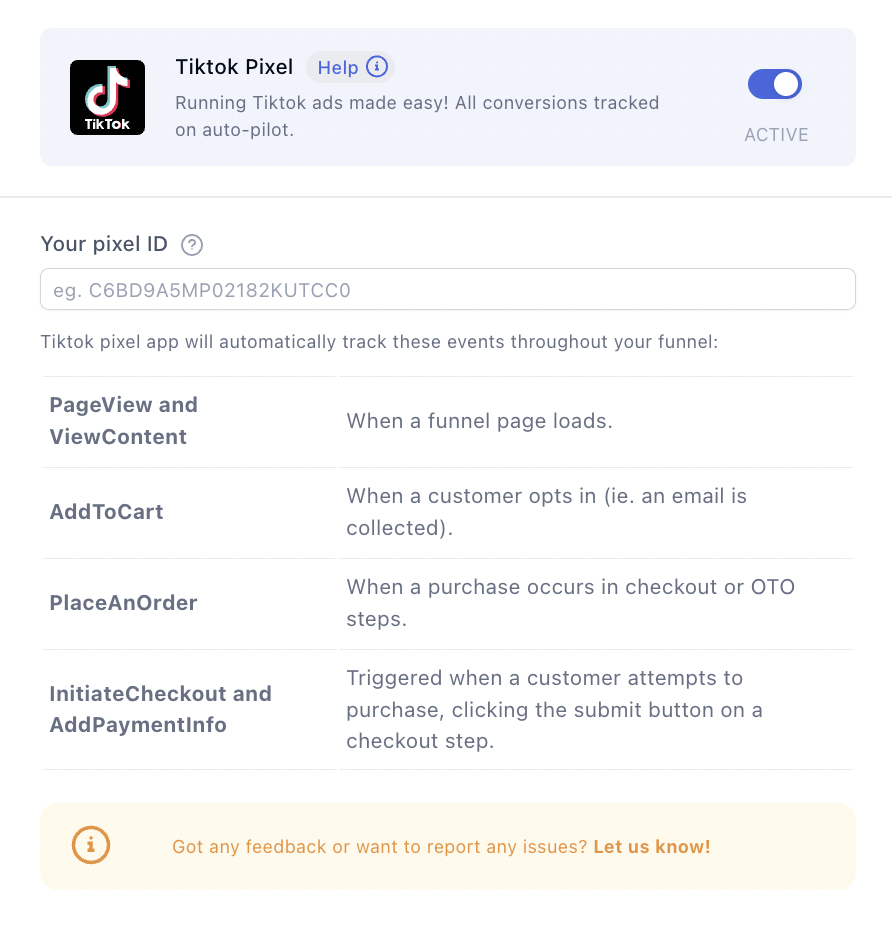
That’s it! Your pages now fire TikTok events for every visit, lead, add-to-cart, and purchase. 
 TikTok Ads playbook for ecommerce merchants
TikTok can print money for the right product, and burn budgets faster than any other platform for merchants who run it like Meta. Here’s what separates the two groups:
Creative IS the targeting
On TikTok, the algorithm finds your buyers based on who engages with your creative, far more than on your audience settings. Practical consequences:
-
Make ads that look like TikToks, not ads. Native, UGC-style videos consistently beat polished studio creative.
-
The first 2 seconds decide everything. Open with the hook (the problem, the result, the “wait, what?”), never with your logo.
-
Run 3 to 5 creative variations per ad group and expect fatigue fast: on TikTok, winning creatives often burn out in 1 to 2 weeks, so keep a production pipeline, not a single hero ad.
-
Use Spark Ads to promote from a real account (yours or a creator’s). You keep the comments, likes, and organic feel, and they typically outperform standard in-feed ads.
Feed the algorithm the right event
Conversion campaigns need volume to learn: TikTok’s learning phase looks for roughly 50 conversions per ad group per week. If your pixel is new or your purchase volume is thin, don’t optimize for purchases yet — start ad groups optimized for Add to Cart or Initiate Checkout, let the pixel accumulate data, then graduate to purchase optimization. And once an ad group is learning, resist editing it; every significant change resets the phase.
Go broad, let the machine work
Tight interest-stacking, the classic Meta move, usually strangles TikTok campaigns. Broad targeting with strong creative gives the algorithm room to find pockets of buyers you’d never think to target. Narrow only what you must (geo, age floor), and let creative do the segmentation.
Understand the attribution gap before you panic
TikTok’s default attribution is 7-day click / 1-day view, while GA4 only credits clicks — so Ads Manager will always report more conversions than your analytics. On top of that, TikTok drives a unique behavior: people watch, don’t click, then later search your brand on Google or TikTok itself (“TikTok made me buy it” is a real purchase path). Watch your brand-search volume and direct traffic when campaigns scale; that halo is TikTok revenue that no pixel fully captures. Tag every ad URL with UTMs (utm_source=tiktok) so at least the click-through side reconciles cleanly.
Build audiences from your pixel events
In Ads Manager, turn your event data into targeting assets:
-
Retargeting: visitors who fired
ViewContentorAdd to Cartbut no purchase in the last 7 to 14 days. This is reliably your cheapest ROAS on the platform. -
Lookalikes: seeded from your purchasers once volume allows, to scale prospecting toward people who resemble your buyers.
Treat comments as part of the funnel
TikTok users read ad comments the way Amazon shoppers read reviews. Reply to questions fast (sizing, shipping, “is this legit?”), and pin your best social-proof comment. A dead or hostile comment section quietly kills conversion on an otherwise great ad.
Testing your pixel
-
Install the TikTok Pixel Helper Chrome extension (grab it from the Chrome Web Store) and browse your funnel to see events fire in real time.
-
In Events Manager, open your pixel and use the Test Events tab: perform a real add-to-cart and test purchase, and watch the events arrive with the correct value and currency.
Disable ad blockers when testing. They routinely block the TikTok Pixel and make a healthy setup look broken.
 Keep learning
More app guides: browse the full Apps documentation category for step-by-step setup guides.
Track and convert smarter:
-
Meta Pixel (Facebook Pixel): Conversion Tracking & Conversions API — run both pixels to retarget across platforms.
-
Google Analytics (GA4): Ecommerce Event Tracking — your neutral scoreboard across TikTok, Meta, and every other channel.
-
Pinterest Tag: Pinterest Ads Conversion Tracking — another visual platform worth a slice of budget.
Questions about your TikTok Pixel setup? Reply below and the community will help you out. 