Cards are the payment method almost every funnel needs, and the one every gateway here supports. Which cards your customers can actually use (Visa, Mastercard, Amex, and so on) depends on your merchant account rather than on Funnelish.
Setting them up is two steps: connect a gateway that processes cards, then select it on your checkout’s payment form.
Choosing a card gateway
Four gateways process cards, and they’re not interchangeable. The differences that matter in practice:
| Setup | Also unlocks | Worth knowing | |
|---|---|---|---|
| Stripe | Authorise, no keys to copy | Express Checkout, Klarna, iDEAL, Bancontact, SEPA, P24, EPS | Self-serve and the most capable. The default choice unless you have a reason otherwise |
| Airwallex | Authorise, no keys to copy | Klarna, iDEAL, Bancontact | Built for multi-currency selling. For subscriptions, use managed subscriptions; Airwallex has no dashboard for gateway-held ones |
| NMI | Two security keys | Nothing extra | You bring your own merchant account, so you’re not exposed to a platform shutting you down. Common for high-risk. Can route to a specific merchant account |
| Checkout.com | Two API keys | Nothing extra | Enterprise. The only one that gives you direct 3D Secure controls, and you can build against its sandbox before becoming a customer. No gateway pools or managed subscriptions |
If you’re starting out and none of the specifics above apply to you, use Stripe. It’s the quickest to connect and it covers the most ground.
Selling subscriptions?
Funnelish products come in two types, one-time and subscriptions, and subscriptions come in two flavours. The difference decides which gateways are open to you.
Gateway subscriptions are held by the payment processor. Stripe, NMI or Airwallex keeps the recurring schedule and charges on its own timetable. These can’t be used with Gateway Pools, our smart payment routing and failover product.
Managed subscriptions are held by Funnelish instead: recurring billing built specifically for eCommerce, not adapted from SaaS billing. That difference shows up in three ways:
-
They’re gateway-agnostic, and they work with Gateway Pools. A processor-held subscription is locked to the gateway that created it; lose that gateway and the recurring schedule dies with it. A managed subscription belongs to you: swap the gateway underneath, or route renewals through a pool, and the charges keep coming.
-
Simpler for you. Subscriptions live where your orders, customers and funnels already do, rather than in a processor dashboard per gateway.
-
Simpler for your customers. Through Customer Portals, subscribers manage things themselves: skip an order, merge orders, add items to an existing subscription. The kind of flexibility physical-product subscriptions need and SaaS-style billing never offers.
One constraint to keep straight: managed subscriptions work with most payment methods already (cards, PayPal, express checkout, iDEAL and more), but Gateway Pools currently support Stripe, Airwallex and NMI only. So if you’re selling a subscription and want its payments routed across more than one merchant account, use managed subscriptions on one of those three gateways. Managed subscriptions on any other method still work; they just can’t route through a pool yet.
The full picture, including supported methods per gateway, pricing, and setup: Managed Subscriptions.
Adding cards to your checkout
-
Connect a card gateway using its guide above.
-
Place a payment form on your checkout step, if you haven’t already. See Add payment methods to your checkout.
-
On the payment form, add Credit Card as a payment method and select your gateway.
-
Save your changes.
The card option on a payment form points at one gateway. If you want cards processed across several, spreading volume or failing over when one declines, that’s what Gateway Pools are for, and you select a pool in the same place you’d select a gateway.
Make cards the default
When you offer cards alongside PayPal or a local method, one option is pre-selected as the page loads. If most of your customers pay by card, make cards the default. Every extra click between a buyer and a completed order costs conversions.
Click the radio button beside the method to set it. See Add payment methods to your checkout for the panel it lives on.
Translating the card fields
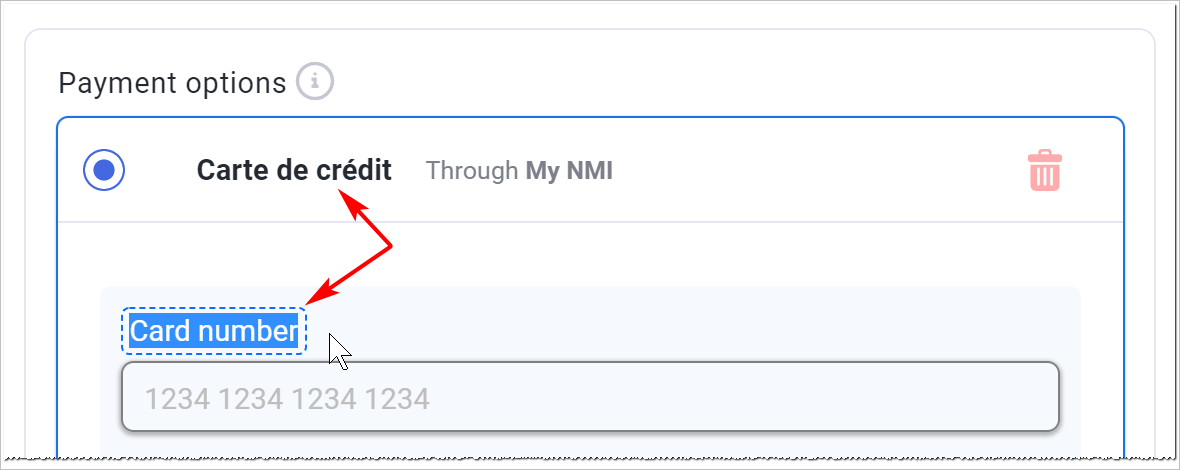
The labels inside the card fields are editable, which is what you want for a checkout in any language other than English. Select the gateway on the Edit payment options panel, click the field, type your replacement, and save.
3D Secure
3D Secure is the step where a customer’s bank asks them to confirm a payment. It reduces fraud and generally shifts liability for fraudulent chargebacks to the card issuer, at the cost of an extra hurdle at checkout.
If you sell into the UK or EEA, authentication is a regulatory requirement. Payments without it get declined by the issuer rather than approved, and that isn’t something you can opt out of by turning a setting off.
Most gateways here handle authentication for you. Checkout.com is the exception: it exposes the controls directly, so you can require 3DS on every payment or let it be skipped where the rules allow.
Testing card payments
Every card gateway gives you test card numbers, including ones that deliberately fail; the number or the amount decides the outcome. They’re listed in each gateway’s article.
Test a decline as well as a success. A checkout that has only ever seen a working card looks finished and isn’t; what your customer sees when their payment fails is the part you can’t afford to guess at.
Full process in Test payments before launch.
If something isn’t working
For declines in depth (reading decline codes, soft vs hard, recovering the revenue) see Failed & declined payments. The quick checks:
No card fields on the checkout. Three things to check, in order: Funnelish Pay is switched on in the payment options, a gateway is selected on the payment form and saved, and the payment form is on a checkout step.
Cards work in test mode but not live. Your gateway is probably still holding test credentials, or the funnel is still in Test Mode. Some gateways also need account verification before they’ll process live payments.
Payments declining for European customers. Check 3D Secure. Without authentication, issuers in the UK and EEA decline rather than approve.
A specific card brand is refused. That’s your merchant account, not Funnelish. Amex in particular often needs enabling separately with your processor.
Cards were working and now they’re not. Check whether anything changed on the gateway’s side: regenerated keys, an account switched into test mode, or a verification requirement that’s come due.
Payment processing is the fiddliest part of building a funnel. Gateway credentials, currencies, country rules, the form itself: a lot of moving parts, and the one area where a mistake costs you orders rather than just looking wrong.
If your card payments aren’t behaving, start a topic in Ask the community with the gateway you’re using and what you’re seeing. Someone will help. For anything tied to your account or a specific transaction, contact us on chat support.