Managed Subscriptions: Recurring Payments Built for eCommerce
Funnelish has two kinds of subscription, and the difference decides how resilient your recurring revenue is.
Gateway subscriptions are held by the payment processor — Stripe, NMI or Airwallex keeps the schedule and charges on its own timetable, and they can’t be used with Customer Portals.
Managed subscriptions are held by Funnelish: subscriptions built for eCommerce — billing designed around physical products, deliveries and repeat boxes rather than adapted from SaaS plans — and the type we recommend for almost every subscription offer.
Why managed subscriptions
Your MRR survives a gateway. A gateway subscription is locked to the processor that created it — if that gateway shuts your account down, or you leave it, every recurring schedule dies with it, and revenue you built over years goes to zero overnight. A managed subscription is gateway-agnostic: it belongs to you, not to the processor. Swap the gateway underneath, or route through several, and the renewals keep charging. For a subscription business, that’s the difference between a payments hiccup and an extinction event.
Renewals can route through Gateway Pools. When the first subscription payment goes through a pool, its renewals keep using that pool — retries on decline, volume splitting, regional routing — meaning fewer failed renewals and payments orchestrated at the subscription level. Start the subscription on a single gateway instead, and renewals stay on that gateway — moving it later is possible, but it’s a manual process (more on that below). Gateway subscriptions can’t do any of this.
Built for physical products. SaaS-style billing assumes one plan, one card, forever. eCommerce subscriptions don’t work like that — customers want to skip a delivery, combine shipments, or add a product to next month’s box. Managed subscriptions are designed around exactly that.
Self-service through Customer Portals. Your subscribers manage their own subscriptions — skip an order, merge orders, add items to an existing subscription — without a support ticket for every change. That flexibility is also what keeps them subscribed: the easy alternative to skipping a month is cancelling.
Everything in one place for you. Subscriptions live where your orders, customers and funnels already do, instead of scattered across processor dashboards per gateway.
Supported gateways and methods
Both legs of a subscription are verified per method: the first purchase (customer-initiated) and the renewal charge (merchant-initiated, with no customer present). A method only appears below as supported when both work.
| Gateway / method | Direct | Through a Gateway Pool |
|---|---|---|
| Stripe (cards) |  |
|
| Stripe — Bancontact | |
— |
| Stripe — iDEAL | |
— |
| Stripe — SEPA Direct Debit | |
— |
| Stripe — Klarna | |
— |
| Airwallex (cards) | |
|
| Airwallex — Klarna | |
— |
| Airwallex — Bancontact | |
— |
| Airwallex — iDEAL | |
— |
| NMI (cards) | |
|
| PayPal | |
— |
Checkout.com |
 |
|
| RazorPay | |
|
| Stripe — Przelewy24 (P24) | |
|
| Stripe — EPS | |
|
| Klarna — direct merchant account | |
|
Three of those rows are worth reading twice:
-
Klarna’s route decides subscription support. Klarna through Stripe or Airwallex works with managed subscriptions; the direct merchant-account route doesn’t. If subscriptions are part of your offer, pick your Klarna route accordingly.
-
SEPA Direct Debit is the subscription rail of Europe — bank accounts don’t expire the way cards do, so renewals fail less over time. See SEPA Direct Debit.
-
Checkout.comand RazorPay don’t support managed subscriptions. If you’re on either and selling subscriptions, you’ll need one of the supported gateways alongside.
Pricing
0.5% per transaction, on top of your processor’s normal rates.
For comparison: Stripe Billing charges 0.7% for SaaS-style billing that locks your subscriptions to Stripe. For less, you get subscription billing built for eCommerce: renewals that can route through Gateway Pools to recover declines, a portal where subscribers manage their own deliveries, and recurring revenue that moves with you instead of belonging to a gateway.
Set up a subscription product
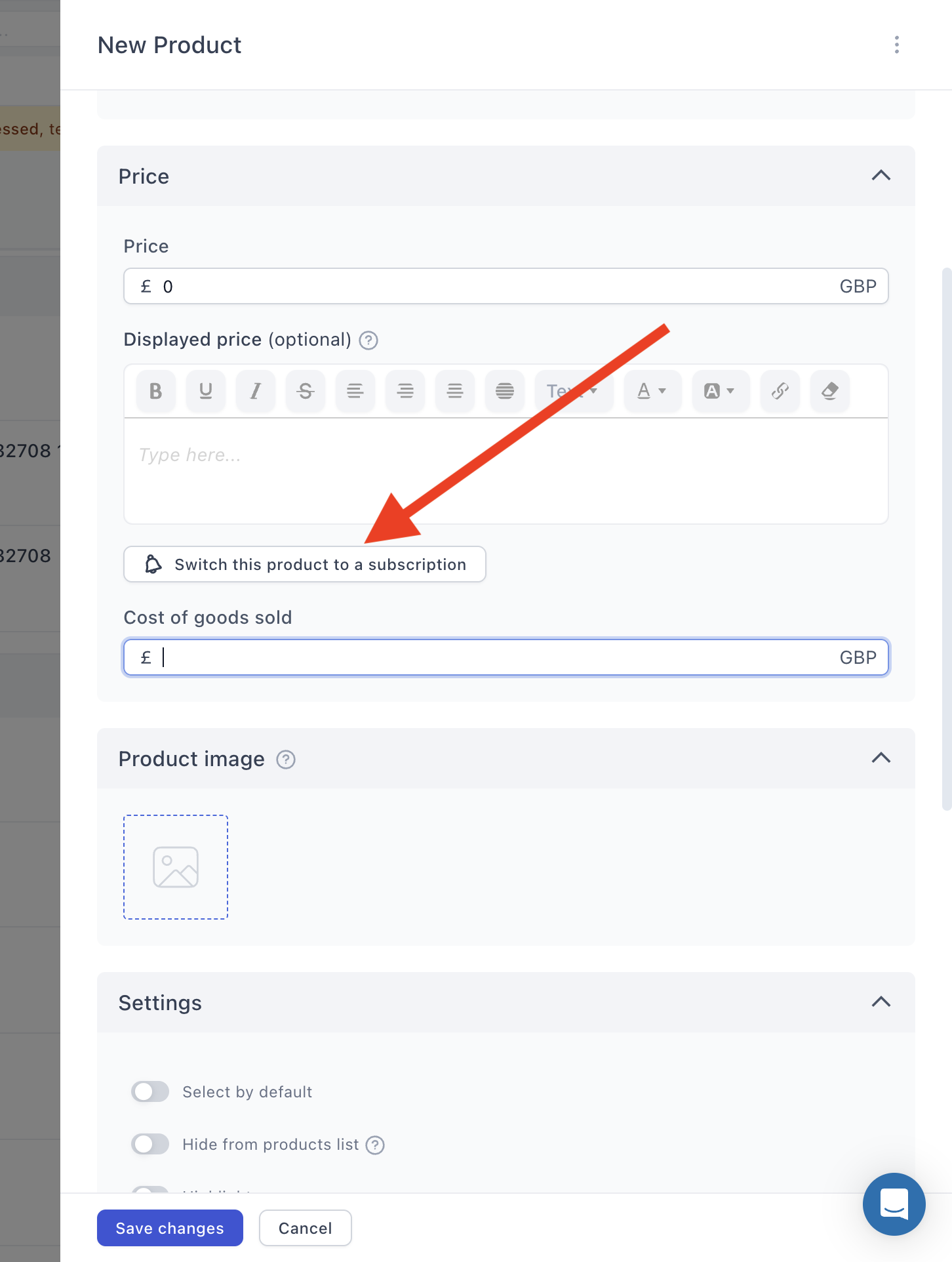
A subscription isn’t a separate product type you pick upfront — any product becomes one from its Price settings:
-
On your funnel step, scroll to Products and click Add product (or edit an existing one).
-
In the Price section, click Switch this product to a subscription.
-
Choose the subscription type — Managed subscription for everything this article describes.
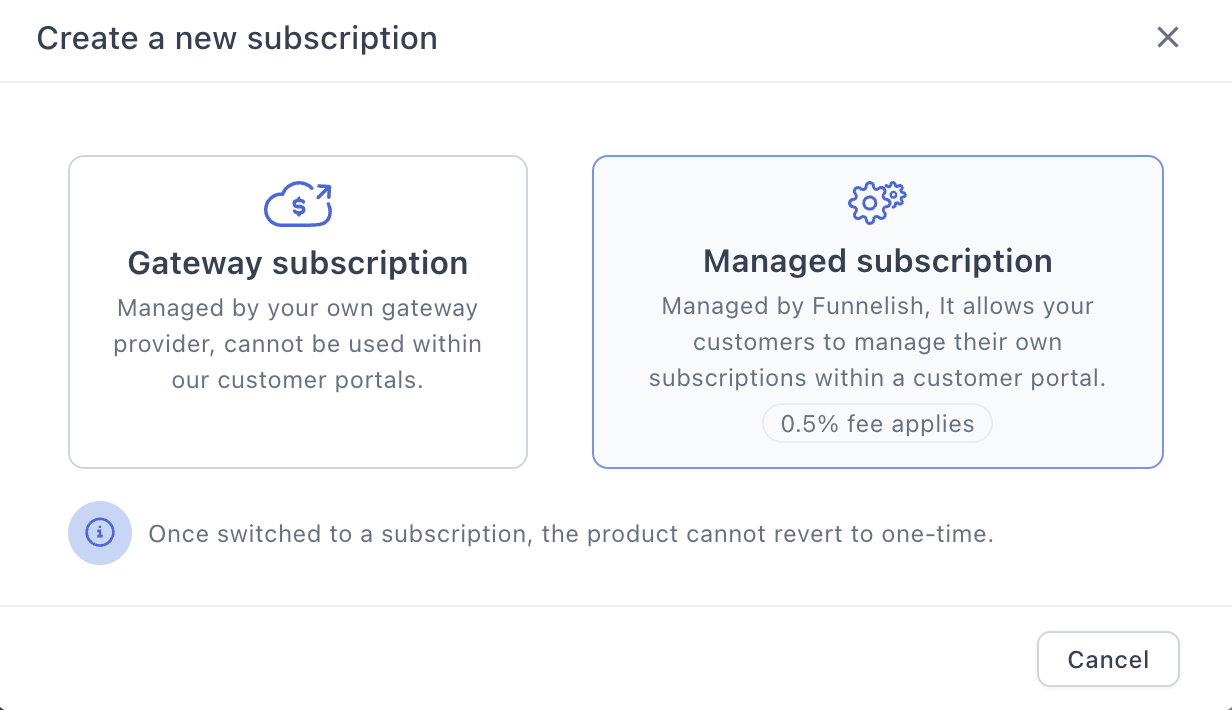
This is a one-way door. Once a product is switched to a subscription, it can’t revert to one-time — Funnelish says so on the modal itself. If you might want both, duplicate the product first and convert the copy.
-
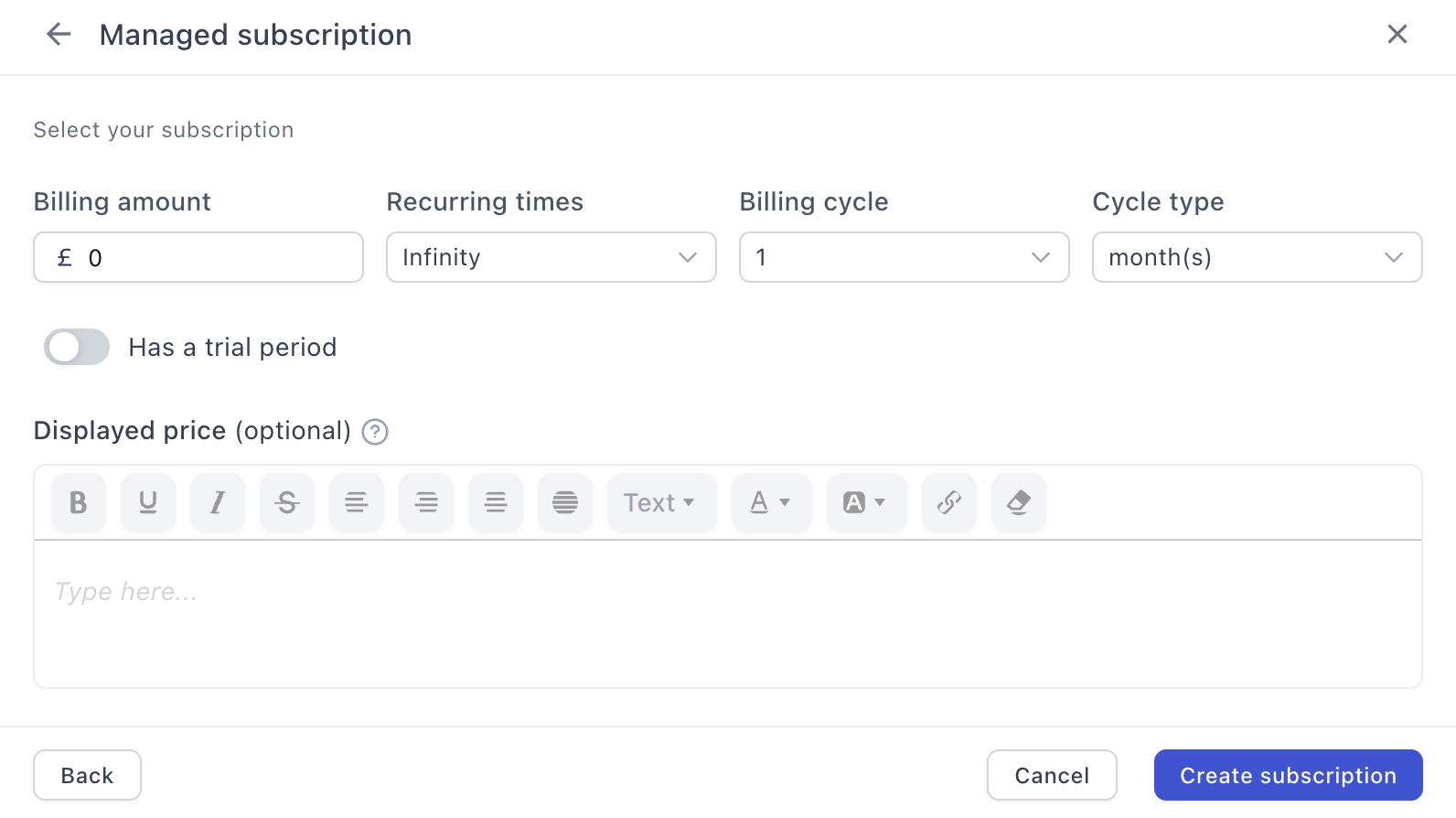
Set the billing terms:
-
Billing amount — what each charge takes.
-
Recurring times — Infinity for a classic subscription, or a fixed count for a payment plan: charge 12 times and stop, and you’ve split a big-ticket price into instalments with no further setup.
-
Billing cycle and cycle type — every 1 month, every 2 weeks, and so on.
-
Has a trial period — toggle on to configure a trial before the first charge.
-
-
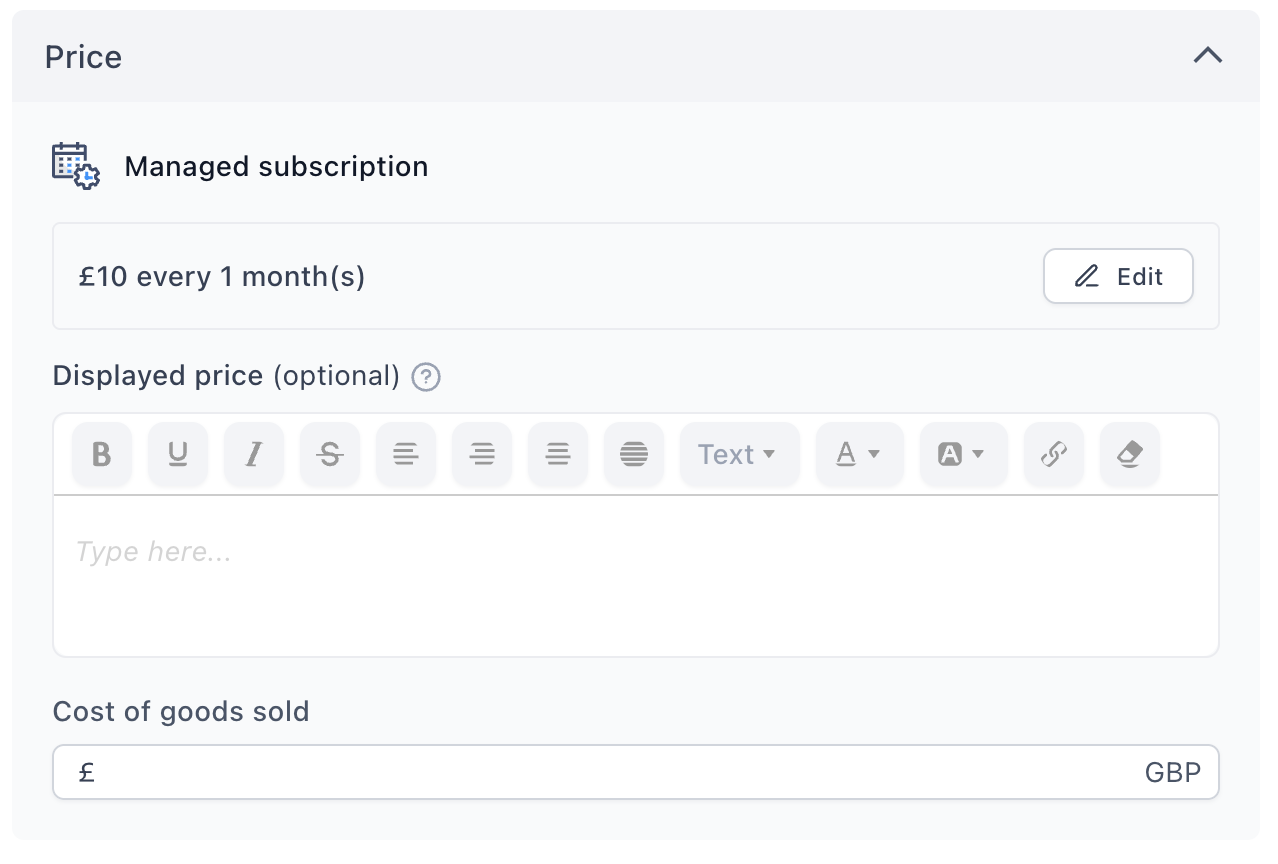
Click Create subscription. The Price section now shows the terms —
£10 every 1 month(s)— with an Edit button for changes.
-
Save changes on the product.
The product sits in your step’s product list like any other, alongside one-time products and order bumps — a funnel can mix all three.
What your customers can do
Through Customer Portals, subscribers manage their own subscriptions:
-
Skip the next order — pause a delivery without cancelling
-
Change the next order date — move a renewal forward or back
-
Get it now — trigger the next order early instead of waiting for the cycle
-
Change what’s in the box — add items, change quantities, or remove products from an existing subscription
-
Update delivery details — new address, no support ticket
-
Change the payment method — swap the card before a renewal fails
-
Pause or cancel — with everything above as the easier alternative
-
See past orders — a full order history in one tab
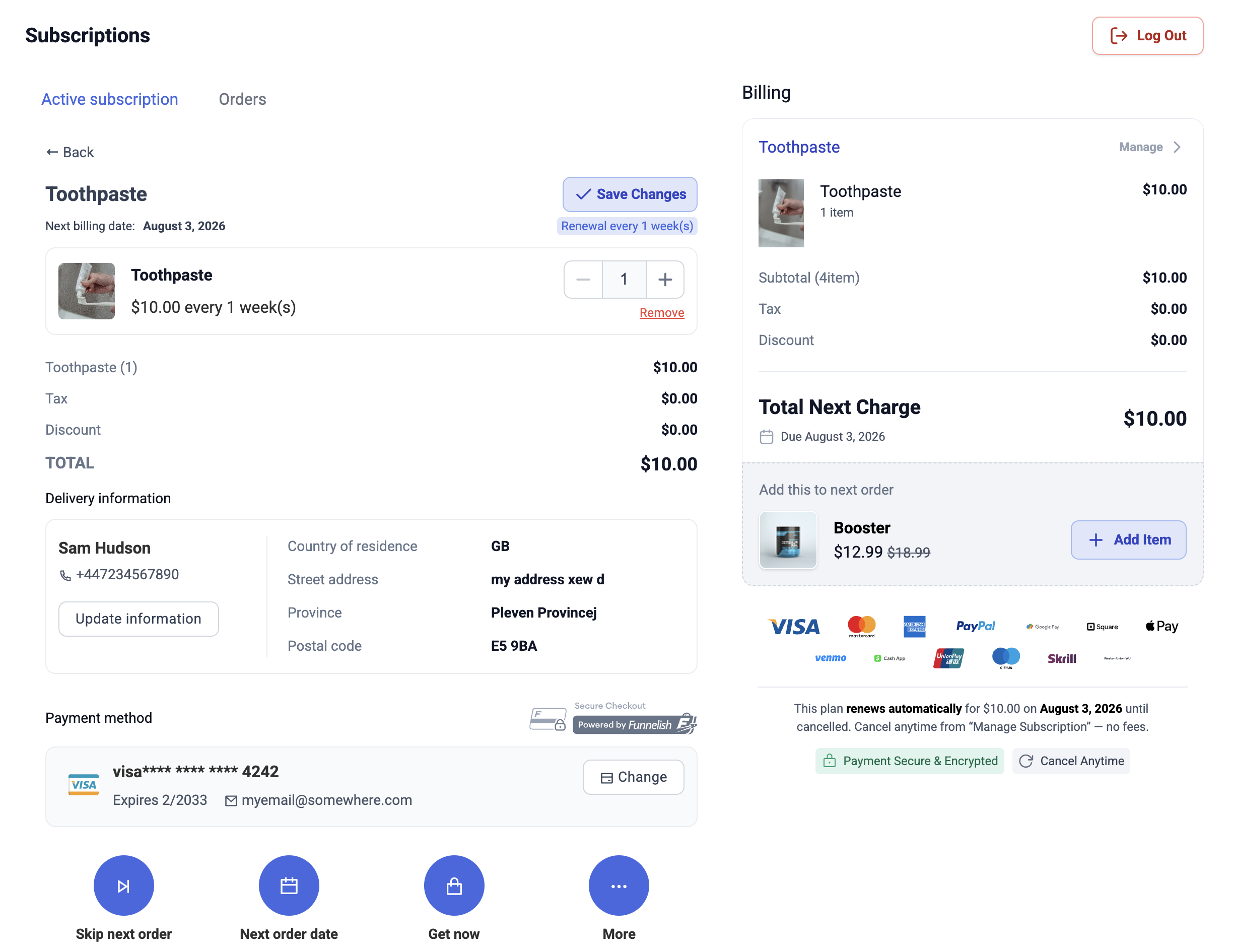
Every one of those is a cancellation that didn’t happen. The harder it is to adjust a subscription, the more people solve the problem by ending it.
Switching or adding gateways under live subscriptions
Because managed subscriptions are gateway-agnostic, the gateway is a setting, not a foundation. A subscription renews on whatever handled its first payment — a single gateway, or a gateway pool — and how you change gateways later depends on which of the two it was:
On a Gateway Pool: nothing to migrate. A subscription that started on a pool renews on the pool, not on any particular gateway inside it. Add a gateway to the pool, remove one, swap them out entirely — renewals keep charging through whatever the pool currently contains, fully automatically. This is why we recommend selling subscriptions through a funnel whose card payments run on a pool from day one: changing gateways later becomes a pool edit, not a migration.
On a single gateway: a manual, case-by-case migration. Renewals depend on the card tokens vaulted with the gateway that took the first payment, so moving is a two-step process. First, your vaulted tokens are migrated from the old gateway to the new one — that transfer happens between the gateways themselves and is at the discretion of the gateway holding the tokens, so some migrations are possible and some aren’t. Once the tokens are across, contact us on chat support and we’ll switch the gateway your subscriptions renew on.
Testing
Turn on Test Mode in the funnel’s top bar and buy your own subscription with your gateway’s test cards. What matters beyond the first charge: the subscription appears with the right interval and amount, and — after launch — that the first real renewal charges correctly. See Test payments before launch.
If something isn’t working
A payment method won’t offer the subscription. Check the supported table above — several methods take one-time payments but not recurring ones (Przelewy24, EPS, Checkout.com, RazorPay).
Subscriptions aren’t routing through the pool. They’re probably gateway subscriptions, not managed ones. Only managed subscriptions can use a pool — Funnelish warns about this when you attach a pool to a funnel that sells gateway subscriptions.
Renewals are failing. Renewals are payments — the same diagnosis applies as anywhere else: check the decline reasons in your gateway, and see Failed & declined payments. A pool under the subscription recovers the soft declines automatically.
Payment processing is the fiddliest part of building a funnel. Gateway credentials, currencies, country rules, the form itself — a lot of moving parts, and the one area where a mistake costs you orders rather than just looking wrong.
If you’re weighing gateway vs managed subscriptions, or a renewal problem doesn’t make sense, start a topic in Ask the community. For anything tied to your account or a specific transaction, contact us on chat support.