This guide gets your workspace set up and your first asset live, whether that’s a funnel, a blog, or a full brand with subscriptions and a customer portal. Every section is short and links to its full guide.
Find your way around (one minute)
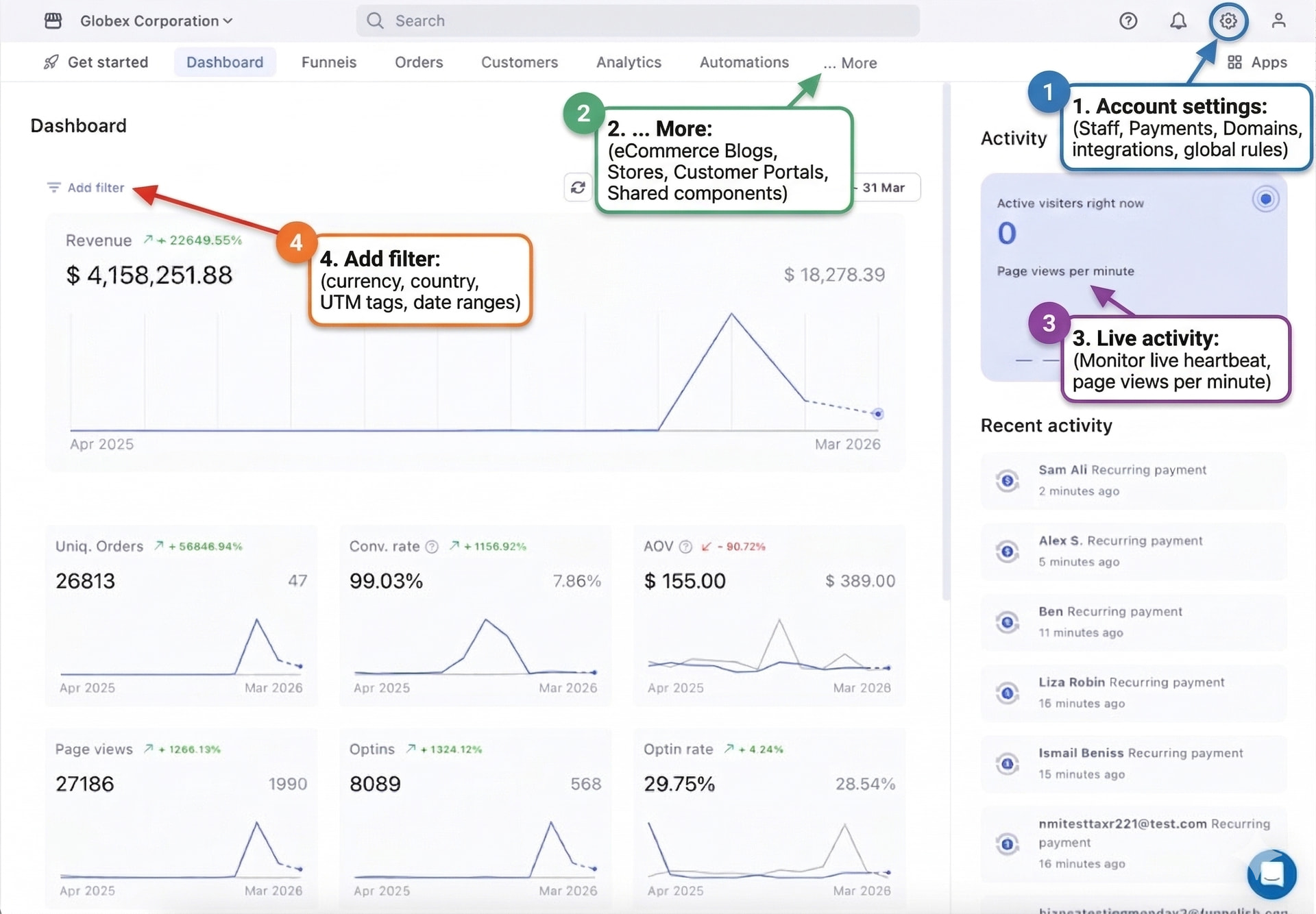
-
The top bar holds your working assets: Funnels, Orders, Customers, Analytics, Automations. The … More menu adds Blogs, Subscriptions, Customer Portals, Stores and Shared Components.
-
The gear icon (top right) is your workspace: payments, integrations, discounts and team. Set these up once, everything you build uses them.
-
The search bar finds any funnel, customer or setting by name. When lost, search.
Set up your workspace (15 minutes, once)
Do these four things first and you’ll never interrupt a build to fix plumbing:
-
Connect a payment gateway: Stripe, PayPal or any supported gateway.
-
Connect your domain: your own URL with automatic SSL. Your free
.myfunnelish.comsubdomain works meanwhile. -
Connect your integrations: Shopify for fulfillment, Klaviyo for email, whatever your stack uses.
-
Invite your team (gear icon → Team) with per-member permissions.
You can also do any of these later from inside a funnel’s settings, mid-build, without leaving the page.
Build a funnel
The core flow: create, add products, design, test.
-
Create the funnel from a template or blank, and get the funnel steps mental model: landing page → checkout → upsell → thank you.
Check our Templates , you can find more atGet startedinside the platform. -
Add your products and configure the checkout, prices, variants, bumps.
-
Design the pages in the drag-and-drop builder. Check mobile view before moving on.
-
Run a test payment through the whole funnel. Test order shows in Orders? Launch.
Then raise your numbers with one-click upsells and A/B split tests.
Start a blog
Your organic traffic engine, same editor as your funnels, so the brand stays consistent from article to checkout.
-
Create the blog from a template, then set up its home, template and custom pages.
-
Write and publish posts that link into your funnels.
-
Add tracking so you know what converts.
New to blogging for e-commerce? Start with Funnelish Blogs: Start Here.
Sell subscriptions
Managed Subscriptions handles recurring billing natively: subscribe-and-save offers, membership products, retries on failed charges. Any product can become a subscription, on a checkout or as a post-purchase upsell.
Open a customer portal
Give buyers a white-labeled login area where they track orders, manage their subscriptions and download digital products themselves. Every question a customer answers on their own is a support ticket you don’t get. Find it under … More → Customer Portals.
Stores
(Coming soon): a classic storefront with collections and a global cart, sharing your products, payments and components.
Build once, reuse everywhere
-
Shared Components: save a header, footer or guarantee block once, drop it into any funnel, blog or portal page. Update it in one place, it updates everywhere.
-
Products are global: one product sells on a funnel checkout, in a blog post, and in your store, same inventory, same subscriptions.
-
Discounts are global: one coupon code works across everything.
Track and automate
-
Apps: Meta Pixel, TikTok Pixel, Google Analytics, social proof and currency conversion.
-
Automations: abandoned cart emails, purchase confirmations, tagging, webhooks, and order routing to Shopify or ShipStation. Set up once, runs on every order.
Advanced: payment routing at scale
Processing serious volume, or running several merchant accounts? Gateway Pools is our payment routing engine: it distributes payments across your accounts by the rules you set, balances the load between them, and fails over automatically when a gateway has problems, so checkout never stops. Pair it with the failed payments guide to recover the declines that do happen.
Where next
The full platform map lives in the Funnelish Overview. Stuck on anything? Ask in Ask the community, or open the chat widget in your dashboard.