Welcome to the next generation of Funnelish! 
Funnelish v2 is built to be a modular, all-in-one e-commerce ecosystem. Whether you prefer to handle your technical setup first or dive straight into designing your masterpiece, this guide will help you find your way around the new interface.
Watch the 5-Minute Tour:

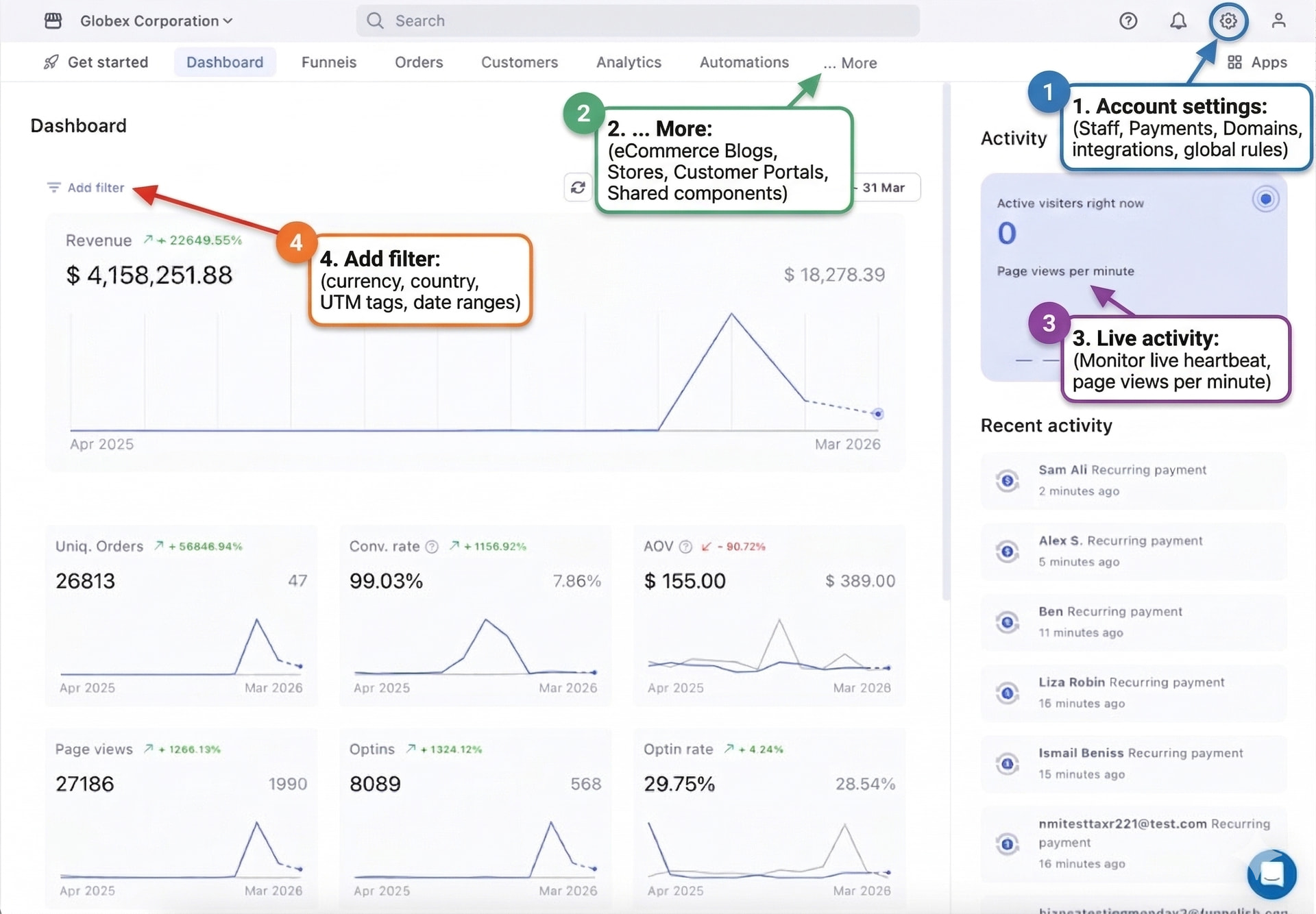
 The Top Navigation Bar
The toolbar at the top of your screen is your primary “Command Center.” Unlike v1, where everything was buried inside a single funnel, v2 separates your core assets into dedicated, easy-to-access categories:
- Dashboard: Your live “heartbeat.” Monitor revenue, conversion rates, active visitors, and real-time page views at a glance.
- Funnels: Build and manage your high-converting sales flows and Geo-Funnels.
- Orders: A central hub to track and manage all transactions and refunds.
- Customers: View and manage your buyer profiles and histories.
- Analytics: Deep-dive into your platform performance data.
- Automations: Set up rules to sync data with your CRM and email tools.
 The “… More” Mega-Menu
For our specialized e-commerce tools, click the … More dropdown in the top navigation. This is where you’ll find the advanced pillars of your brand:
- Stores (Coming Soon): Run long-term campaigns and daily sales from one place effortlessly.
- Subscriptions (Coming Soon): Manage your customer recurring billing logic centrally.
- Customer Portals (Waiting List): Allow your customers to manage their own subscriptions and orders.
- Blogs: Create a highly optimized e-commerce blog in minutes, not days.
- Shared Components: Build headers, footers, or blocks once and use them across all your pages.
 Settings & Workspace Management
In the top right corner of your dashboard, you’ll find the tools to manage your account and workspace “gears.”
 Search Bar: Quickly find specific apps, customers, funnels, or integrations.
- Apps (Grid Icon): Quick access to your connected platform tools.
- Help (Question Mark): Access documentation, tutorials, and support.
- Notifications (Bell): Stay updated on platform alerts and important account notices.
The Gear Icon (Workspace Settings)
This manages the global foundation of your business:
- Discounts: Create coupon codes that can be used anywhere.
- Account Settings & Billing: Manage your Funnelish subscription and global data.
- Team: Invite members and assign specific permissions.
- Payments & Integrations: Connect Stripe, PayPal, or apps like Klaviyo globally.
The Profile Icon (User Settings)
This manages your personal user identity:
-
Profile: Update your login details and password.
-
Become an Affiliate: Join our partner program and earn by referring others.
-
Logout: Securely end your current session.
 Settings: Global vs. Local Flexibility
One of the most powerful features of v2 is its setup flexibility. You no longer have to break your creative flow to handle technical tasks!
-
The Global Setup: Use the Gear Icon to connect your and once at the workspace level. They will instantly become available to use across all your funnels, blogs, and stores.[1]
-
The “In-the-Moment” Setup: Are you in the middle of building a funnel and realized you haven’t connected a domain or a payment method yet? No problem! In v2, you can connect new domains and payment gateways directly from within the Funnel or Store settings without ever leaving the page you’re working on.[2]
 Your First 3 Steps
There is no “wrong” way to build in Funnelish. Choose the path that fits your style, but we recommend these three tasks to get started:
- : Give your brand a professional, branded URL.
- : Ensure your checkout is ready to collect revenue.
- : Start driving traffic and making sales!